
Learning how to sell Bitcoin is not the same as learning how to send Bitcoin. Selling changes BTC into cash or another balance on a platform. Sending moves BTC to another Bitcoin address. Cashing out usually means selling first, then withdrawing fiat money to a bank or payment method.
Beginners often put all of those actions into one mental bucket called "getting money out."
That bucket is where mistakes start.
This guide separates the four actions: sell, send, withdraw, and cash out. It also uses Binance screenshots as a real exchange interface example, because a beginner should see what the buttons look like before any button becomes expensive. The screenshots are educational only. Binance availability, fees, limits, payment methods, interface labels, withdrawal support, and regional rules can change. Check the platform's current official pages before acting.

Sell, send, withdraw, and cash out are related, but they are not the same action.
Selling vs sending Bitcoin
Selling Bitcoin means exchanging BTC for fiat currency, a cash balance, a stablecoin, or another asset on a platform. If you sell BTC for USD, EUR, or another fiat currency, the Bitcoin balance goes down and the cash or fiat balance goes up. You may still need a separate withdrawal step before the money reaches a bank account.
Sending Bitcoin means broadcasting a Bitcoin transaction to another Bitcoin address. You might send BTC to your own wallet, another exchange account, a merchant, a friend, or another person. Once a Bitcoin transaction is confirmed, it is usually not reversible in the way a card payment or bank transfer might be.
Withdrawing can mean two different things:
Withdraw crypto: send BTC from a platform to a Bitcoin address.
Withdraw fiat: move cash or fiat balance from a platform to a bank or payment method.
Cashing out usually means the whole exit path: sell BTC, hold the fiat balance, then withdraw fiat to a bank or supported payment method.
Here is the map:
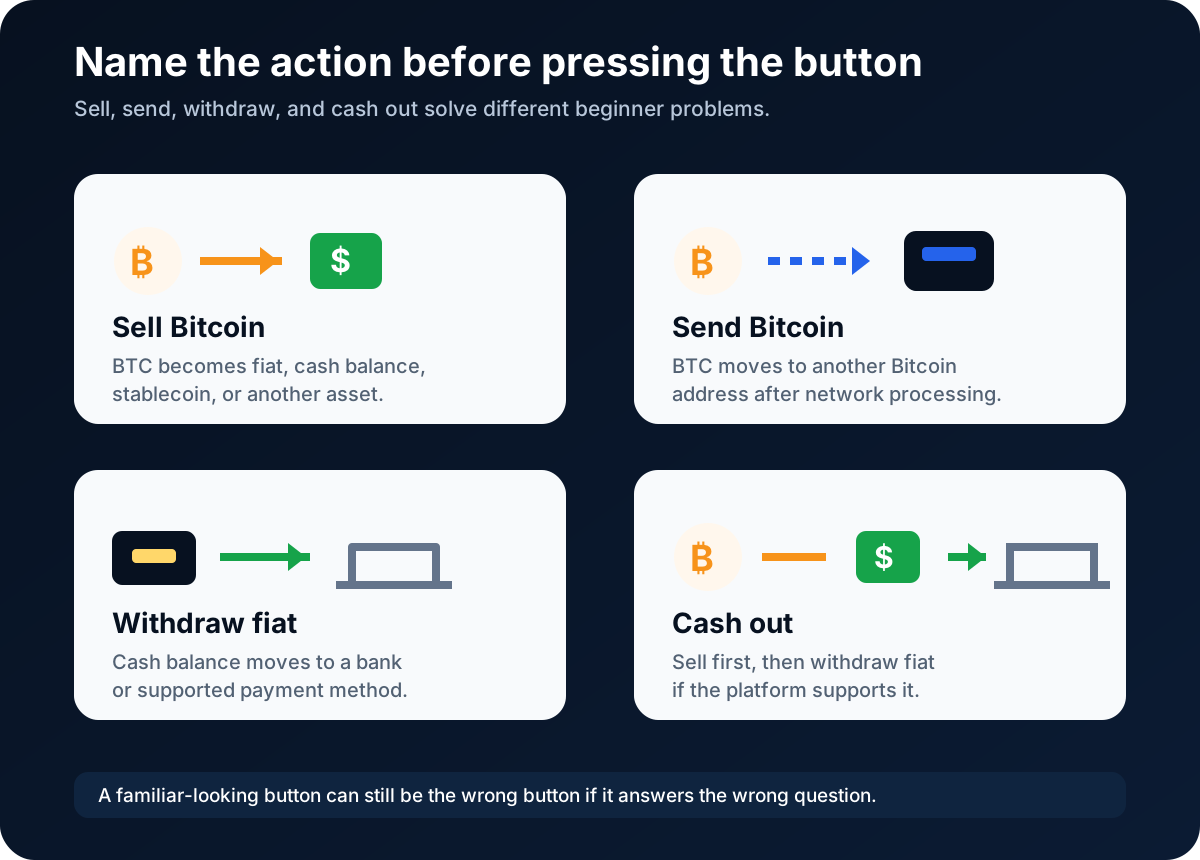
A beginner's first step is naming the action correctly.
The practical difference is simple:
If you want cash or fiat balance, you are looking for a sell flow.
If you want BTC to arrive at another [wallet](/how-to-store/bitcoin-wallets-and-storage) address, you are looking for a send or crypto withdrawal flow.
If you want money in your bank account, you may need both sell and fiat withdrawal steps.
Do not start with the button. Start with the outcome.
How selling usually works
To sell bitcoin on an exchange or payment app, the usual flow looks like this:
Confirm you are on the official website or app.
Log in and secure the account with two-factor authentication where available.
Open the platform's Sell, Buy/Sell, Trade, or Convert area.
Select Bitcoin / BTC as the asset you want to sell.
Choose the currency or balance you want to receive.
Enter the amount.
Review the quote, fee, spread, receive method, limits, and final amount.
Confirm only if you understand the transaction and personally decide to sell.
Save records for personal tracking and tax reporting.
The review step is the important step. The platform may show a live quote that can expire, a spread built into the price, a platform fee, payment-method limits, or available receive methods. Do not assume a headline price is the final amount you receive.
Selling can also be a taxable event in some places, including the United States. This article is not tax advice. Keep records and check current IRS or local tax guidance before relying on any simplified explanation.
Binance example: where sell and send paths begin
The Binance dashboard below shows how several exit paths can sit near each other: Buy Crypto or Buy & Sell for sell flows, Withdraw for sending BTC, and Cash In or fiat withdrawal areas for money movement. Account details are hidden.

On Binance, sell, send, and cash-out paths start from different parts of the account.
The sell form below is a live Binance interface example. This particular account defaulted to USDT because of the account balance and region context. If you are selling Bitcoin, the key lesson is not the asset shown in this screenshot; it is the form logic: select the correct asset, check the receive currency and method, review fees and quote details, and stop before final confirmation unless you personally decide to sell.

Example only: when selling Bitcoin, select BTC and review the current quote, fee, and receive method.
This is also where beginners need emotional brakes. A sell screen can make the action feel like a normal checkout. It is not exactly that. You are changing an asset position, creating records you may need later, and possibly triggering withdrawal, tax, or platform review steps.
How sending Bitcoin works
To send bitcoin, you need a recipient Bitcoin address, the correct network, an amount, and enough balance to cover any platform withdrawal fee or Bitcoin network fee shown by the wallet or platform.
A beginner send flow usually looks like this:
Open the wallet or exchange withdrawal screen.
Choose Bitcoin / BTC.
Paste or scan the recipient address.
Confirm the network matches the recipient wallet's instructions.
Enter the amount.
Review the fee, total amount, and estimated confirmation information.
Send a small test amount first when learning or moving to a new address.
Confirm only after checking every character or using the wallet's address-verification tools.
Save the transaction record or transaction ID.
Bitcoin transactions are not instant promises. A platform may show a pending withdrawal before it broadcasts the transaction. The Bitcoin network then needs confirmations. Network congestion, platform review, wallet settings, withdrawal holds, fee selection, and address checks can all affect timing.
The Binance screenshot below shows a BTC withdrawal screen before any address, network, amount, or final confirmation is entered.

Sending BTC from an exchange usually appears as a crypto withdrawal flow.
Do not send BTC to an address from a stranger, fake support chat, investment group, romance contact, job offer, giveaway, or "account unlock" message. Do not let someone remote-control your screen. Do not share seed phrases, private keys, exchange passwords, two-factor codes, or account recovery codes.
If you are sending BTC to your own wallet, learn the wallet first. The wallet address is the destination. The seed phrase is not an address. The seed phrase should not be entered into the exchange withdrawal form.
Cash out and withdrawal basics
Cash out usually means turning BTC into money you can use outside the crypto platform. The common sequence is:
Sell BTC into fiat currency or a cash balance on the platform.
Check the fiat balance, fees, limits, and withdrawal methods.
Withdraw fiat to a bank account or supported payment method.
Save records for taxes and personal accounting.
The Binance example below shows a fiat withdrawal page. It does not show a completed withdrawal. The available currencies, methods, timing, fees, and limits depend on region, verification status, payment rails, bank details, and platform rules.

Cash out usually means selling first, then withdrawing fiat through an available method.
Before cashing out, check:
Whether your account verification is complete.
Whether fiat withdrawal is supported in your region.
Whether the bank or payment method is in your own name.
The platform's current withdrawal fee, minimum, maximum, and processing time.
Whether the withdrawal method has bank-side fees or review steps.
Whether selling BTC creates taxable reporting obligations.
Whether the platform requires extra security checks before withdrawal.
Do not use another person's bank account, false information, a VPN to misrepresent location, or edited documents to get around platform rules. That can create account reviews, rejected withdrawals, frozen funds, or legal and tax problems.
Fees and confirmations
Fees and confirmations affect the result differently depending on whether you sell or send Bitcoin.
When you sell bitcoin, costs may include trading fees, instant-sell fees, spreads, payment-method fees, fiat withdrawal fees, or bank-side fees. The platform's final review screen matters more than a marketing page.
When you send bitcoin, costs may include a platform withdrawal fee and a Bitcoin network fee. If you are using a self-custody wallet, you may see fee-rate options. A higher fee rate can sometimes help a transaction confirm sooner, but no article should promise timing. Network conditions change.
Confirmations are also different from platform status labels. A platform may show "processing," "pending," "completed," or "withdrawn." A Bitcoin wallet or block explorer may show unconfirmed, one confirmation, or more confirmations after the transaction is broadcast. A receiving platform may require a certain number of confirmations before crediting the deposit.
The safe beginner habit is to separate three clocks:
Platform clock: account review, withdrawal processing, banking rails.
Bitcoin clock: network broadcast and confirmations.
Bank clock: fiat withdrawal arrival, bank review, business days.
If a transfer is delayed, do not immediately send again. Check the platform status, transaction ID, receiving wallet, and official support pages first.
Address safety checklist
The address is the part of sending Bitcoin that looks like a harmless string and behaves like a locked door.
Use this checklist before sending BTC:
Confirm the asset is Bitcoin / BTC.
Confirm the recipient gave you a Bitcoin address.
Confirm the network selection matches the recipient wallet or platform instructions.
Copy and paste carefully, then compare the beginning and end of the address.
Watch for clipboard malware that changes copied addresses.
Use a small test transaction first when sending to a new address or new wallet.
Check the fee and total amount before confirming.
Do not type or paste your seed phrase anywhere.
Do not send because someone is rushing, threatening, or promising returns.
Save the transaction ID and records after sending.

Address checking is boring in the exact way irreversible systems require.
Risks, limits, and common misconceptions
The first misconception is that selling and cashing out are the same thing. Selling may only create a cash balance inside the platform. Cashing out usually requires a separate fiat withdrawal.
The second misconception is that Bitcoin transfers happen instantly. The sender may press a button instantly. The platform and Bitcoin network still need to process the withdrawal and confirmations.
The third misconception is that a wrong address can be fixed by support. In many cases, it cannot. If you send BTC to the wrong address or wrong network, recovery may be impossible or depend on a platform's limited recovery policy. Do not assume recovery exists.
The fourth misconception is that PayPal, Cash App, Binance, Kraken, Coinbase, and other services all work the same way. They can differ in supported regions, fees, withdrawal access, confirmation policies, tax records, payment methods, and account reviews. Check current official rules.
The fifth misconception is that "cash out" advice can ignore taxes. Selling or converting crypto may create tax reporting obligations depending on your country and situation. Keep records and check official tax guidance.
The sixth misconception is that a large withdrawal is just a bigger version of a small one. Larger amounts can trigger additional platform checks, bank reviews, tax questions, or personal security concerns. Break the process into verified steps and use official support.
The clean beginner rule is this:
If the action is irreversible, slow down until it feels slightly boring.
FAQ
Can I sell and send Bitcoin from the same app?
Often, yes, if the app supports both selling and BTC withdrawals. But the actions are different. Selling changes BTC into another balance. Sending moves BTC to a Bitcoin address. Some apps let users buy and sell but do not support external Bitcoin withdrawals in every region or account type.
Do Bitcoin transfers happen instantly?
No article can promise instant Bitcoin transfers. A platform may need to process the withdrawal, then the Bitcoin network needs confirmations. Timing can vary based on platform review, withdrawal holds, network conditions, fee settings, and the receiving wallet or platform's confirmation policy.
What happens if I use the wrong address?
Bitcoin transactions are often irreversible. If you send BTC to the wrong address, wrong network, or a scammer, recovery may be impossible. Some platforms have limited recovery processes for specific mistakes, but you should not rely on that. Verify the address and network before sending.
How do I sell my Bitcoin for cash?
A common path is to sell BTC on a platform that supports fiat balances, then withdraw the fiat money to a supported bank account or payment method. Check the platform's current fees, limits, verification requirements, withdrawal methods, timing, and tax records before acting.
Can Bitcoin convert to cash?
Yes, Bitcoin can be sold for fiat currency on supported platforms, but availability, fees, payment methods, and withdrawal rules vary. Converting BTC to cash may also create tax reporting obligations. Check official platform and tax guidance for your region.
How do I sell cryptocurrency with PayPal?
PayPal may allow eligible users in supported regions to sell supported crypto through its own app or website. The exact assets, fees, transfer rules, and cash-out options can change. Check PayPal's current official crypto help pages before acting.
How much is $100 worth of Bitcoin right now?
It depends on the live BTC price and the platform quote at the moment you check. A platform's preview may include spread or fees, so the amount of BTC received or sold for $100 can differ from a simple market-price calculation. Check a current quote before acting.
Does Edward Jones trade Bitcoin?
Traditional financial firms have different policies for direct Bitcoin, Bitcoin ETFs, and crypto-related products. Check the firm's current official offerings and speak with a qualified professional if needed. This article does not recommend any brokerage or product.
Risk Disclaimer
This article is for beginner education only. It is not financial, investment, legal, tax, wallet-security, or platform advice. Bitcoin is volatile, and you can lose money. Selling, sending, withdrawing, and cashing out can involve fees, spreads, confirmations, withdrawal holds, platform reviews, bank rules, and tax obligations. Check official platform policies, current fees, limits, regional availability, and local tax requirements before acting. Never share private keys, seed phrases, passwords, login codes, or recovery information.
Editorial Attribution
Written by Alex Chen. Reviewed by Jordan Blake for factual accuracy, clarity, and beginner safety.