
To send Bitcoin, you need five things: BTC in a wallet or exchange account, the recipient's Bitcoin address, the correct network, the amount you want to send, and enough balance to cover the fee. The serious part is not pressing the button. The serious part is checking that the address, network, and amount are right before the transaction leaves your control.
That is the odd little trick of Bitcoin. The screen looks like a normal payment form, but the consequences are closer to mailing a sealed envelope with no return window. A confirmed Bitcoin transaction usually cannot be reversed by a bank, a wallet app, or the Bitcoin network.
This guide explains how to send Bitcoin as a beginner: what to check first, how the send flow works, how fees and confirmation time behave, why a small test transfer helps, and what to do after the transaction is broadcast.

Sending Bitcoin is a careful address-and-network check before a transaction enters the Bitcoin network.
Before sending: wallet and address basics
Before learning how to send Bitcoin, separate two things that beginners often blur together:
Bitcoin address is where BTC can be sent.
private key or seed phrase controls access to funds.
A
A
You may need to share a receiving address with someone who is sending you BTC. You should not share your private key, seed phrase, recovery phrase, or wallet backup with anyone. A legitimate wallet, exchange support agent, or recipient does not need your seed phrase to receive a Bitcoin payment.
For a normal Bitcoin send, you usually need:
The recipient's current Bitcoin receiving address.
A wallet or exchange account that supports Bitcoin withdrawals or sends.
The correct asset: BTC, not another coin or token.
The correct network: Bitcoin, BTC, or the network name shown by the recipient wallet.
The amount to send.
Enough balance for the transaction fee or platform withdrawal fee.
Any security checks required by your wallet or exchange, such as 2FA or email confirmation.
Bitcoin addresses can appear in different formats, such as addresses beginning with bc1, 1, or 3. Do not treat the first character alone as proof that everything is correct. Copy the address from the recipient's wallet, compare the beginning and ending characters, and use the recipient's instructions if they name a specific network.
If you are sending from an exchange, the screen may say Withdraw instead of Send. That is normal. From the exchange's point of view, you are withdrawing BTC from the platform to an outside address. From your point of view, you are sending Bitcoin to another wallet.
Step-by-step send flow
Most wallets make the send screen look tidy. That can be helpful, but it can also hide the number of decisions packed into the page. Use the flow below as your mental map before you touch the final confirmation button.
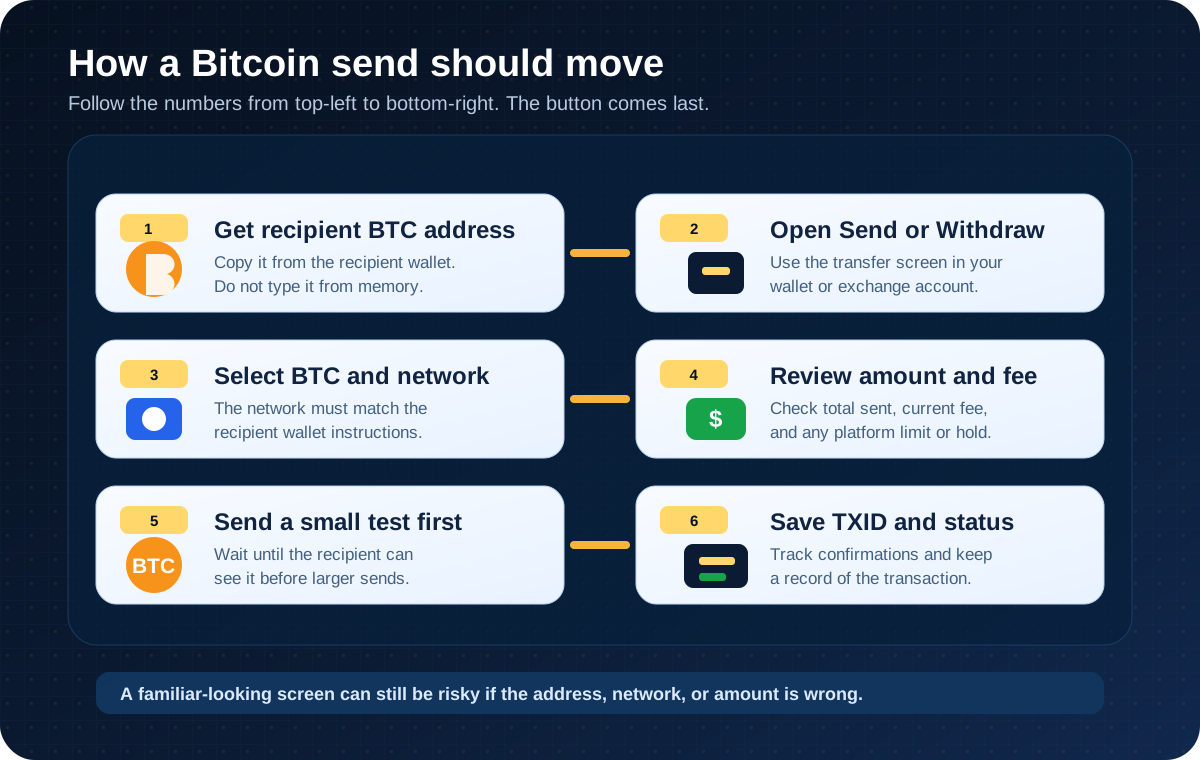
A beginner send flow starts with the recipient address and ends with tracking the transaction ID.
Here is the practical version:
Do not type the address from memory. Copy it, scan a QR code from a trusted screen, or ask the recipient to send it through a channel you can verify.
In a self-custody wallet, this may be called Send. On an exchange, it may be called Withdraw.
If a platform shows several networks, do not choose one just because it looks cheaper. The network must match what the receiving wallet supports.
Check the first characters, the last characters, and whether the wallet warns you about address type or network mismatch.
Make sure you know whether the amount shown is the BTC being sent, the fiat estimate, or the total including fees.
Fees, withdrawal limits, and platform holds can change. Check the current screen before acting.
This costs an extra fee, but it can catch address or network mistakes before a larger send.
You can use it to track the transaction status later.
Get the recipient's Bitcoin address from the recipient wallet.
Open the send or withdraw screen.
Select BTC and the Bitcoin network.
Paste the address and review it slowly.
Enter the amount.
Review the fee, total, and security prompts.
Send a small test transfer when the amount matters.
Save the transaction ID, also called the txid or transaction hash.
Binance example: BTC withdrawal screen
The Binance screenshot below is included only as an interface example. It shows a logged-in withdrawal/send-style screen before any recipient address, amount, or final confirmation is entered. Your screen may look different because exchanges change layouts, supported regions, asset lists, fees, limits, and security checks.

Example only: on an exchange, sending Bitcoin often appears as a BTC withdrawal workflow.
If you use Binance or any other exchange, check the platform's current official interface before acting. Confirm the coin, recipient address, network, fee, withdrawal limit, security prompts, and regional availability. Do not use a third-party walkthrough as a substitute for the platform's live instructions.
Fees and confirmation time
Beginners often ask, "How long does Bitcoin take to send?" The honest answer is: it depends on several clocks running at once.
One clock belongs to the sender's wallet or exchange. A self-custody wallet may broadcast the transaction soon after you approve it. A custodial exchange may review, queue, or hold a withdrawal for security or compliance reasons.
Another clock belongs to the Bitcoin network. A Bitcoin transaction normally waits to be included in a block. Fees can affect how attractive your transaction is to miners when the network is busy. Wallets may offer fee options, but no fee setting gives a universal promise of timing.
A third clock belongs to the recipient. Some wallets show incoming transactions quickly, while exchanges and services may wait for one or more confirmations before treating funds as available.
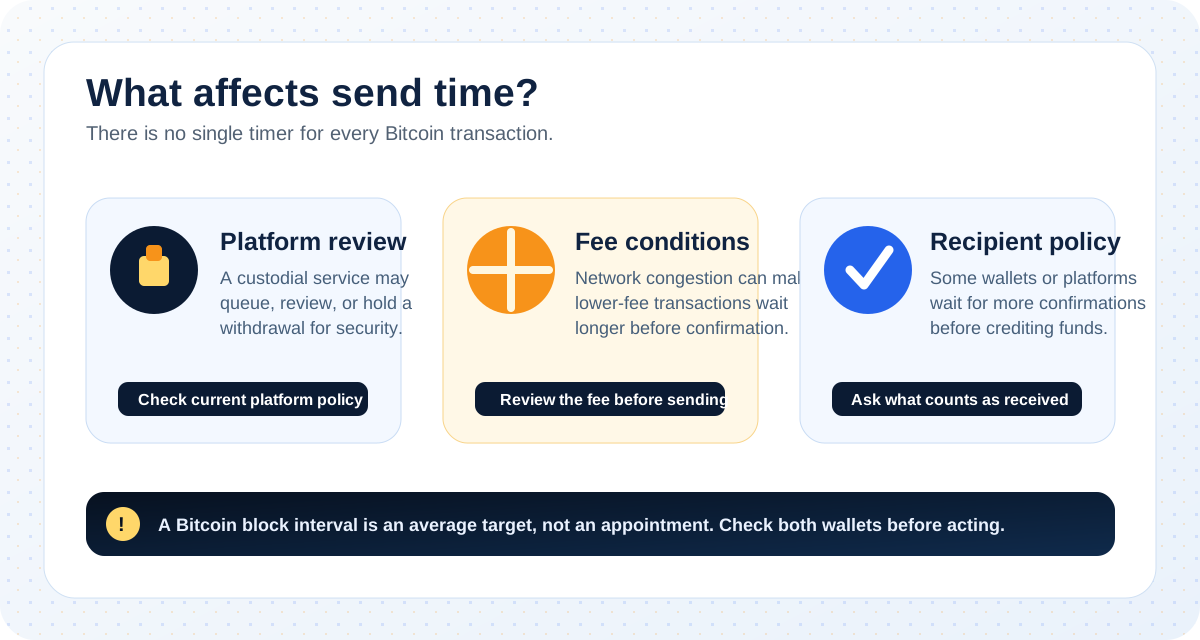
Send time depends on platform processing, network conditions, and the recipient's confirmation policy.
The key terms are:
The fee paid to get a Bitcoin transaction included in a block. If you send from an exchange, the platform may show a withdrawal fee or total fee using its own wording.
The transaction has not reached the status the wallet or recipient needs yet.
A transaction gets its first confirmation when it is included in a block. More confirmations are added as later blocks build on top of that block.
The public identifier you can use to look up the transaction on a block explorer.
Transaction fee:
Pending:
Confirmation:
TXID or transaction hash:
A useful beginner rule is to avoid sending when you are rushed. Rushing turns every small uncertainty into a guess, and Bitcoin is not a friendly place for guesses.
Small test transfer checklist
A small test transfer is not magic. It still costs a fee, and it does not prove every later transfer will work. But it does give you a controlled rehearsal before you send an amount that would hurt to lose.
Use this checklist before the test:
The recipient address came from the recipient's wallet or official account screen.
You did not get the address from a random message, comment, or unofficial support chat.
The asset is BTC.
The network matches the recipient's Bitcoin receiving instructions.
You compared the first and last characters after pasting the address.
You checked that clipboard malware has not changed the pasted address.
The amount is intentionally small.
You understand the fee and any exchange withdrawal minimum.
You know where to find the transaction ID after sending.
The recipient knows to wait for the confirmation level their wallet or platform requires.
After the test arrives, do not simply click "repeat" without looking. Check the address again, check the amount again, and check the current fee again. A clean test is a signal that the path worked once, not a permission slip to stop paying attention.
Common errors and warning signs
Bitcoin mistakes are often boring in the moment. A pasted address. A network dropdown. A message from someone who sounds confident. Then the boring thing becomes expensive.
Watch for these errors:
If BTC is sent to the wrong address, you usually cannot reverse it through the Bitcoin network.
Some exchanges show multiple network options. Sending through a network the recipient does not support can make recovery difficult or impossible.
Malware can replace a copied Bitcoin address with a different one. Always compare characters after pasting.
Anyone asking for your seed phrase or private key is asking for control of your funds.
Scammers often push speed because speed makes people skip checks.
Use official help centers and in-app support paths, not accounts that contact you first.
A bank transfer, card payment, or peer-to-peer dollar transfer is not the same as an on-chain Bitcoin transaction.
Wrong address:
Wrong network:
Changed clipboard address:
Seed phrase request:
Urgent pressure:
Fake support:
Confusing a bank payment with Bitcoin:
If you think you sent to the wrong address, save the TXID, screenshot the transaction details, and contact the official support channel of your wallet or exchange if a custodial platform was involved. Be realistic: a confirmed Bitcoin transaction is generally irreversible, and support cannot simply pull funds back from the network.
After sending: how to track status
After you send Bitcoin, your wallet or exchange should show a transaction record. Look for a TXID, transaction hash, or explorer link. That public ID lets you check whether the transaction has been broadcast, whether it is still pending, and how many confirmations it has.

Use the transaction ID to follow broadcast status and confirmations after sending.
When using a block explorer, remember that Bitcoin transactions are public. You do not need to paste your seed phrase, private key, exchange password, or 2FA code into any block explorer. A normal explorer lookup only needs the public TXID or public address.
If a transaction is pending, possible reasons include:
The wallet or exchange has not broadcast it yet.
The fee is low relative to current network demand.
The recipient platform is waiting for more confirmations.
The exchange is doing a security review or withdrawal hold.
You are looking at the wrong network or wrong transaction ID.
Do not keep resending larger amounts because the first one has not appeared. First, check the transaction record, the sending platform's status, and the recipient's confirmation policy.
What to do before your next send
Sending Bitcoin becomes less mysterious once you stop thinking of it as one action. It is a chain of small checks:
Is this the right recipient address?
Is this BTC on the right network?
Is the fee acceptable on the current screen?
Is this amount small enough for a test?
Do I know where to find the TXID?
Am I using the official wallet or platform path?
The button at the end is not the skill. The skill is arriving at the button with fewer unanswered questions.
FAQ
How long does Bitcoin take to send?
It depends on the sending wallet or exchange, the current network fee environment, and the recipient's confirmation policy. A transaction may appear quickly, but some platforms wait for one or more confirmations before crediting funds. Check the current wallet or platform status instead of relying on a fixed time estimate.
Can Bitcoin transactions be reversed?
Bitcoin transactions are generally not reversible once they are broadcast and confirmed. If you used a custodial exchange or wallet, official support may be able to explain the account record, but they usually cannot reverse a normal confirmed Bitcoin network transaction.
Why is my Bitcoin transaction pending?
A Bitcoin transaction may be pending because the sender has not broadcast it yet, the fee is low during a busy period, the recipient platform is waiting for confirmations, or an exchange is reviewing the withdrawal. Check the TXID, wallet status, and platform notices.
How do I send someone Bitcoin?
Ask the recipient for a Bitcoin receiving address from their wallet, open Send or Withdraw in your wallet or exchange, select BTC and the correct Bitcoin network, enter the amount, review the fee and address, then send a small test transfer before any larger amount.
Can I send Bitcoin through Zelle?
Zelle is a bank payment service for fiat money, not the Bitcoin network. You generally cannot send on-chain BTC directly through Zelle. If any service combines bank payments with crypto activity, check its official terms, fraud warnings, and platform rules before using it.
Does Edward Jones trade Bitcoin?
A brokerage account is not automatically a Bitcoin wallet. Even if a brokerage offers crypto-related exposure or products, that does not mean it supports on-chain BTC withdrawals to another wallet. Check Edward Jones' current official account documentation or speak with the firm directly before assuming you can send Bitcoin from a brokerage account.
How do I send Bitcoin directly?
To send Bitcoin directly, use a wallet that supports Bitcoin sends, enter the recipient's Bitcoin address, choose the Bitcoin network if asked, review the amount and fee, and broadcast the transaction. If you are using an exchange, the direct send may be shown as a withdrawal to an external wallet.
What address do I need before sending Bitcoin?
You need the recipient's Bitcoin receiving address. Get it from the recipient's wallet or official account screen. Never ask the recipient for a private key or seed phrase, and never provide yours.
Should I send a small test transfer first?
For beginners, a small test transfer is a useful safety habit when the amount matters. It costs an extra fee, but it helps confirm that the address, network, and recipient wallet path work before a larger transfer.
Related SatoABC Guides
Risk Disclaimer
This article is for beginner education only. It is not financial, legal, tax, or investment advice. Bitcoin transactions can involve price volatility, network fees, platform fees, account restrictions, address mistakes, fraud risk, irreversible transfers, and possible tax or reporting obligations. Always check the current wallet or platform policy, official interface, fees, limits, supported networks, and local requirements before acting.
Editorial Attribution
Written by Alex Chen. Reviewed by Jordan Blake for factual accuracy, clarity, and beginner safety.