
The strange part of learning how to buy Bitcoin is that the yellow button is usually the easy part.
The real work happens before the button gets interesting: checking whether the platform is legitimate and available where you live, completing identity verification if required, adding a payment method or deposit only after you understand the rules, then rehearsing a small BTC purchase slowly enough that the screen stops feeling like a control panel from a movie.
For a complete beginner, the path has four stages:
Vet the venue: confirm the platform, official domain, regional availability, fees, withdrawal support, and support pages.
Verify identity: complete required checks honestly and secure the account before adding money.
Deposit carefully: understand payment methods, funding holds, limits, and what a deposit does and does not mean.
Rehearse small size: run through the buy screen with a small learning amount, review every number, and stop at the final confirmation boundary unless you personally decide to buy.
This article uses Binance.com screenshots as a real interface example because beginners deserve to see the machinery, not just a tidy list of advice. It is not a recommendation to use Binance. Screens can differ by country, state, account status, payment method, currency, verification status, and platform updates. If Binance.com or Binance.US is not available where you live, use the same safety checks on another legitimate platform.

A first Bitcoin purchase should start with preparation, not urgency.
Stage 1: Vet the venue before you buy Bitcoin
Before you buy bitcoin, pause at the venue.
The venue is the place where the purchase happens: a crypto exchange, brokerage, payment app, Bitcoin ATM operator, or another service. A beginner's first job is not to find a dramatic opportunity. It is to avoid walking into the wrong building because the sign outside looked familiar.
For most new users, an exchange, broker, or payment app is easier to inspect than an in-person deal because the account usually shows the asset, payment method, order review, fee, and transaction history in one place. Bitcoin ATMs and in-person services can involve different fee structures, location risks, and scam risks.
There is no universal answer to where to buy bitcoin. The better question is: which platform gives you enough clarity to make a careful decision?
Use this venue checklist:
Official source: Use the official website or official app store listing, not a link from a stranger, ad, social post, or direct message.
Regional availability: Confirm the platform is available in your country, state, or region.
Bitcoin support: Make sure it supports Bitcoin / BTC, not only other crypto assets.
Identity rules: Read whether identity verification is required before you spend time creating the account.
Fees and spread: Check how the platform explains trading fees, payment fees, deposit fees, spreads, and withdrawal fees.
Withdrawal support: If you may want self-custody later, check whether BTC withdrawals to a Bitcoin wallet are supported.
Records: Confirm you can see or download transaction history for personal records and tax reporting.
Support and warnings: Look for official help pages, security settings, risk warnings, and complaint routes.
Bitcoin can move sharply in price. You can lose money. Do not use rent money, emergency savings, borrowed money, or funds you cannot afford to lose. A first purchase should feel like learning how the machine works, not like betting your financial life on a screen you met six minutes ago.
For U.S. readers, this step deserves extra attention. Binance.com, Binance.US, Cash App, PayPal, Kraken, Coinbase, and other services can have different regional availability, verification rules, payment methods, fees, and withdrawal rules. Check the current official policy before acting.

Example only: always check the platform's current regional availability.
The screenshot above is a useful kind of boring. Boring pages are where platforms tell you what is actually allowed.
When using Binance as an example, start by checking the official page, the navigation, and the account context. A fake page can borrow a logo. It cannot borrow your habit of slowing down and checking the details.
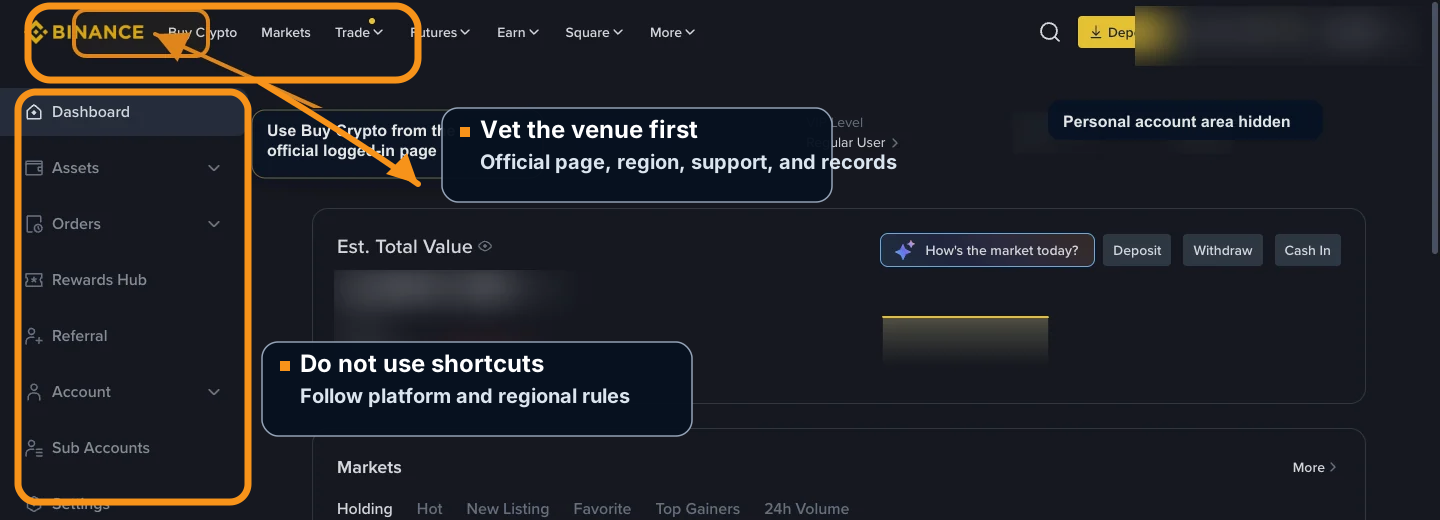
Vet the platform before using the buy screen: official page, region, support, and account records.
Do not use a VPN, false address, borrowed identity, or someone else's account to bypass KYC, regional restrictions, or platform rules.
That last point is not a tiny legal footnote. It is part of the system. If a platform later freezes, limits, or reviews an account because the information does not match its rules, the beginner has not discovered a clever shortcut. The beginner has discovered a paperwork trap with a login screen.
Stage 2: Verify identity and secure the account
Many regulated platforms require identity verification before you can buy BTC, deposit funds, raise limits, or withdraw. That can feel annoying, but for a beginner it is better to treat it as part of the account setup, not as a surprise obstacle that appears later.
Identity verification usually means the platform asks for information such as your legal name, date of birth, address, government ID, selfie or liveness check, and sometimes source-of-funds information. The exact requirements vary by platform and region. Check the platform's current official instructions before uploading anything.
Use a simple rule:
Only submit identity documents through the official website or official app after you have checked the domain and login session. Do not send ID photos, passwords, recovery codes, payment details, or account screenshots to someone in a chat, email, or social message who claims they can "help you verify."
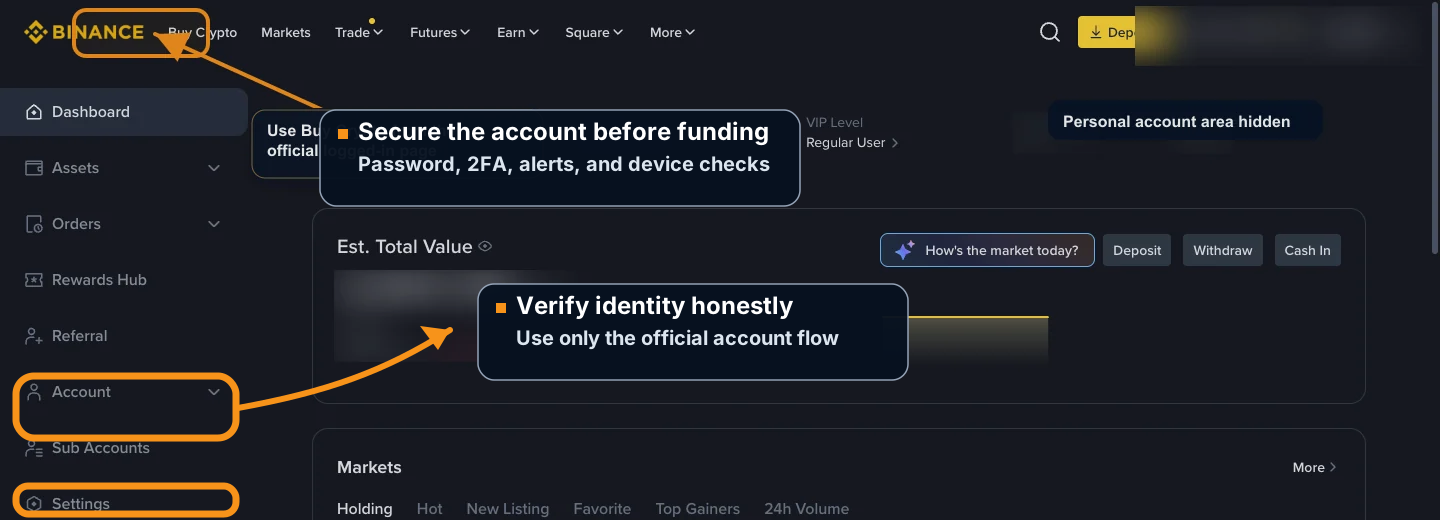
Verify identity through the official account flow, then secure the account before funding it.
Before adding money, finish the basic security setup:
Create a strong, unique password.
Turn on two-factor authentication.
Review anti-phishing code settings if the platform offers them.
Check device history and active sessions.
Turn on account alerts where available.
Review withdrawal allowlists or address-book controls before you ever withdraw BTC.
Confirm you understand how to contact official support.
If verification fails, stop and use the official help center. Do not ask a stranger to "fix" the account. Do not create multiple accounts with mismatched information. Do not upload edited documents. A failed verification is a problem to resolve carefully, not a puzzle to sneak around.
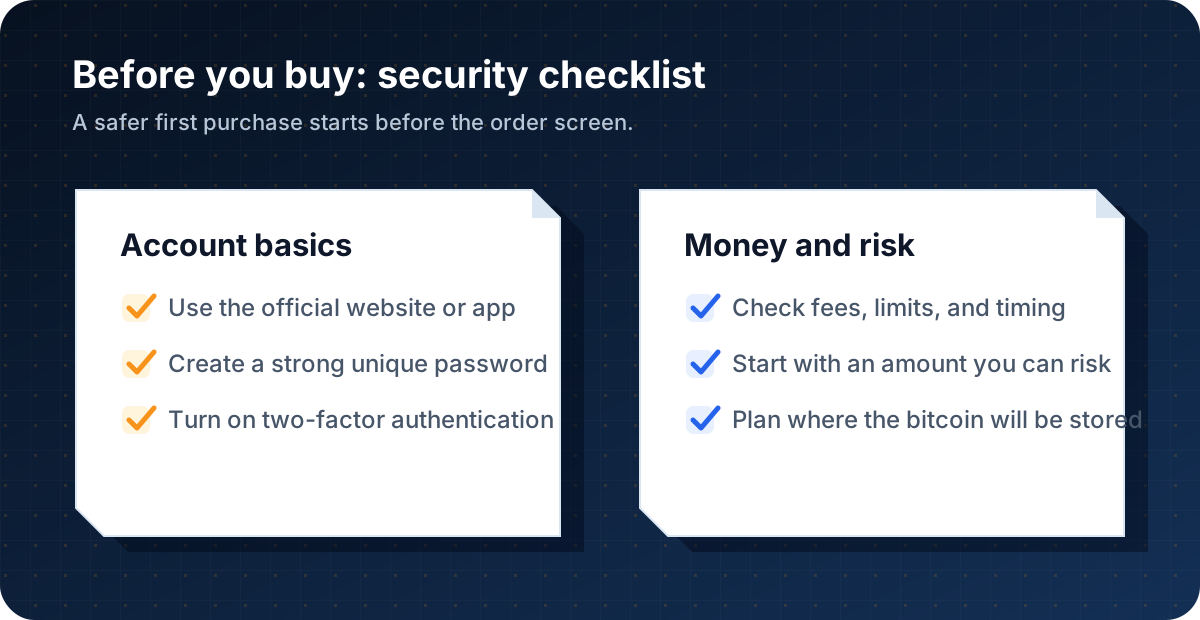
Prepare account security and risk limits before using any buy screen.
Stage 3: Deposit or choose a payment method carefully
Some platforms let you buy Bitcoin directly with a card, bank account, digital wallet, or account balance. Others ask you to deposit fiat currency first, then use that balance to buy BTC. These are different flows, and beginners often mix them together.
A deposit means you are adding funds to the platform account. It does not mean you have bought Bitcoin yet.
A buy order means you are exchanging fiat or account balance for BTC.
That distinction matters. A person can deposit dollars, euros, or another currency and still own zero bitcoin until a buy order is completed. The platform may also apply payment holds, withdrawal holds, minimums, maximums, processing times, failed-payment rules, or regional restrictions.
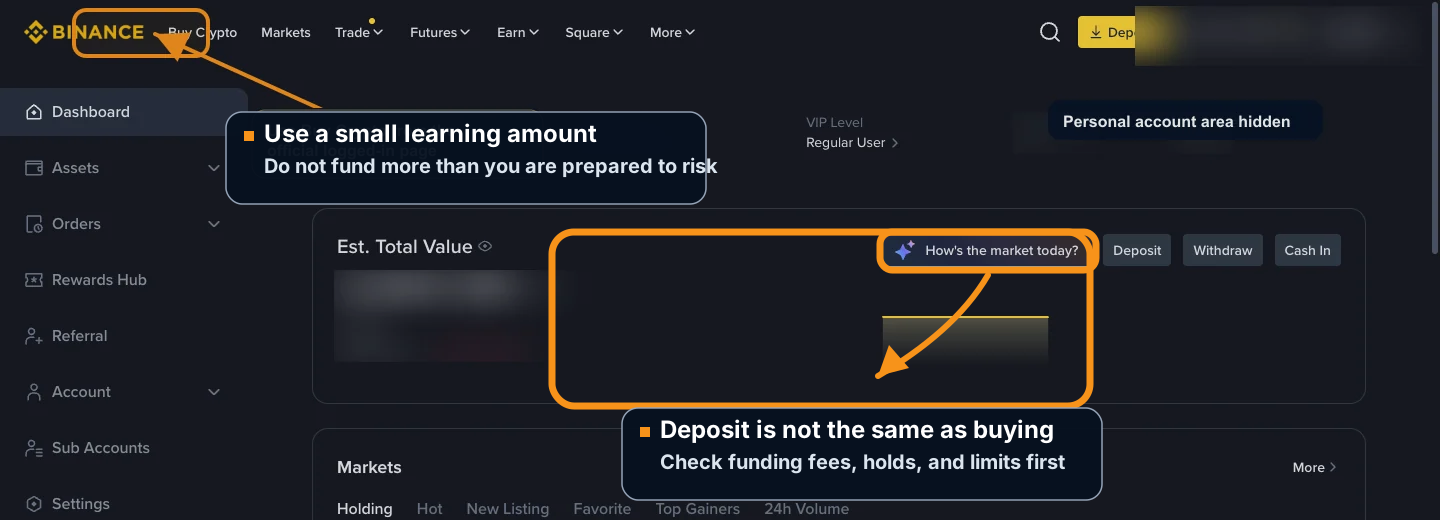
Deposit is funding the account. Buying BTC is a separate step.
Before you deposit or select a payment method, check:
Which fiat currency you are using
Whether the payment method belongs to you
Deposit fees, card fees, bank fees, or processing fees
Whether the platform uses a spread in the buy quote
Minimum and maximum amounts
Processing time
Withdrawal holds after funding or buying
Whether the payment creates a one-time action or a recurring order
What happens if the payment fails or is reversed
The right first funding amount is not a heroic number. It is an amount small enough that the lesson remains a lesson if the payment is delayed, the fee is higher than expected, or the interface feels confusing.
In the Binance example below, the payment method appears inside the buy box. On your own account, the method and availability may differ.
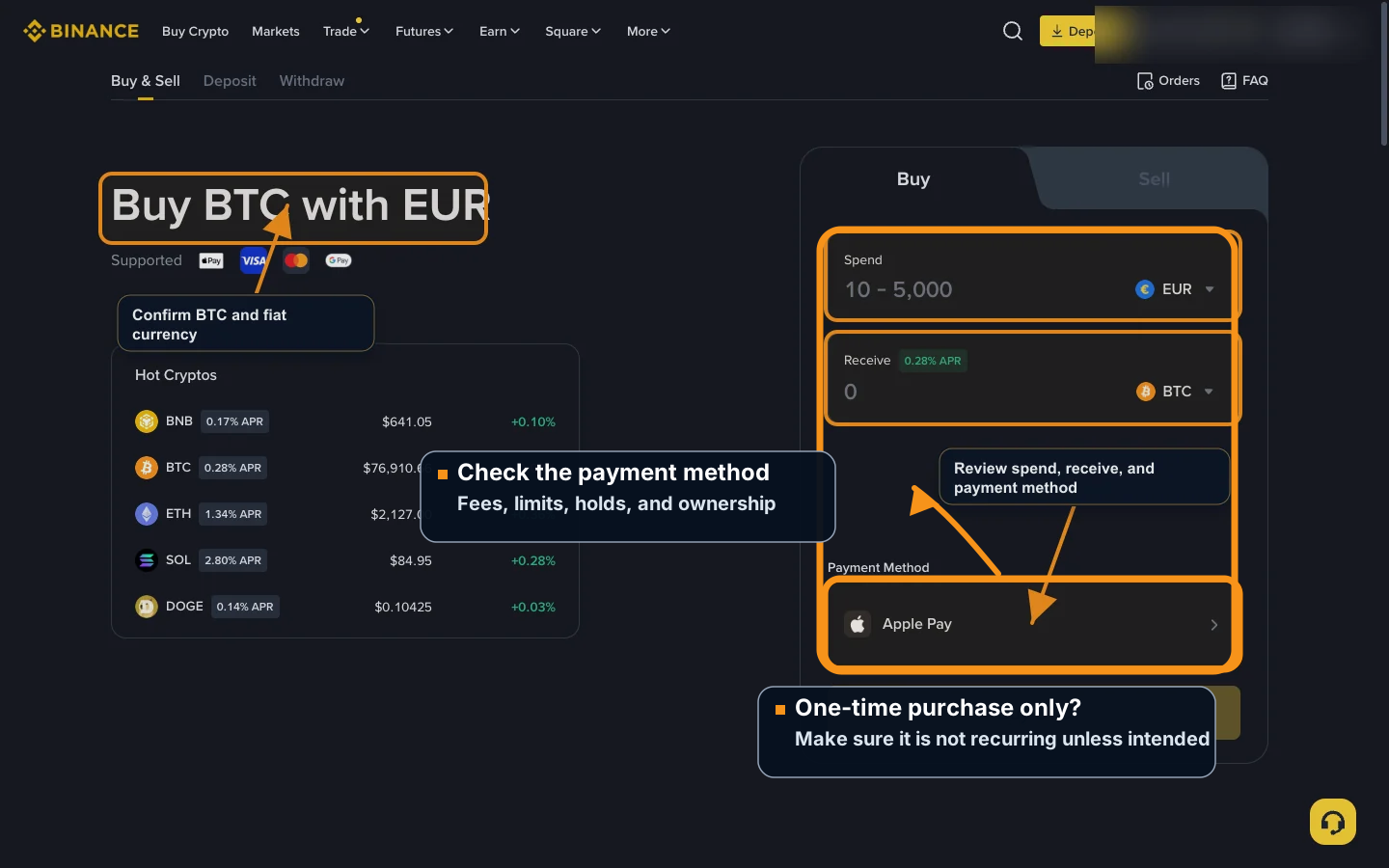
Check payment method, fiat currency, fees, limits, and whether the action is one-time or recurring.
Stage 4: Rehearse a small BTC purchase
The screenshots below show a Binance.com account after login. Sensitive account details and balances are hidden. The example order amount, quote, fee, and total spend are left visible so beginners can see what a real review screen looks like. No purchase was completed.
The visible values are examples from the screenshot time, not advice about how much to buy. Binance can change buttons, currencies, payment methods, fees, quotes, and limits at any time.
Step 1: Log in and find Buy Crypto
After logging in, look at the top navigation. On Binance, the buying path usually starts from Buy Crypto or a similar buy/sell area.
This is also a good moment to check the boring detail that saves people from ridiculous trouble: the domain. Scam pages can copy exchange branding. Your browser should show the official site, not a lookalike address.

Start from the official logged-in page and use the buy navigation.
Step 2: Open the Buy & Sell page
On the buy page, check the page title and default settings. In this captured example, Binance shows Buy BTC with EUR because of the account and region context. Your screen may show USD, another fiat currency, or a different payment method.
Do not assume the default settings are your settings. A buy screen is basically a small form asking three questions: what asset, what currency, and what payment method.

Confirm the page is for BTC and check the fiat currency before typing an amount.
Step 3: Enter a small learning amount
For a first purchase, think of the order as a learning transaction. The goal is not to be impressive. The goal is to make a mistake, delay, fee, or confusing screen survivable if one appears.
The buy box usually separates two ideas:
Spend: the fiat amount you plan to pay
Receive: the estimated BTC amount you may get
In the screenshot, the visible amount is only an interface example. Your own amount should be based on your budget, risk tolerance, and current platform rules.

Check both the spend field and the receive field before continuing.
Make sure the receive field says BTC or Bitcoin. Do not rely only on a logo, color, or price. Buying the wrong asset because the interface felt familiar is one of those small mistakes that becomes large only after the button has already been pressed.
Step 4: Check the payment method one more time
The payment method can affect fees, timing, limits, and withdrawal availability. In the captured example, the page shows Apple Pay, but your account may show bank transfer, debit card, wallet balance, or another supported method.
Before moving forward, check:
Whether the payment method is actually yours
Whether the platform shows a fee or spread
Whether there are minimum or maximum order limits
Whether the purchase can be withdrawn immediately or may have a hold
Whether you are making a one-time purchase, not a recurring order
If the platform asks you to add a new card, bank account, or payment method, read the terms before adding it. Do not save payment information on a shared device.
Step 5: Click Buy BTC only when you are ready to reach the review screen
On many platforms, the first Buy BTC button does not complete the purchase immediately. It may take you to a review screen.
However, labels vary. Slow down and read the screen. If a button clearly says Confirm, Place Order, Submit, or similar final language, treat it as the point where a purchase may happen.
That is the line.
Step 6: Review before Confirm
The review screen is the final safety stop. In the captured Binance example, the screen shows estimated BTC, payment method, fee, total spend, a terms checkbox, and a yellow Confirm button. Those values were the quote shown at capture time and can change before a real order.
Do not click Confirm unless you personally decide to complete the purchase after reviewing every detail.

The tutorial stops here. Confirm is the user's personal decision point.
Before confirming any real order, review:
Asset: BTC / Bitcoin
Fiat amount you will spend
Estimated BTC amount you will receive
Fees, spread, or price markup
Payment method
Total spend
Terms checkbox and platform terms
Any withdrawal hold, limit, or regional restriction
If anything is unclear, stop and check the platform's official help center.
Payment methods beginners commonly use
If you are asking "how can I buy bitcoin?", the answer often depends less on Bitcoin and more on your payment rail.
Common methods include bank transfer, debit card, wire transfer, app balance, wallet balance, or supported digital wallets such as Apple Pay or Google Pay. Availability varies by platform and region.
Bank transfers may have different fees and timing than cards. Debit cards and digital wallets can feel faster, but fees and limits may differ. Credit cards deserve extra caution because some card issuers may treat crypto purchases as cash advances, add fees, or block the transaction.
The useful question is not "which method sounds fast?" It is:
What will this cost?
How long can it take?
Can I withdraw the BTC afterward?
What happens if the payment fails?
Can I download a record of the transaction?
Speed is nice. Clarity is nicer.
Fees, limits, and timing
Bitcoin buying costs can include more than one layer:
Trading fee
Card or payment processing fee
Deposit fee
Withdrawal fee
Network fee if you later move BTC to a wallet
Spread between the quoted price and the market price
Some costs are shown directly. Others may be built into the quote. This is why the review screen matters. It is the page where the platform's friendly buying flow has to become numbers.
Limits can also vary. A new account may have lower limits than an older verified account. A payment method may allow buying but delay withdrawals. A platform may change fees, supported payment methods, or regional availability.
Before acting, check the platform's current policy. Do not rely on old screenshots, social media comments, or a tutorial as the source of truth for current fees or limits.
What to do after buying
After you buy bitcoin, you are in the storage box.
Usually, you have two broad choices:
Leave the bitcoin on the platform account for now.
Move it to a Bitcoin wallet you control.
Leaving it on the platform can be simpler for a very small beginner balance, but you depend on the platform's account security, withdrawal rules, and availability. Moving bitcoin to your own wallet gives more direct control, but it also moves the responsibility onto you.
Self-custody is powerful, but it is not magic. If you use a self-custody wallet, never share your private key or seed phrase. Store recovery information offline. Check the receiving address carefully. A wrong address, exposed seed phrase, or lost backup can lead to irreversible loss.
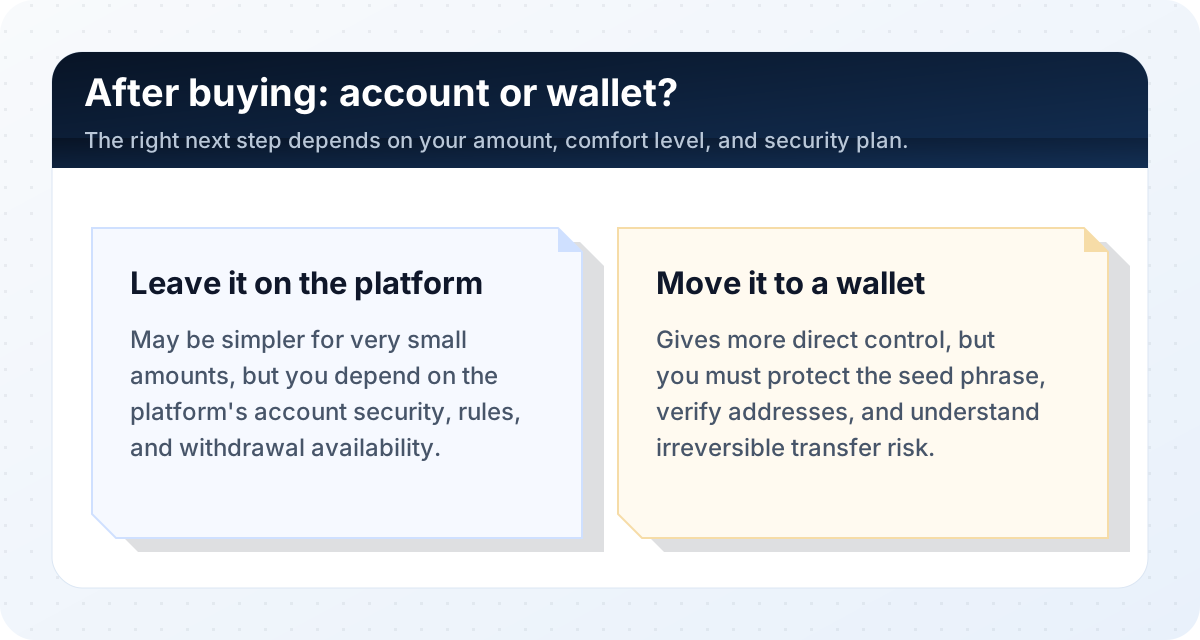
After buying, decide whether simplicity or self-custody fits your current skill level.
For a first tiny purchase, many beginners learn the platform first and study wallets next. Before holding a meaningful amount, learn how Bitcoin wallets, private keys, seed phrases, and withdrawals work.
A practical first-time path
If you are completely new, a careful path looks like this:
Learn the basics of Bitcoin.
Vet the venue: official site, regional availability, fees, withdrawal support, and support pages.
Verify identity if required, using only the official account flow.
Secure the account with a unique password, two-factor authentication, alerts, and device checks.
Deposit only after you understand fees, limits, holds, and whether you are funding an account or placing an order.
Open the buy screen and select BTC / Bitcoin.
Enter a small learning amount.
Review payment method, estimated BTC, fees, spread, total spend, terms, and limits.
Confirm only if you personally decide to buy.
Save the transaction record.
Learn wallet basics before moving larger amounts.
This article does not tell you to buy Bitcoin. It shows the mechanics and the safety checks if you decide to buy.
The button is still there at the end. It is just no longer pretending to be the whole story.
FAQ
How can I buy Bitcoin for the first time?
Use the four-stage path: vet the venue, verify identity and secure the account, deposit or choose a payment method carefully, then rehearse a small BTC purchase and review the final order screen before any confirmation.
How do I buy Bitcoin without getting scammed?
Use official websites or official apps, avoid links from strangers, check the domain, turn on two-factor authentication, and do not send money to someone promising to buy Bitcoin for you. If a platform, message, or person pressures you to act quickly, stop and verify through official sources.
Can I buy less than one Bitcoin?
Yes. Bitcoin is divisible, so you do not need to buy one whole BTC. Platforms often support fractional purchases, but minimum order sizes vary. Check the platform's current rules before buying.
How much Bitcoin should a beginner buy first?
This article cannot choose an amount for you. A beginner learning transaction mechanics should think in terms of a small learning amount, not a life-changing commitment. Use only money you can afford to lose and check the platform's minimum order size.
Is BTC the same as Bitcoin?
BTC is the common ticker symbol for Bitcoin. When buying, make sure the platform shows Bitcoin or BTC and not a different crypto asset with a similar name.
Is Binance the only place to buy Bitcoin?
No. Binance is only used here as a screenshot example. Depending on your location, you may need Binance.US, Kraken, Coinbase, Cash App, PayPal, or another legitimate service. Compare availability, fees, withdrawal support, and security settings before choosing.
Do I need a Bitcoin wallet before buying?
Not always. Some beginners buy first and learn wallets afterward. But before holding a meaningful amount, learn the difference between leaving bitcoin on a platform and moving it to a self-custody wallet.
Is depositing money the same as buying Bitcoin?
No. A deposit usually means you added fiat funds or another payment balance to the platform. You do not own BTC until a buy order is completed and reflected in your account according to the platform's records.
Can I buy Bitcoin without ID?
Many regulated platforms require identity verification. Do not use false information or try to bypass KYC, regional restrictions, or platform rules. If privacy is a concern, learn the legal and practical limits before choosing a method.
Risk Disclaimer
This article is for educational purposes only and is not financial, investment, tax, legal, or security advice. Bitcoin is volatile, and you can lose money. Platform fees, limits, verification rules, withdrawal rules, and availability can change. Always verify current official information, protect your account credentials and wallet recovery information, and check local tax and legal requirements before acting.
Editorial Attribution
Written by Alex Chen. Reviewed by Jordan Blake for factual accuracy, clarity, and beginner safety.