
A Bitcoin wallet does not really hold coins the way a leather wallet holds cash. Bitcoin lives on the Bitcoin blockchain. A wallet helps you control the keys that can receive and spend BTC.
That one idea clears up a surprising amount of beginner fog.
After someone buys bitcoin for the first time, the account screen may show a balance and the brain naturally says, "My coins are in there." That is close enough for a first glance, but not close enough for safety. A platform account, a Bitcoin wallet app, a hardware wallet, a private key, a seed phrase, and a Bitcoin address are different parts of the machine.
If you mix them up, the mistakes can be brutal: sending BTC to the wrong address, losing a recovery phrase, trusting a fake support agent, keeping more value on a platform than you intended, or self-custodying before you understand the responsibility.
This guide is a beginner map. It does not rank wallets or tell you to move everything into self-custody today. It explains what a bitcoin wallet does, where BTC actually is, what custodial and self-custody mean, how hot wallets, cold wallets, and hardware wallets differ, and how to lower the chance of losing access.

A Bitcoin wallet is about keys and control, not coins sitting inside an app.
What a Bitcoin wallet does
A Bitcoin wallet is software or hardware that helps you manage Bitcoin keys, create receiving addresses, view balances, sign transactions, and broadcast or prepare transactions.
The wallet is not a little container of BTC.
Think of the Bitcoin blockchain as the public record of who can spend which coins. Your wallet is the tool that proves you have permission to move certain coins. It does this with private keys.
In beginner terms:
A [Bitcoin address](/how-to-store/bitcoin-wallet-address) is where someone can send BTC.
A private key is what can authorize spending from the coins controlled by that key.
A seed phrase or recovery phrase is a backup that can restore the wallet's keys in many modern wallets.
A wallet app or device is the interface that helps you use those keys without manually handling raw cryptography.
This is why wallet safety is so unforgiving. If someone gets your private key or seed phrase, they may be able to move the BTC. If you lose the only backup, there may be no company, bank, or support desk that can recover it.
There is no "forgot seed phrase" button on the Bitcoin network.
That is the part beginners need to feel before they memorize vocabulary.
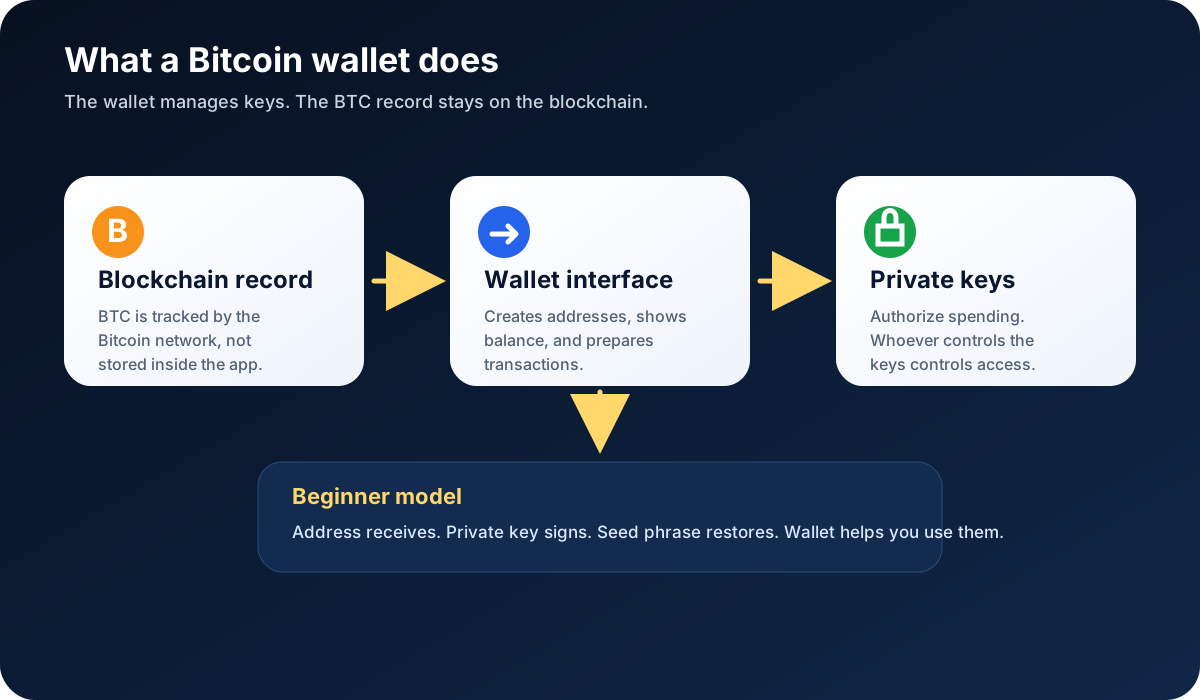
BTC is tracked on the blockchain. The wallet manages the keys that can control it.
Custodial vs self-custody
Most beginners meet Bitcoin through a platform account first. That can make wallet language confusing.
A custodial account means a platform holds or controls the keys for the BTC shown in your account. You log in with an email, password, two-factor authentication, and the platform's account system. This can be simpler at first, but it creates platform risk. The platform may have rules, withdrawal limits, regional restrictions, security reviews, outages, or custody arrangements you do not control.
Self-custody means you control the private keys or seed phrase. You can usually send BTC without asking a platform for permission, but you also take on the risk of protecting the backup. If you lose the recovery phrase, enter it into a fake website, store it in a hacked cloud account, or send BTC to the wrong address, the loss can be permanent.
Neither path is a magic safety blanket.
Custody moves responsibility to a platform. Self-custody moves responsibility to you. The right beginner question is not "Which one is always better?" It is: "Which risks do I understand well enough to handle right now?"
For small learning amounts, some beginners may keep BTC on a reputable platform while learning wallet basics. Others may practice self-custody with a small amount before moving more. Both paths require caution. Do not self-custody a meaningful amount until you can explain seed phrase backup, address checking, device security, and recovery testing in plain English.
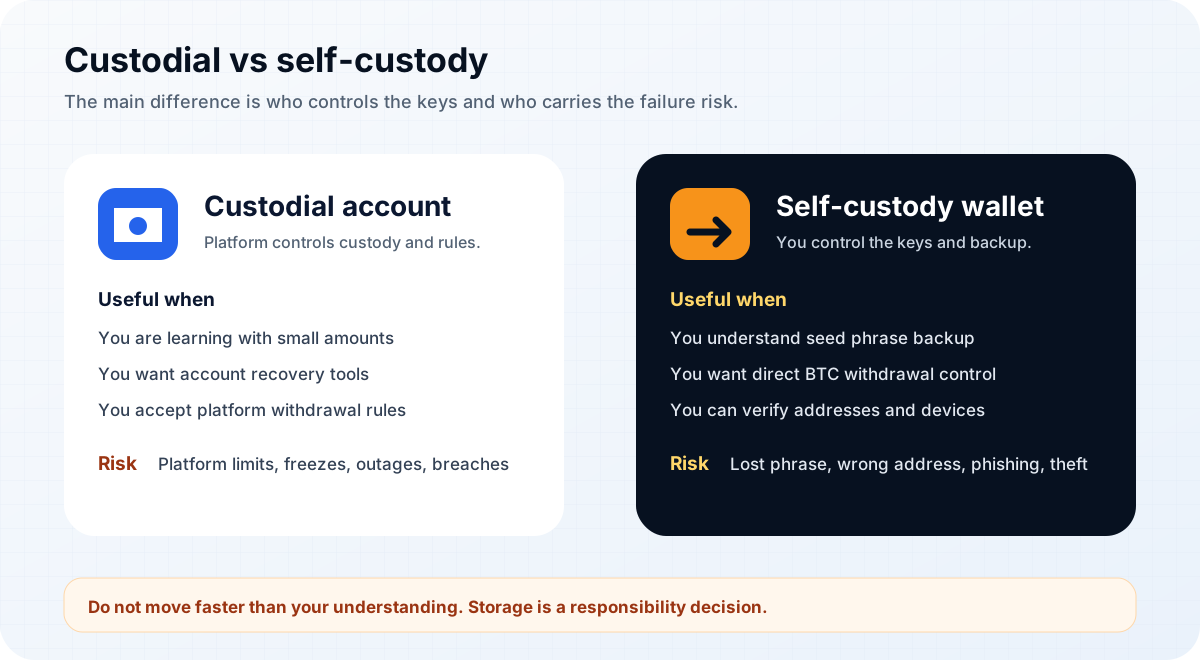
Custodial and self-custody storage solve different problems and create different responsibilities.
Hot wallets, cold wallets, and hardware wallets
Bitcoin wallets are often grouped by how connected they are to the internet and where the private keys live.
A hot wallet is connected to the internet. A bitcoin wallet app on your phone or computer is usually a hot wallet. Hot wallets can be convenient for small amounts, learning, and frequent transactions. The tradeoff is exposure: phones and computers can be lost, infected, phished, or compromised.
A cold wallet keeps the private keys offline or in a setup designed to avoid routine internet exposure. Cold storage can reduce online attack risk, but it also demands better backup habits. If the offline backup is lost, destroyed, or misunderstood, the BTC can become unreachable.
A hardware wallet is a physical device designed to keep private keys isolated and sign transactions without exposing the keys to a normal computer or phone. Hardware wallets can be useful for longer-term storage, but they are not automatic protection. You still need to buy from official sources, initialize the device correctly, protect the recovery phrase, verify addresses on the device screen, and avoid fake support or fake apps.
There are also paper backups, watch-only wallets, multisig wallets, and other setups. Those can be useful, but they add complexity. A complete beginner does not need to become a wallet engineer on day one.
Use a simple sorting rule:
Frequent use usually favors convenience.
Longer-term storage usually favors less internet exposure.
Larger responsibility requires better backups and slower decisions.
The wallet type is only one part of safety. The user's habits are the other part, and the habits usually win.
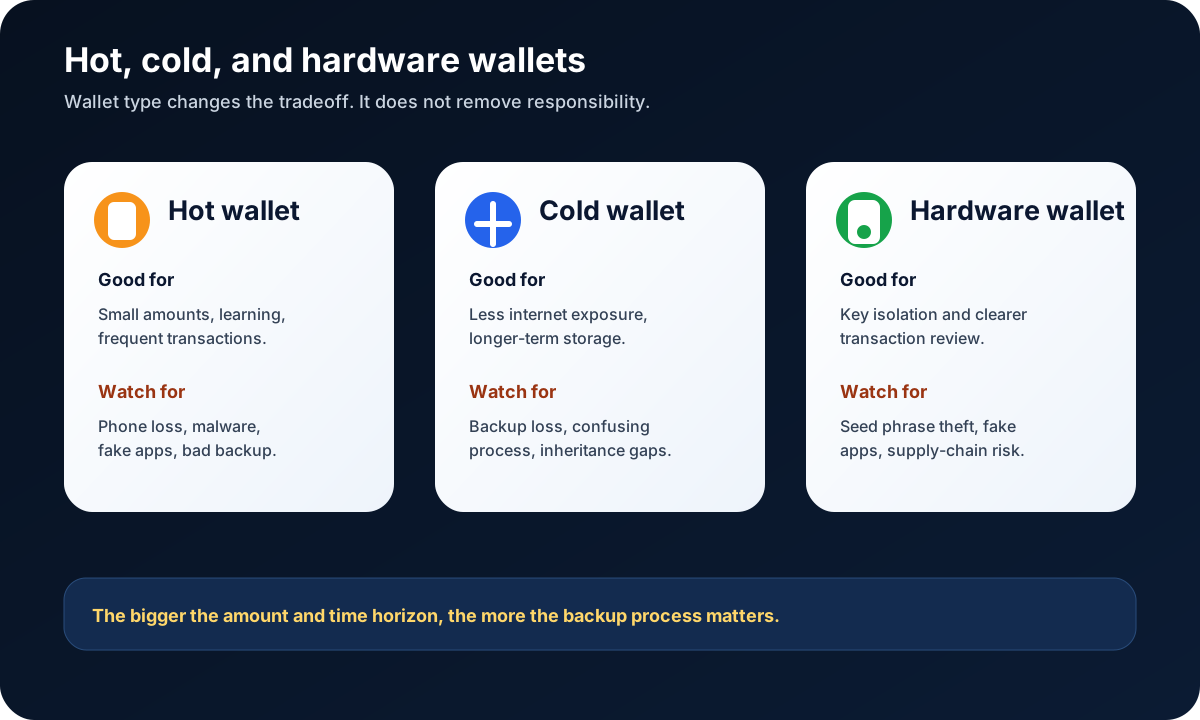
Wallet types are tradeoffs between convenience, control, and backup responsibility.
Address, private key, and seed phrase basics
The wallet vocabulary is weird because several things look like "the important secret."
They are not the same.
A Bitcoin address is like a receiving destination. You can share it with someone who is sending BTC to you. Addresses are often long strings of letters and numbers, and many wallet apps show QR codes to reduce typing mistakes. Before receiving or sending, always check the address carefully. Malware and clipboard attacks can replace copied addresses.
A private key is secret signing material. It authorizes spending. In normal beginner use, you should not need to copy, paste, export, or type a raw private key into websites or chat windows. Anyone who asks for it is creating danger.
A seed phrase or recovery phrase is usually a set of words that can restore access to the wallet's keys. It is a backup, but it is also power. Anyone who gets it may be able to recreate the wallet and move the BTC.
That means:
Do not share your seed phrase with support.
Do not type it into random websites.
Do not store it in screenshots, cloud notes, email drafts, or chat apps.
Do not photograph it.
Do not print it on a networked printer.
Do not test it on a website that claims to "verify" your wallet.
Do keep an offline backup in a place protected from theft, loss, fire, water, and accidental disposal.
Do consider whether trusted heirs or legal arrangements need to know how recovery would work, without exposing the phrase casually.
A recovery phrase is not like a password reset email. It is more like a master key you wrote on paper. The paper does not care who is holding it.

A seed phrase belongs offline, private, and protected from both theft and accidental loss.
How to store BTC after buying
After buying Bitcoin, you usually face three practical choices.
The first is to leave BTC on the platform account for now. This may be simple for a beginner who is still learning. If you do this, turn on two-factor authentication, use a strong unique password, review withdrawal settings, keep records, and understand that platform availability, policies, and risks still matter.
The second is to move a small test amount to a self-custody wallet. This teaches the real flow: copy or scan a receiving address, verify the address, send a small amount, wait for confirmations, and learn how the wallet displays the transaction. A test transaction can reduce the fear of the unknown without risking the full amount.
The third is to plan longer-term storage. This may involve a hardware wallet, cold storage process, better backup material, secure locations, inheritance planning, and written procedures. It should be slow and boring. Slow and boring is a compliment here.
Do not move BTC just because a stranger tells you to. Do not move BTC to a wallet address from a support chat, investment group, romance contact, giveaway, job offer, or "account unlock" message. Crypto transfers are often irreversible. If you send BTC to the wrong address or to a scammer, there may be no practical way to get it back.
If you move BTC from a platform to a wallet:
Use your own wallet, created through official software or hardware.
Back up the recovery phrase before receiving meaningful funds.
Confirm the receiving address inside the wallet.
Send a small test amount first when learning.
Verify the transaction arrived.
Keep records for taxes and personal tracking.
Only then consider whether moving more fits your situation.
This is not about being dramatic. It is about respecting an irreversible system.
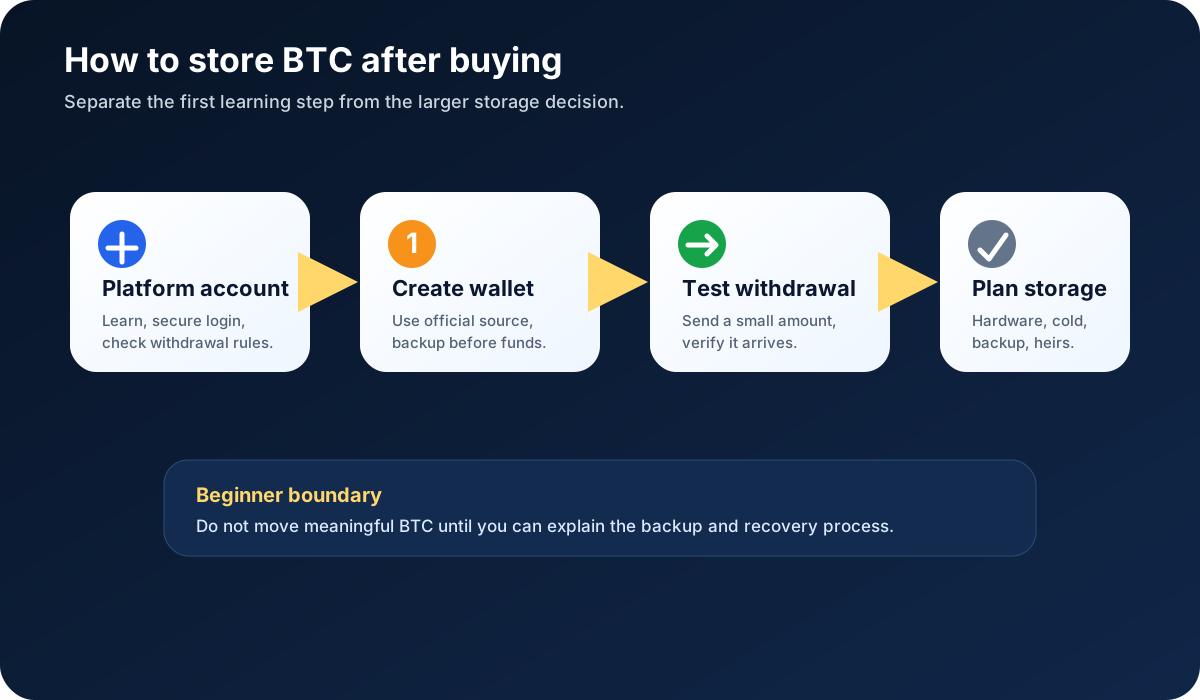
After buying BTC, separate the learning step from the larger storage decision.
Beginner safety checklist
Use this checklist before choosing a BTC wallet or moving funds.
I understand that BTC is recorded on the blockchain, not physically inside an app.
I know whether I am using a custodial account or a self-custody wallet.
I know who controls the private keys.
I have turned on two-factor authentication for platform accounts.
I downloaded wallet software only from the official source.
I bought hardware devices only from official or trusted supply channels.
I wrote down the seed phrase offline and checked it carefully.
I did not store the seed phrase in screenshots, cloud notes, email, or chat apps.
I understand that anyone with the seed phrase may be able to move the BTC.
I understand that losing the only valid backup can mean permanent loss.
I can explain how to receive BTC and verify an address.
I am willing to send a small test amount before moving more.
I know where to find official support, and I know support should not ask for my seed phrase.
If too many boxes feel fuzzy, pause. Fuzzy is not failure. Fuzzy is useful information.
It means the next step is learning, not moving more BTC.
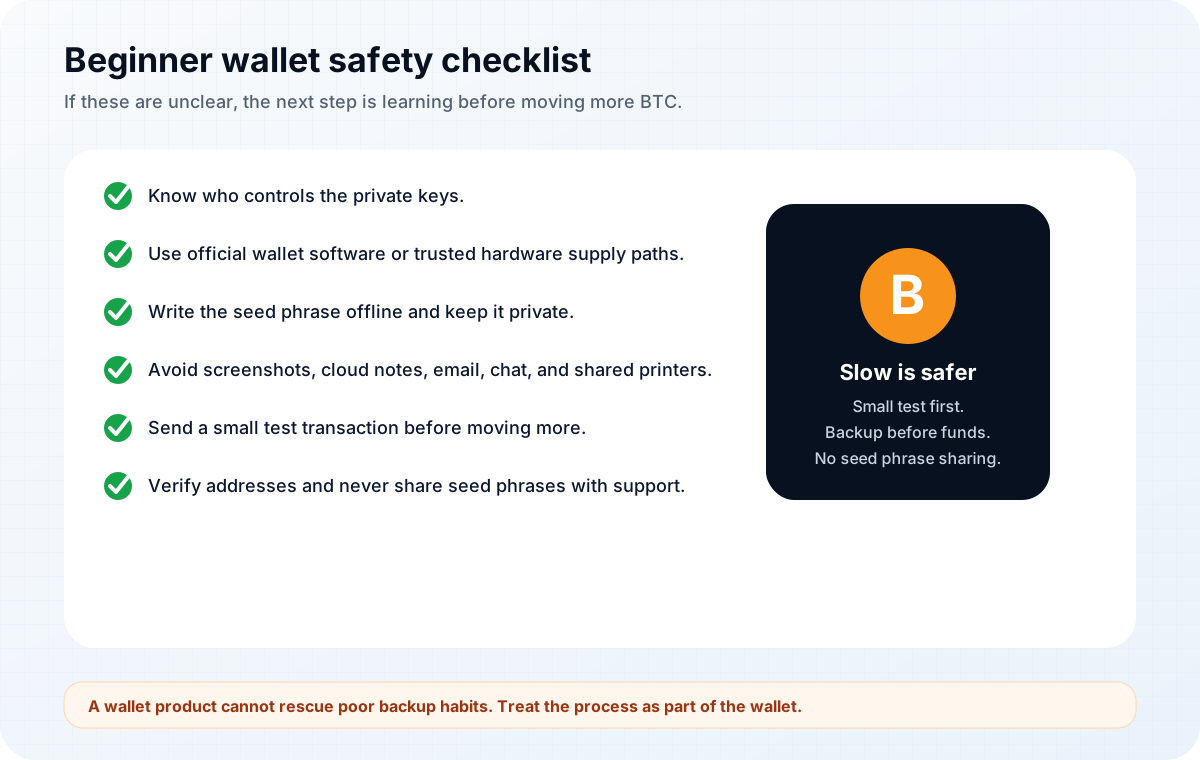
Good wallet security is a set of habits, not a single product choice.
Risks, limits, and common misconceptions
The first misconception is that a bitcoin wallet stores coins. It stores or manages keys. The BTC itself is tracked by the Bitcoin network.
The second misconception is that an exchange account is the same as a wallet. An exchange account may show a BTC balance, but the platform usually controls the keys until you withdraw to a wallet you control.
The third misconception is that a hardware wallet removes all risk. A hardware wallet can reduce some online risks, but it cannot save you from a stolen seed phrase, a fake app, a wrong address, a bad backup, or a careless confirmation.
The fourth misconception is that a seed phrase can be recovered by support. In self-custody, support usually cannot recreate a lost recovery phrase. Anyone who says they can recover it if you type it into a website may be trying to steal it.
The fifth misconception is that more complex storage is always better. Multisig, passphrases, metal backups, and offline signing can help some users, but they can also create new failure points. Complexity should match understanding.
The clean beginner rule is this:
Do not upgrade your storage complexity faster than your ability to explain it.
FAQ
Do I need a Bitcoin wallet?
You need a Bitcoin wallet if you want to receive, send, or self-custody BTC. If you only bought BTC on a platform and have not withdrawn it, you may be using a custodial account rather than your own wallet. Learn the difference before moving funds.
Is a Bitcoin wallet the same as an exchange account?
No. A Bitcoin wallet usually means software or hardware that manages keys for receiving and spending BTC. An exchange account is controlled through the platform's login and rules. The platform may custody the BTC until you withdraw it.
Can I recover Bitcoin if I lose my seed phrase?
If you use self-custody and lose the only valid seed phrase or backup, recovery may be impossible. Some custodial platforms have account recovery processes, but that is different from recovering a self-custody wallet. Do not assume support can restore a lost seed phrase.
How does a cryptocurrency wallet work?
In simple terms, a wallet creates or manages keys. Public information can be used to receive funds, while private keys sign transactions to spend them. Modern wallets hide most of the technical work behind an app or device interface.
How do I create a cryptocurrency wallet?
Choose a wallet type that fits your skill level, download software only from the official source or initialize hardware from a trusted source, create the wallet, write down the recovery phrase offline, verify the backup, and practice with a small amount first. Do not share the phrase or type it into random websites.
How do I choose a cryptocurrency wallet?
Start with needs, not rankings. Ask whether you need mobile convenience, long-term storage, hardware support, open-source transparency, fee control, privacy features, or beginner simplicity. Then check official documentation, device security, backup process, recovery method, and support history.
Is a bitcoin wallet app enough for beginners?
A bitcoin wallet app can be enough for learning and small amounts, but it depends on the app, device security, backup quality, and user habits. For larger or longer-term storage, beginners often study hardware wallets or cold storage before deciding.
What happens if someone gets my seed phrase?
If someone gets a valid seed phrase for a self-custody wallet, they may be able to restore the wallet and move the BTC. Treat the phrase as highly sensitive. Never share it with support, friends, online forms, social messages, or websites.
Risk Disclaimer
This article is for beginner education only. It is not financial, investment, legal, tax, custody, or security advice. Bitcoin transactions can be irreversible, Bitcoin is volatile, and wallet mistakes can cause permanent loss. Wallet software, platform rules, withdrawal support, security features, and recovery processes can change. Check official wallet and platform documentation before acting, and use qualified professional help when needed.
Editorial Attribution
Written by Alex Chen. Reviewed by Jordan Blake for factual accuracy, clarity, and beginner safety.