
There is no single best bitcoin wallet for every beginner. The right choice depends on what you need the wallet to do, who controls the private keys, how often you plan to move BTC, how much responsibility you can handle, and whether the wallet or platform is available where you live.
That is a less clickable answer than a top-10 list.
It is also the answer that saves beginners from the most expensive kind of confusion: choosing a wallet because someone else said it was "the best," then discovering too late that it solves the wrong problem.
For example, if you already buy Bitcoin on Binance or Binance.US where it is legally available, the Binance account wallet can be a familiar custodial starting point for small learning amounts. But it is not the same thing as controlling your own Bitcoin keys. Binance Wallet, the Binance self-custody Web3 product, is also different from a simple Bitcoin-only cold storage plan. Same brand. Different rooms.
This guide gives you a beginner decision map instead of a fake universal winner.

Choosing a Bitcoin wallet is really choosing a responsibility model.
Why there is no single best Bitcoin wallet
The phrase "best Bitcoin wallet" sounds like there should be one winner.
There isn't.
A wallet for quick learning is not the same as a wallet for long-term storage. A wallet for someone who needs account recovery is not the same as a wallet for someone ready to protect a seed phrase. A wallet for buying Bitcoin inside a platform is not the same as a self-custody wallet that lets you send BTC from your own keys.
The useful beginner question is:
What job am I hiring this wallet to do?
There are usually four jobs:
Hold a small learning amount while you understand Bitcoin basics.
Receive and send BTC from a wallet you control.
Store BTC for longer periods with less routine online exposure.
Connect to broader crypto or Web3 services, which may involve more tokens, networks, and contract risks.
Those jobs overlap, but they are not the same. A platform wallet may be convenient for the first job. A Bitcoin wallet app may fit the second. A hardware wallet or cold wallet may fit the third. A Web3 wallet may fit the fourth, but it can add complexity for someone who only wants to understand Bitcoin.
The trap is using one tool because it looks popular, then expecting it to solve every storage problem.
Wallet types by beginner need
Beginners usually meet four wallet types: a custodial platform wallet, a self-custody mobile or desktop wallet, a hardware wallet, and a Web3 wallet. Each type has a different tradeoff.
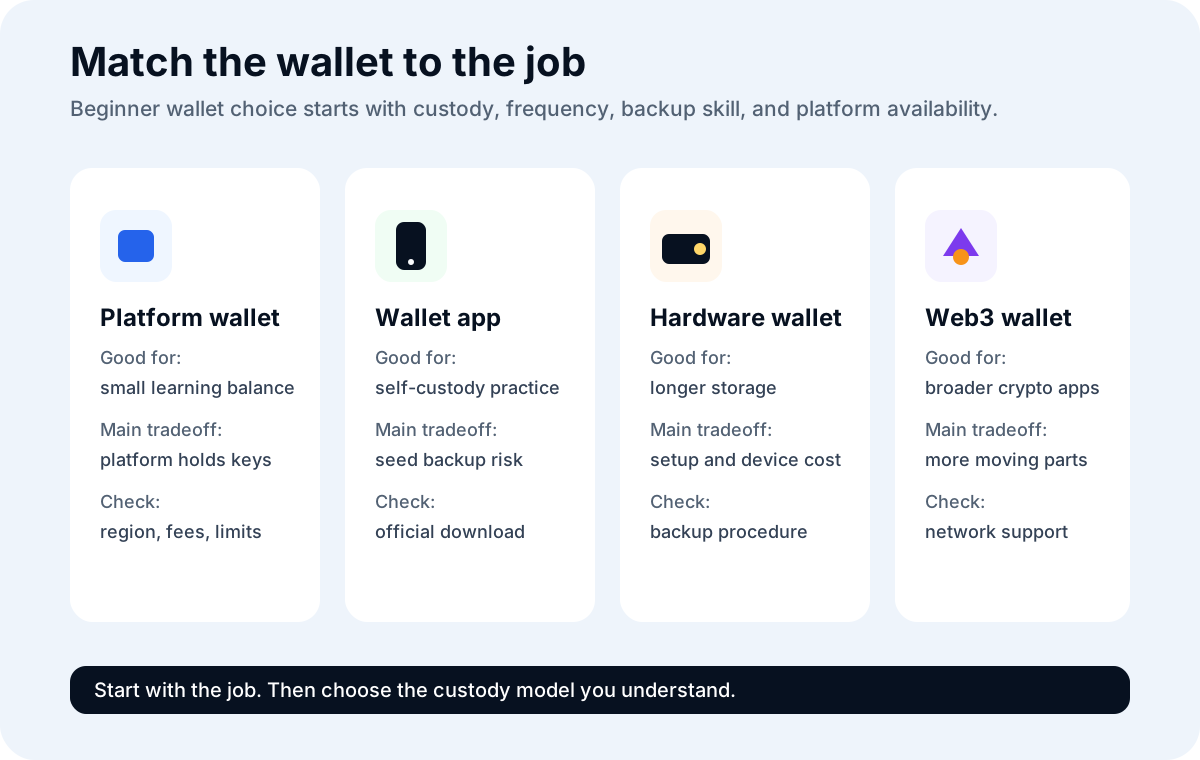
The wallet type should match the job: learning, sending, storing, or exploring Web3.
Custodial platform wallet
A custodial platform wallet is the wallet or balance area inside a crypto platform. Binance.US describes its account wallet as custodial: when you buy, sell, or store crypto using the account, Binance.US holds and manages the digital assets on the user's behalf.
For a beginner, the appeal is obvious. You can log in with an account, use two-factor authentication, follow the platform's buy and sell flow, and rely on account recovery procedures if you lose your password. If you already use Binance or Binance.US where available, this can be a reasonable place to learn the basic interface with a small amount.
The tradeoff is just as important: the platform controls the private keys. You are managing a platform account, not holding Bitcoin through your own seed phrase. Platform rules, regional availability, verification, withdrawal limits, outages, security reviews, and policy changes can affect what you can do.
For U.S. readers, do not assume Binance.com and Binance.US are the same experience. Check Binance.US availability in your state, supported services, fees, and withdrawal rules before acting. Do not use false information, another person's account, or location tricks to bypass platform rules.
Self-custody Bitcoin wallet app
A self-custody bitcoin wallet app gives you control of the private keys or recovery phrase. Mobile wallets can be convenient for receiving and sending small amounts because they use QR codes and are always nearby.
The tradeoff is that your phone is an internet-connected device. You must protect the recovery phrase, use official download sources, secure the device, avoid fake support, and understand that losing the backup can mean losing access.
This can be a good learning step after a beginner understands addresses, test transactions, network fees, and seed phrase safety.
Hardware wallet or cold wallet
A hardware wallet is a physical device designed to keep private keys isolated while signing transactions. It can be useful for longer-term storage or larger responsibility, especially when paired with a careful offline backup.
The tradeoff is cost and setup responsibility. You need to buy from an official or trusted source, initialize it yourself, protect the recovery phrase, verify addresses, and practice with a small test before moving anything meaningful.
Cold storage is not a magic safety box. It is a slower process with fewer online attack paths and more backup responsibility.
Binance Wallet and other Web3 wallets
Binance Wallet is Binance's self-custody Web3 wallet product. Binance says it uses multi-party computation, or MPC, and key shares instead of a traditional single seed phrase. That is different from the custodial Binance.US account wallet, where the platform holds the private keys for assets in the account.
This distinction matters.
If your beginner goal is "I want a simple place to see BTC after buying it," a Binance account wallet may be the simpler Binance-related example, where available. If your goal is "I want a Binance-branded self-custody wallet for Web3," Binance Wallet is a different product with a different recovery model, network support, app flow, and risk profile.
Do not choose it just because the name is familiar. Check the official Binance Wallet documentation, supported networks, backup requirements, recovery password rules, and whether it fits your Bitcoin-specific use case.
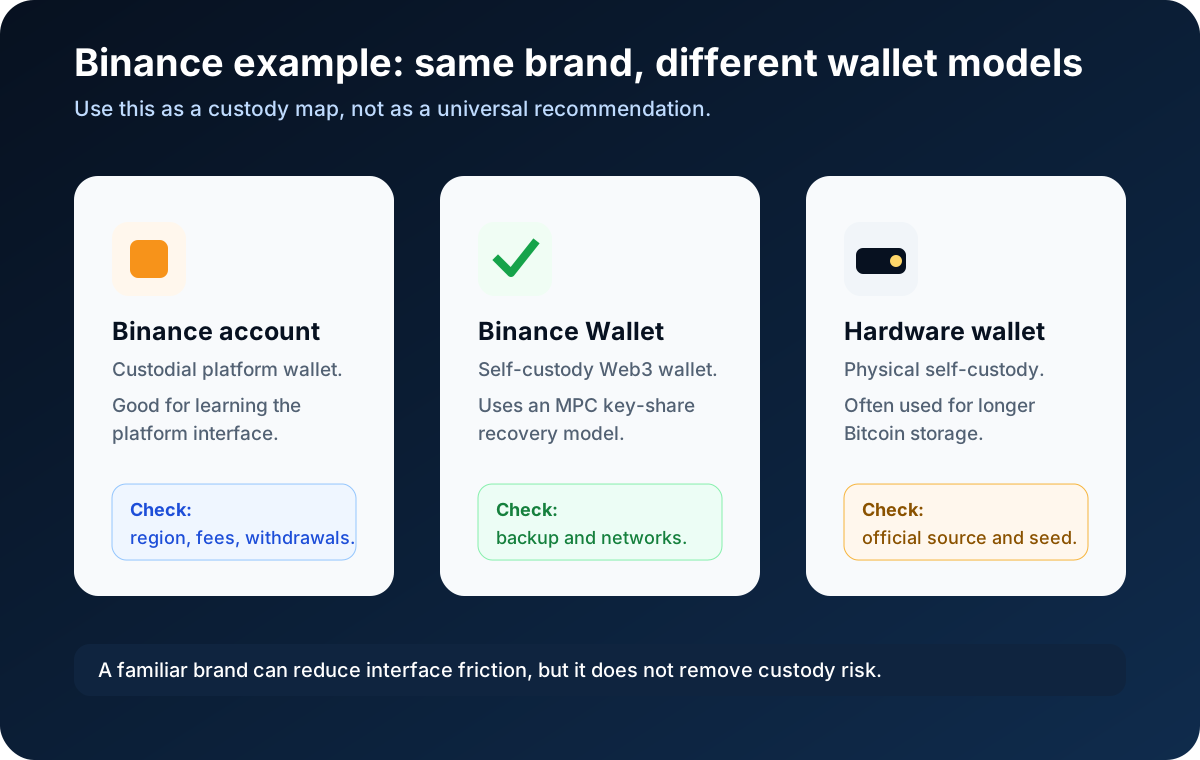
Binance can be part of a beginner path, but its wallet products are not all the same custody model.
Security, control, convenience, and cost
A beginner wallet choice usually sits inside a four-corner map.
One corner is convenience. Can you understand the interface? Can you buy, receive, send, and review transactions without feeling lost? Does the wallet show Bitcoin clearly instead of mixing in too many coins, networks, dApps, promotions, or trading tools?
Another corner is control. Who controls the private keys? If a third party holds them, you have platform risk. If you hold them, you have backup risk. Neither sentence is a moral sermon. It is just the machinery.
The third corner is security. Does the wallet come from an official source? Does it support two-factor authentication for accounts, or secure seed phrase handling for self-custody? Does it help you verify addresses? Does it have a clear update path? Does it avoid asking you to paste recovery words into a website?
The fourth corner is cost. Free wallet apps may still involve network transaction fees. Hardware wallets have device costs. Platforms can have trading fees, spreads, withdrawal fees, limits, or holds. Web3 wallets may add network and smart-contract interaction costs. Check current official disclosures before acting.
Here is the small model:
If you want ease and account recovery, you may accept platform custody.
If you want key control, you must accept seed phrase or recovery responsibility.
If you want longer-term storage, you may accept slower setup and hardware cost.
If you want Web3 features, you may accept more networks, interfaces, and risk checks.
The wallet is not just software. It is a deal you make with your future self.
Red flags when choosing a wallet
Fake wallets do not always look fake. That is their entire business model.
Before downloading or using any bitcoin wallet app, slow down and check the source. Use the official website, official app store links from the wallet provider, or the platform's verified help center. Search results and ads can be manipulated. Social media replies can be impersonators. App names can be copied.

A wallet download is a security decision, not just an app choice.
Watch for these red flags:
The wallet appears only through an ad or social media link.
The app name is almost the same as a known wallet but not quite.
The website asks for your seed phrase before you create or restore a wallet.
"Support" asks for your recovery phrase, private key, login code, or screen-sharing access.
The wallet promises guaranteed profit, easy mining income, rewards for depositing BTC, or urgent account protection.
The app pushes you into unfamiliar tokens, bridges, or dApps when your goal is only Bitcoin storage.
The wallet has no clear official documentation, company information, support channel, security model, or update history.
The platform says you can skip verification, taxes, withdrawal rules, or regional limits.
The checkout or withdrawal screen does not clearly show fees, network, address, or final confirmation details.
If the wallet wants your seed phrase before you understand why, close it.
That is not caution. That is pattern recognition.
Beginner wallet checklist
Use this checklist before choosing a wallet:
I know whether this is a custodial wallet or a self-custody wallet.
I know who controls the private keys.
I downloaded it from an official source.
I can explain how account recovery or seed phrase recovery works.
I understand what happens if I lose my password, phone, device, or recovery phrase.
I know whether the wallet is Bitcoin-only or multi-asset.
I know whether it supports sending BTC to a Bitcoin address.
I know how fees are shown before sending.
I can verify the receiving address before moving BTC.
I can send a small test transaction before moving more.
I have turned on two-factor authentication for any platform account.
I am not using someone else's account or false location information.
I know whether the platform or wallet is available in my region.
If you are comparing several best bitcoin wallets from a search result, do not start with star ratings. Start with this checklist. A five-star app that solves the wrong custody problem is still the wrong app.
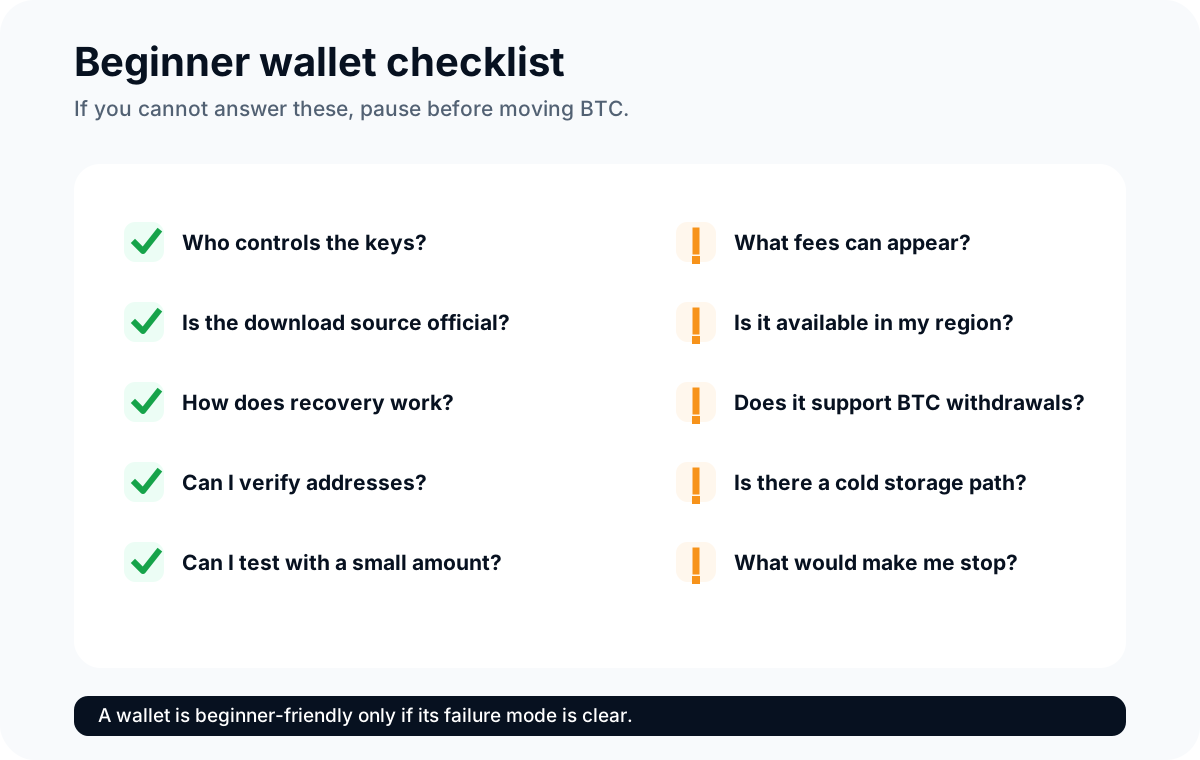
A beginner-friendly wallet is one whose risks you can explain before using it.
When to upgrade to cold storage
Cold storage becomes more relevant when the amount, time horizon, and backup skill make a regular platform wallet or hot wallet feel too exposed.
Consider learning cold storage when:
You plan to hold BTC for a longer period.
The amount is meaningful enough that platform or phone risk worries you.
You understand seed phrases and offline backups.
You can store a backup privately and durably.
You are willing to practice with a small test transaction first.
Wait before upgrading if:
You still cannot explain a Bitcoin address.
You are tempted to photograph or cloud-save the seed phrase.
You cannot keep a backup safe from theft, fire, water, or accidental disposal.
You would rely on a stranger, friend, or "support agent" to set up the wallet.
The amount is small and the cold-storage setup would create more confusion than safety.
The upgrade path can be calm:
Learn with a small platform balance or wallet app.
Practice sending and receiving a tiny amount.
Learn seed phrase safety.
Study cold wallets and hardware wallets.
Move slowly if the storage responsibility fits your situation.
No one gets extra credit for making the first wallet decision dramatic.
Risks, limits, and common misconceptions
The first misconception is that the best Bitcoin wallet is the one with the most features. Beginners usually need fewer features at first, not more. Too many coins, chains, dApps, earn products, swaps, bridges, and charts can turn a simple storage question into a hallway full of doors.
The second misconception is that a platform wallet is unsafe by definition. A platform wallet can be a practical starting point for small learning amounts, especially when account recovery matters. The risk is that you rely on the platform's custody, policies, and availability. That is a real tradeoff, not a universal failure.
The third misconception is that self-custody is automatically safer. Self-custody gives you control, but it also gives you the power to lose funds permanently through a bad backup, fake app, exposed recovery phrase, or wrong address.
The fourth misconception is that Binance Wallet, a Binance.US account wallet, and a hardware wallet are interchangeable. They are different custody models. A Binance.US account wallet is custodial. Binance Wallet is a self-custody Web3 wallet. A hardware wallet is a physical self-custody device often used for cold storage.
The fifth misconception is that wallet advice from Reddit, YouTube, or social media can be followed without verification. Community experience can be useful, but the final check should be official documentation, current app details, region availability, and your own risk tolerance.
The beginner rule is:
Choose the wallet whose failure mode you understand.
FAQ
What is the best Bitcoin wallet for beginners?
There is no single best Bitcoin wallet for every beginner. A beginner who wants account recovery and a small learning balance may prefer a reputable custodial platform wallet where available. A beginner who wants key control may prefer a self-custody bitcoin wallet app. Someone planning longer-term storage may eventually learn hardware wallets or cold storage.
Are free Bitcoin wallets safe?
Some free wallet apps can be legitimate, but "free" does not answer the safety question. Check the official source, custody model, backup process, update history, supported devices, fee controls, and whether the app asks for sensitive information in unsafe ways. Free wallet apps can still involve Bitcoin network fees when sending BTC.
Should I keep Bitcoin on an exchange?
For a small learning amount, some beginners may keep BTC on a reputable exchange or platform while they learn. That can be convenient, but the platform controls the private keys and may have rules, fees, limits, outages, verification requirements, regional restrictions, or withdrawal holds. Do not treat an exchange balance as the same thing as self-custody.
Is Binance a good Bitcoin wallet for beginners?
Binance or Binance.US can be a familiar custodial starting point for some beginners where the service is legally available and the user understands the account risks. It is not the right answer for everyone, and it is not the same as controlling your own private keys. U.S. users should check Binance.US state availability, supported services, fees, limits, and withdrawal rules before acting.
Is Binance Wallet self-custody?
Binance describes Binance Wallet as a self-custody Web3 wallet that uses MPC key shares rather than a traditional single seed phrase. That is different from holding BTC in a custodial Binance or Binance.US account wallet. Before using it, check Binance's current official documentation, supported networks, recovery password and backup requirements, and whether it fits your Bitcoin-specific needs.
Which wallet is best to hold Bitcoin?
For small active amounts, a platform wallet or mobile wallet may be easier to use. For longer-term storage or meaningful amounts, many users study hardware wallets and cold storage. The better question is whether you understand the custody model, backup process, fees, and recovery risks well enough to use that wallet safely.
What is the best wallet to buy Bitcoin?
Buying Bitcoin and storing Bitcoin are related but different tasks. A platform such as Binance or Binance.US may let eligible users buy BTC and hold it in a custodial account wallet. A self-custody wallet lets you control keys after withdrawal. Check platform availability, verification requirements, payment methods, fees, withdrawal support, and current rules before buying.
How do I avoid fake Bitcoin wallet apps?
Start from the wallet's official website or verified help center, then follow its official download links. Be careful with ads, social media links, copied names, fake support accounts, and apps that ask for your seed phrase. Never share a seed phrase, private key, login code, or recovery password with support or strangers.
Which crypto wallet do people actually trust in 2026?
Trust should come from current evidence, not vibes. Check custody model, official documentation, security history, update activity, open-source or audit information where relevant, withdrawal support, backup design, region availability, and whether the wallet matches your use case. Do not rely on old rankings without checking current details.
Risk Disclaimer
This article is for beginner education only. It is not financial, investment, legal, tax, wallet-security, or platform advice. Bitcoin is volatile, wallet mistakes can cause irreversible loss, and platform rules can change. Before using any wallet or platform, check official documentation, regional availability, fees, limits, withdrawal support, and current security guidance. Never share private keys, seed phrases, login codes, recovery passwords, or sensitive account information.
Editorial Attribution
Written by Alex Chen. Reviewed by Jordan Blake for factual accuracy, clarity, and beginner safety.