
A cold wallet is a Bitcoin wallet setup that keeps private keys offline or away from everyday internet-connected devices. It can reduce online theft risk, but it does not make Bitcoin storage automatic, simple, or risk-free.
That is the beginner trap.
People hear "cold wallet" and imagine a magic box where bitcoin becomes safe because the box looks serious. The real picture is less shiny and more useful: a cold wallet changes where the danger sits. It lowers some online risks, then hands you a new job called "do not lose or expose the backup."
This guide explains what is a cold wallet, how a bitcoin cold wallet works, how it compares with a hot wallet, why hardware wallets and paper wallets are not the same thing, and when cold storage may or may not make sense for a beginner.

A cold wallet is about keeping signing keys away from routine online exposure.
Cold wallet in simple terms
A cold wallet is not a physical container full of BTC.
Bitcoin is recorded on the Bitcoin blockchain. A wallet helps you manage the private keys that can authorize spending from certain Bitcoin addresses. When people say "cold wallet," they usually mean the private keys are created, stored, or used in a way that avoids regular internet exposure.
Here is the plain model:
A [Bitcoin address](/how-to-store/bitcoin-wallet-address) can receive BTC.
A private key can authorize spending from BTC controlled by that key.
A seed phrase or recovery phrase can restore the wallet's keys in many modern wallets.
A cold wallet keeps those keys offline or isolated from normal online devices.
The "cold" part describes the key environment. It does not mean the coins are stored inside a device, and it does not mean nothing can go wrong.
One common setup is a hardware wallet. The computer or phone prepares a transaction, the hardware device signs it internally, and the private key does not need to leave the device. Another setup might involve an offline computer or an air-gapped process, but those are usually more advanced.
The key idea is simple enough to fit on a napkin: online devices are useful, but they are noisy. A cold wallet tries to keep the most powerful secret out of that noise.
Cold wallet vs hot wallet
A hot wallet is connected to the internet. A mobile wallet, browser wallet, or desktop wallet on a normal online computer is usually a hot wallet. Hot wallets can be convenient for small amounts, learning, and regular transactions.
A cold wallet is designed for less frequent access. It can reduce exposure to malware, phishing pages, browser attacks, clipboard replacement, and other online threats. The tradeoff is that cold storage is slower and less forgiving. You have to handle backups, device setup, address checking, recovery planning, and sometimes firmware or companion-app updates.
The better question is not "Which one is always better?" The better question is "Which risk am I actually prepared to manage?"
A hot wallet asks: can you protect a connected device and avoid online scams?
A cold wallet asks: can you protect an offline secret for years without losing it, damaging it, photographing it, or typing it into the wrong place?
Both questions matter.
Comparison point | Hot wallet | Cold wallet |
|---|---|---|
Key environment | Private keys are on, or used with, an internet-connected phone, browser, or desktop device. | Private keys are kept offline or isolated from routine internet-connected devices. |
Typical use | Often easier for learning, small amounts, and regular transactions. | Designed for less frequent access, longer holding periods, and stronger separation from online threats. |
Convenience | Usually faster to open, send, or receive because the wallet is already connected. | Usually slower because signing, device checks, backups, and address verification take more care. |
Main online risk | More exposed to malware, phishing pages, fake apps, browser attacks, clipboard replacement, and device compromise. | Reduces routine online exposure, but still depends on safe setup, official tools, and careful transaction review. |
Main responsibility | Protect the connected device, app access, passwords, and scam resistance. | Protect the offline backup, recovery phrase, device setup, and recovery plan for years. |
Beginner question | Can I protect a connected device and avoid online scams? | Can I protect an offline secret without losing it, damaging it, photographing it, or typing it into the wrong place? |
Simple rule | Neither wallet type is always better. Choose the risks you understand well enough to manage. | Neither wallet type is always better. Choose the risks you understand well enough to manage. |
Cold storage reduces routine online exposure, but it increases backup responsibility.
Hardware wallets and paper wallets
A hardware wallet is a physical device designed to keep private keys isolated while signing transactions. For many beginners, this is the first practical example of a cold wallet.
But a cold wallet is not always a hardware wallet.
"Cold wallet" describes the offline key setup. "Hardware wallet" describes one type of tool that can be used for that setup. Cold wallets for cryptocurrency can also include older paper-wallet methods, air-gapped computers, or more advanced signing setups.
Beginners should be especially careful with paper wallets. A paper wallet sounds simple: print or write a key on paper and put it somewhere private. In practice, paper wallets can create serious failure points: unsafe key generation, malware on the computer or printer, accidental exposure, poor randomness, physical damage, partial spending mistakes, and no simple recovery workflow. This article does not provide paper-wallet generation steps.
Hardware wallets are often easier to reason about, but they are not automatic protection. You still need to:
Buy from the official source or a trusted channel.
Initialize the device yourself.
Write the recovery phrase offline.
Never share the recovery phrase with support, friends, websites, or apps.
Verify receive addresses and transaction details on the device screen when the device supports it.
Keep the device, backup, and recovery plan protected from theft, loss, fire, water, and confusion.
The device is a tool. The backup is the real cliff edge.
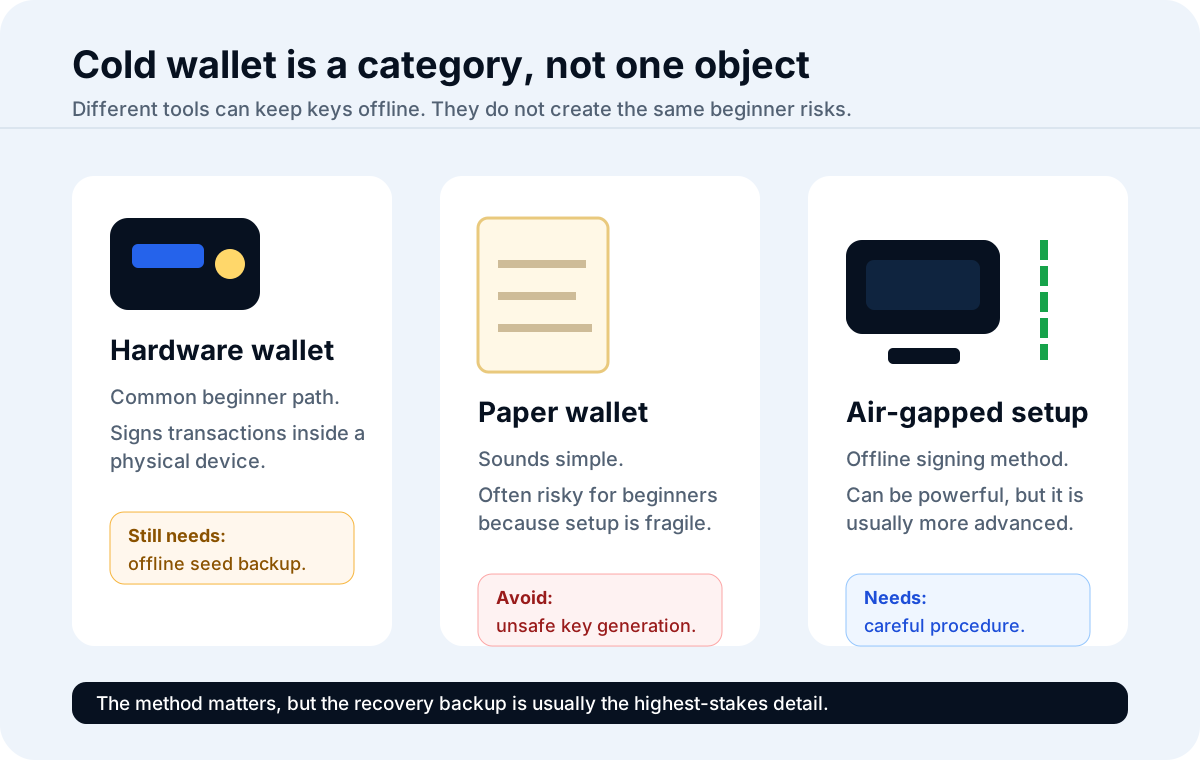
Hardware wallets are one cold-storage tool. Paper and air-gapped setups have different failure points.
When beginners should consider cold storage
Beginners do not need to turn their first Bitcoin lesson into a security engineering project.
Cold storage starts to make more sense when the amount of BTC, the holding period, and the user's comfort with self-custody make online or platform-only storage feel too exposed. It may also make sense when someone wants to learn self-custody slowly, using a small test amount before relying on it for more.
Cold storage may be worth learning when:
You plan to hold BTC for a long time and do not need frequent access.
The amount is meaningful enough that platform or hot-wallet exposure worries you.
You understand what a seed phrase does.
You can store an offline backup privately and durably.
You are willing to test the process with a small amount first.
You can follow official wallet documentation without rushing.
Cold storage may be premature when:
You are still learning what a Bitcoin address is.
You have not practiced sending and receiving small amounts.
You do not have a private place to store a backup.
You are likely to photograph or cloud-save the seed phrase "just in case."
You would panic if a device screen or companion app looked different after an update.
The amount is small enough that the complexity creates more risk than it removes.
There is no medal for making storage complicated early. Good storage is boring, understandable, and repeatable.
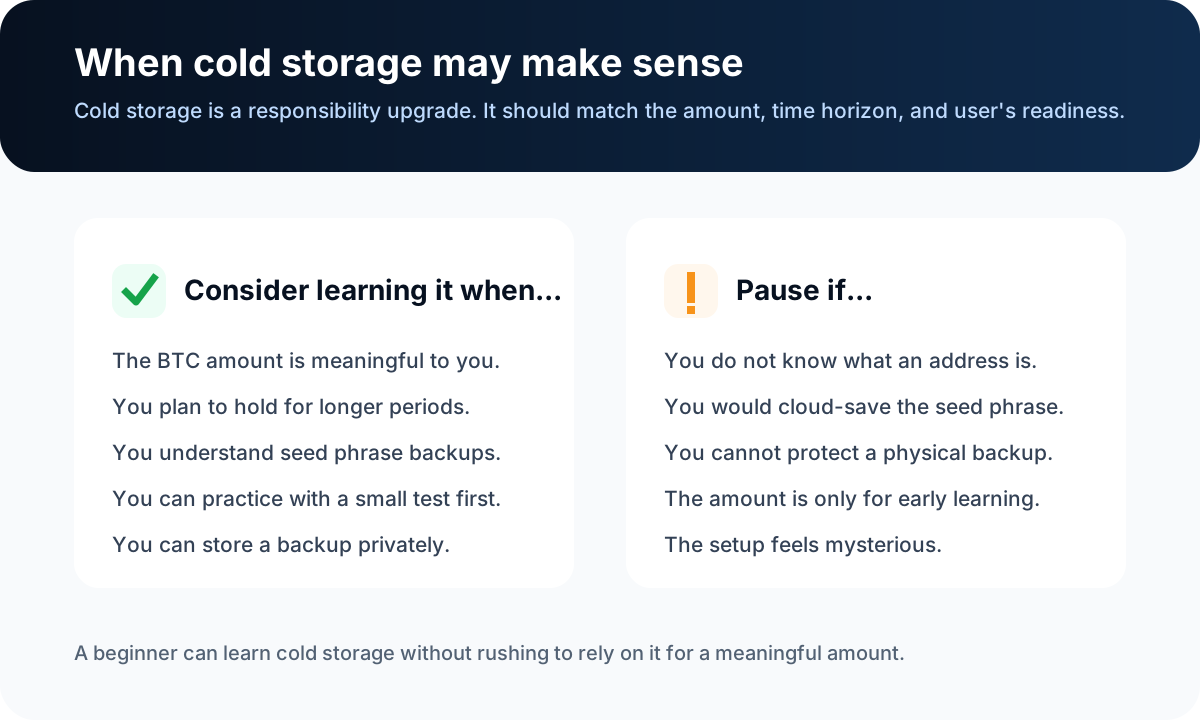
Cold storage is a responsibility upgrade, not just a product upgrade.
Setup and backup risks
Cold wallets reduce some online risks, but they concentrate the most important risk around setup and backup.
The seed phrase is the center of the room. Anyone who gets it may be able to restore the wallet and move the BTC. If you lose the only valid copy, there may be no support desk that can restore it for you. That is very different from resetting a bank password.
Common setup and backup risks include:
Buying a device from an unknown seller or receiving a tampered package.
Using a fake wallet app, fake browser extension, or fake support link.
Letting someone else set up the wallet for you.
Typing the seed phrase into a website, chat, email, or cloud note.
Taking a photo or screenshot of the recovery phrase.
Printing the phrase on a network-connected printer.
Storing the only backup where fire, water, theft, or accidental disposal can destroy it.
Sending BTC to an address without checking it carefully.
Moving a large amount before practicing with a small test transaction.
Creating a passphrase or advanced setup that your future self cannot remember or explain.
Leaving no recovery plan for trusted heirs or legal arrangements when that matters.
This is why a cold wallet can feel strange at first. The online world has trained us to expect account recovery. Bitcoin self-custody does not work that way. The system gives you control, but it does not babysit the backup.

Cold wallet risk often moves from the internet to the backup process.
What fees are involved?
The Bitcoin network does not charge a storage fee just because you hold BTC in a cold wallet. If you receive BTC and do nothing with it, there is no ongoing Bitcoin network fee for simply keeping keys offline.
Costs can still appear around the edges:
A hardware wallet may have a purchase cost.
A platform may charge a withdrawal fee when you move BTC out.
A Bitcoin network transaction fee is needed when BTC is sent on-chain.
Some wallets let you choose a fee rate for sending, which can affect how quickly miners may include the transaction.
Replacement devices, backup materials, or secure storage may add practical costs.
The fee you pay to transfer Bitcoin to a cold wallet depends on the sending platform's current policy and current Bitcoin network conditions. Check the platform's withdrawal screen and fee disclosure before acting. If a wallet or platform offers fee choices, understand what the choices mean before selecting one.
Do not pick a fee blindly from an old article. Network conditions and platform rules can change.
Cold wallet safety checklist
Use this checklist before relying on a cold wallet:
I understand that BTC is recorded on-chain, while the wallet controls keys.
I bought or downloaded wallet tools only from official or trusted sources.
I initialized the wallet myself.
I wrote the seed phrase offline.
I did not photograph, screenshot, email, cloud-save, or print the seed phrase on a networked printer.
I understand that support should not ask for my seed phrase.
I can verify a receiving address before sending BTC.
I am willing to send a small test amount first.
I know where the backup is stored and what risks that location has.
I have thought about recovery if the device is lost, damaged, or unavailable.
I understand that more advanced features, such as passphrases or multisig, can create new failure points if I do not understand them.
If several items feel fuzzy, pause. Fuzzy is not failure. It is the storage system telling you where the next lesson is.
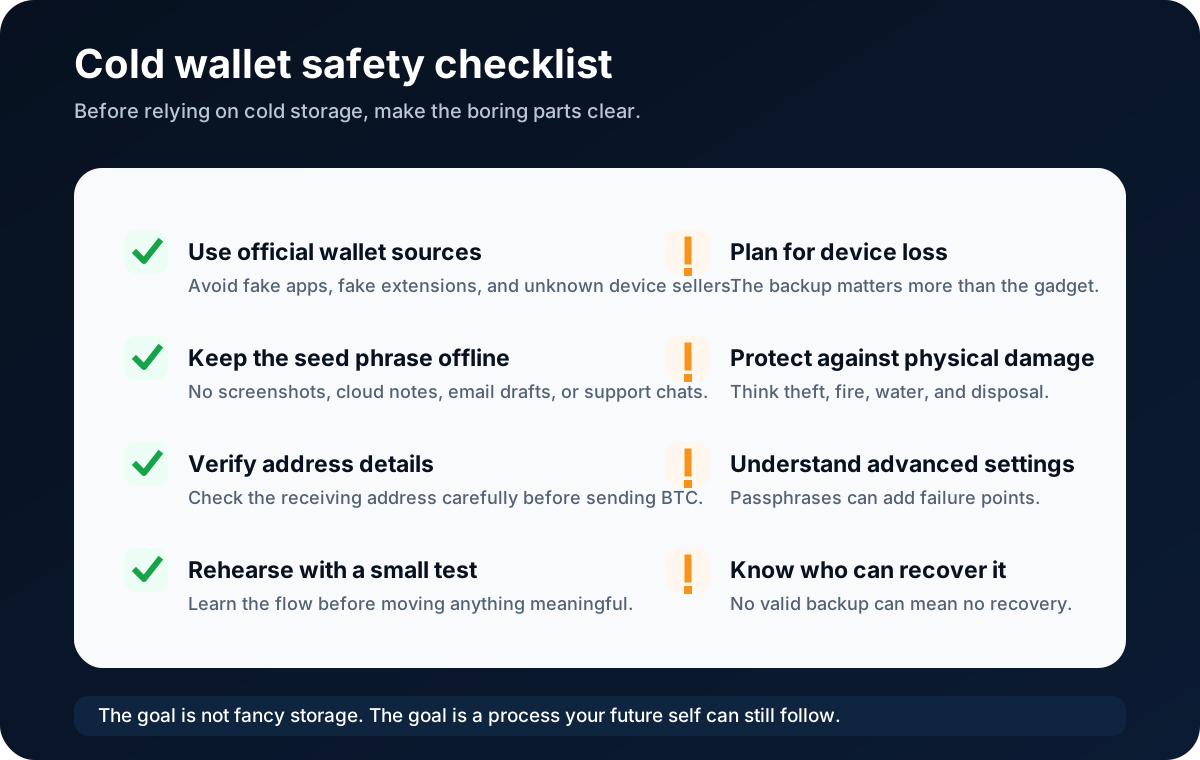
Cold-wallet safety depends on setup, backup, testing, and recovery habits.
Risks, limits, and common misconceptions
The first misconception is that a cold wallet cannot be hacked. Cold storage can reduce online attack paths, but it cannot protect you from every mistake. A fake app, fake support agent, exposed seed phrase, tampered device, malicious computer, wrong address, or lost backup can still cause loss.
The second misconception is that a hardware wallet and a cold wallet are the same thing. A hardware wallet is one common way to create cold storage. It is not the definition of cold storage.
The third misconception is that a paper wallet is the simple beginner route. It looks simple because it is paper. The setup risk is often hidden. Unless you understand secure key generation, offline handling, and spending mechanics, paper wallets can be a poor learning path.
The fourth misconception is that cold storage means no fees. Holding BTC does not create a storage fee on the Bitcoin network, but moving BTC on-chain can involve network fees and platform withdrawal fees.
The fifth misconception is that a recovery phrase can be recovered by a company. In self-custody, the recovery phrase is your backup. If it is lost and no valid backup exists, access may be permanently lost. If someone says they can recover it after you type it into a website, treat that as a major warning sign.
The clean beginner rule is this:
Do not upgrade your storage complexity faster than your ability to explain it.
FAQ
Is a cold wallet safe?
A cold wallet can reduce routine online exposure because private keys are kept offline or isolated from everyday internet-connected devices. It is not risk-free. Seed phrase theft, seed phrase loss, fake wallet apps, tampered devices, physical damage, wrong addresses, and user mistakes can still cause permanent loss.
Can a cold wallet be hacked?
Some online attack paths are reduced, but a cold wallet can still be compromised through setup mistakes, malicious software, supply-chain problems, fake support, exposed recovery phrases, or careless transaction approval. The device or method matters, but user behavior matters too.
Do I need a cold wallet for small amounts?
Not always. For a very small learning amount, a beginner may decide that the complexity of cold storage is more risk than benefit at first. The useful path is to learn wallet basics, practice with small amounts, and move slowly before storing anything meaningful.
Is a hardware wallet the same as a cold wallet?
No. A hardware wallet is a physical device that can be used for cold storage. A cold wallet is the broader idea of keeping private keys offline or isolated. Some cold setups use hardware wallets; others may use air-gapped or offline methods.
What fees are associated with using a cold wallet?
There is no Bitcoin network storage fee for simply holding BTC with a cold wallet. Possible costs include the hardware wallet purchase price, backup materials, platform withdrawal fees, and Bitcoin network transaction fees when BTC is sent on-chain. Check current platform and wallet information before acting.
What kind of fee should I pay to transfer Bitcoin to a cold wallet?
The fee depends on Bitcoin network conditions and the sending platform or wallet. Some platforms set the withdrawal fee for you. Some wallets offer fee choices. Review the current fee estimate, urgency, and official wallet guidance before sending. Do not rely on old fee examples.
How does a cold wallet work?
A cold wallet keeps private keys offline or isolated. In a common hardware-wallet setup, an online phone or computer prepares the transaction, the hardware wallet signs it internally, and the signed transaction is broadcast without exposing the private key to the online device.
Can I recover BTC if I lose the seed phrase?
If the seed phrase or other valid backup is lost and the wallet device is unavailable, recovery may be impossible. That is why offline backup and recovery planning are central to cold-wallet safety. Anyone claiming they can recover a lost seed phrase by having you type it into a website may be trying to steal funds.
Risk Disclaimer
This article is for beginner education only. It is not financial, investment, legal, tax, wallet-security, or recovery advice. Bitcoin is volatile, and self-custody mistakes can cause irreversible loss. Wallet software, hardware devices, platform withdrawal rules, fees, regions, and security guidance can change. Check official sources before acting, protect private keys and seed phrases offline, and do not share recovery information with anyone.
Editorial Attribution
Written by Alex Chen. Reviewed by Jordan Blake for factual accuracy, clarity, and beginner safety.