
A Bitcoin Lightning wallet is a wallet app or service that can send and receive Bitcoin payments over the Lightning Network.
That sentence sounds simple.
The confusing part is that a Lightning wallet may sit right beside a normal Bitcoin wallet, use the same BTC unit, and still ask you to use a different payment format. One screen may show an on-chain Bitcoin address. Another screen may show a Lightning invoice. They are both related to Bitcoin, but they are not the same kind of destination.
This is the beginner trap:
You think, "It is all Bitcoin, so I can paste this anywhere."
Sometimes that is wrong.
Before using a bitcoin lightning wallet, the practical question is not "Is Lightning good?" The first question is quieter and more useful: "Which payment rail is this wallet using right now?"

A Lightning wallet can make small Bitcoin payments feel faster, but the payment format still matters.
Lightning in Plain English
The Lightning Network is a second-layer payment network built around Bitcoin payment channels. In beginner language, it lets wallet software move small Bitcoin payments through a network without putting every individual payment directly onto the Bitcoin blockchain.
That does not make Lightning a separate coin. You are not buying "Lightning tokens." You are still dealing with Bitcoin, commonly measured in BTC or sats. Lightning is more like a payment layer that sits around Bitcoin's base layer.
Here is a simple mental model:
On-chain Bitcoin is like writing the final line into the public notebook. Lightning is like using a shared tab with rules, then settling back to the notebook when needed.
That model is not technically complete, but it helps with the main beginner point. On-chain transactions and Lightning payments use different mechanics. A wallet can hide some of that complexity. It cannot make format mistakes harmless.
Lightning payments can often be quicker for small payments than waiting for on-chain confirmations. Fees may be lower in many everyday use cases. But those are not guarantees. Route availability, wallet design, liquidity, platform limits, channel conditions, and current network conditions can all affect the result.
So think of Lightning as a Bitcoin payment option, not as a magic upgrade button.
On-Chain Bitcoin vs Lightning
An on-chain Bitcoin payment is recorded on Bitcoin's base layer. You usually paste a Bitcoin address or scan a Bitcoin address QR code. The transaction enters the network, waits for confirmation, and may pay an on-chain miner fee depending on wallet and network conditions.
A Lightning payment usually uses a Lightning invoice or Lightning payment request. The invoice contains payment details your Lightning-capable wallet can read and route through the Lightning Network.
Those two objects can look similar to beginners because both may appear as QR codes or long strings. The difference is underneath.
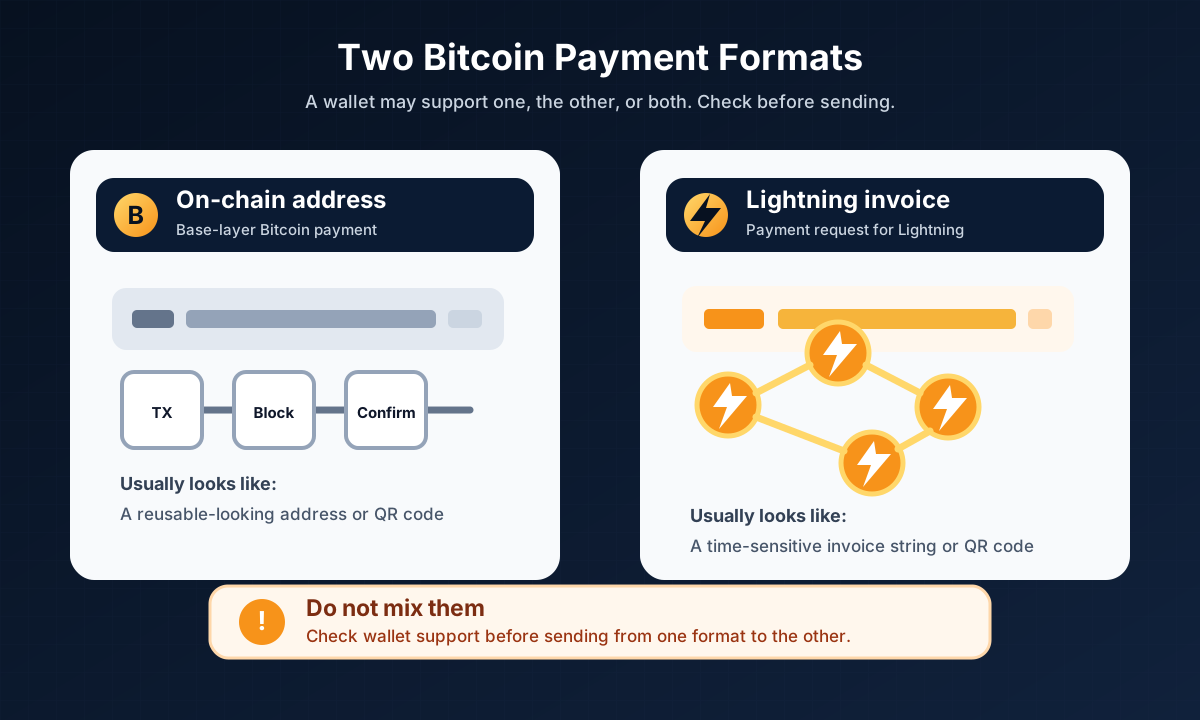
An on-chain address and a Lightning invoice are both Bitcoin-related payment destinations, but they are not interchangeable by default.
If someone gives you an on-chain Bitcoin address, you need a wallet or platform that can send on-chain Bitcoin to that address. If someone gives you a Lightning invoice, you need a wallet or platform that can pay Lightning invoices.
Some wallets support both. Some support only one. Some exchanges or custodial apps may support Lightning withdrawals but not Lightning deposits, or the other way around. Some may support Lightning only in certain regions or under certain account conditions. These details can change, so the wallet's current screen and official help center matter more than memory.
The safer beginner habit is to read the send screen slowly:
What network or payment method is selected?
Does the destination look like an on-chain address or a Lightning invoice?
Is the wallet warning you that the format is unsupported?
Are the amount, fee estimate, and recipient details what you expected?
If the screen feels unclear, pause. A payment interface is not a good place to improvise.
What a Lightning Invoice Means
A Lightning invoice is a payment request for the Lightning Network. It can include information such as the requested amount, destination, and payment metadata. It may also expire after a set time.
That expiration detail matters.
An on-chain Bitcoin address may be reused by some people, although address reuse has privacy downsides and many wallets discourage it. A Lightning invoice is usually treated more like a specific bill for a specific payment. If it expires, the sender may need a fresh invoice from the recipient.
For a beginner, the exact data inside the invoice is less important than the behavior around it:
Do not edit a Lightning invoice by hand.
Do not assume an old invoice is still valid.
Do not paste a Lightning invoice into a wallet field that expects an on-chain address.
Do not paste an on-chain address into a field that expects a Lightning invoice.
Do not continue if the wallet says the payment request is invalid, expired, or unsupported.
There are newer payment-request formats and wallet designs that try to make this smoother. Some apps can read more than one format and guide you automatically. That is helpful when it works.
Still, the beginner rule stays the same:
Let the wallet tell you what it supports, and do not force a payment format into the wrong box.
Custodial vs Non-Custodial Lightning Wallets
A Lightning wallet can be custodial or non-custodial.
In a custodial Lightning wallet, a company or service holds the funds or controls key parts of the payment setup for you. The app may feel simple. You may log in with an email, password, phone number, or account. The tradeoff is that you are depending on that provider's security, rules, limits, account access, and withdrawal support.
In a non-custodial Lightning wallet, you have more direct control over the wallet's keys or recovery setup. That sounds cleaner, but it can also be more demanding. Lightning may involve channel state, liquidity, backups, online availability, and recovery details that are more complex than a normal on-chain wallet.
Neither model is automatically the right answer for every beginner.
The useful question is: "Which risks am I accepting?"
A custodial wallet may be easier to try with a small amount, but you depend on the provider. A non-custodial wallet may give you more control, but the backup and recovery responsibility can become more serious. Some non-custodial Lightning wallets use service providers to help with routing, liquidity, or backups. That can make the experience smoother, but it also means you should understand what the app is doing at a beginner level before relying on it.
If a wallet gives you a seed phrase or recovery phrase, treat it as sensitive. Do not photograph it, upload it, send it to support, paste it into random websites, or store it casually in cloud notes. If the wallet does not give you a seed phrase, understand how account recovery works and what happens if the provider freezes, closes, changes, or loses access to your account.
The label "Lightning wallet" does not answer those custody questions by itself.
Fees, Limits, and Availability Can Change
Lightning is often discussed as a way to make smaller Bitcoin payments faster and lower cost. That can be true in many use cases, but beginners should avoid turning that into a promise.
Lightning payments are routed through channels. A route can fail. A wallet may retry. A fee estimate can change. A payment may be limited by wallet policy, available liquidity, platform rules, recipient setup, regional support, or the amount being sent.
Some apps hide most of that complexity. That is nice until something fails and the error message is vague.
Here is the practical reading:
A Lightning wallet may have send or receive limits.
A custodial app may have account, region, or verification rules.
A non-custodial app may have liquidity or backup constraints.
A Lightning invoice may expire.
Fees and routing success can depend on current conditions.
Larger amounts may be better handled with extra caution, and sometimes on-chain payment may be more appropriate.
This article does not rank wallet brands because brand features, fees, limits, regions, and support policies change. A list that looks neat today can become wrong quietly. For beginner safety, it is better to learn what to check than to memorize a ranking.
When Beginners Should Pause
The moment to pause is not after a payment goes wrong. It is before the send button.
Use a slower checklist when any of these are true:
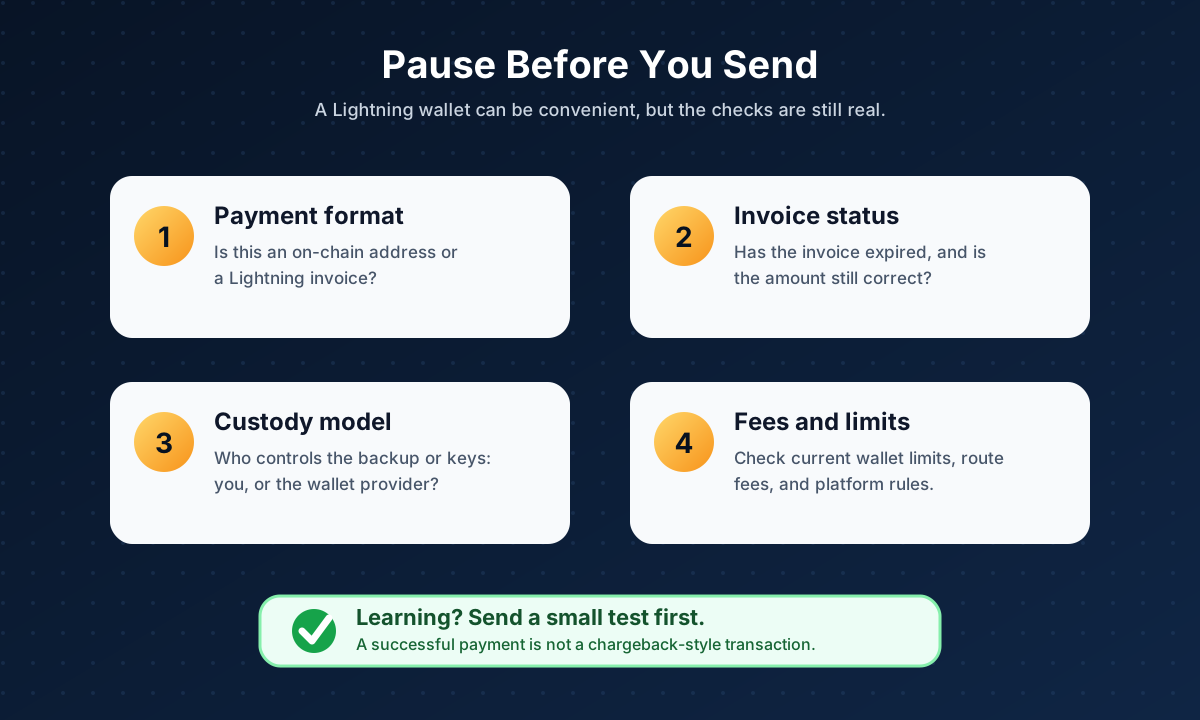
When the format, invoice, custody model, or limits are unclear, slow down before sending.
You are not sure whether the destination is an on-chain address or Lightning invoice.
The wallet warns that the payment request is invalid, expired, or unsupported.
You are sending from an exchange or custodial platform and cannot tell which withdrawal network is selected.
The amount would hurt to lose.
This is your first time using that wallet.
The recipient cannot clearly confirm which payment method they provided.
You do not understand how the wallet backup or account recovery works.
A stranger, comment, ad, or fake support account is rushing you.
For learning, a small test payment is often a better teacher than a confident guess. Even then, remember that a completed Bitcoin payment is not like a card chargeback. If you send to the wrong place, recovery may not be possible.
A Safer Beginner Mental Model
The easiest way to think about a Lightning wallet is to imagine two doors.
One door says on-chain Bitcoin. It expects a Bitcoin address and creates a base-layer Bitcoin transaction.
The other door says Lightning. It expects a Lightning invoice or Lightning payment request.
Both doors may move Bitcoin value. But a door is still a door. You do not prove you understand a building by running into the wrong one.
So before using a BTC Lightning wallet, ask three small questions:
What payment format am I looking at?
Does my sending wallet support that exact format right now?
What happens if this payment succeeds and I cannot reverse it?
Those questions will not make you a Lightning expert. They will make you much harder to confuse at the exact moment where confusion is expensive.
That is a good place for a beginner article to land.
FAQ
Can I send on-chain Bitcoin to a Lightning invoice?
Not directly by default. An on-chain Bitcoin address and a Lightning invoice are different payment formats. Some wallets or services may offer swap or unified payment features, but you should only use them when the wallet clearly supports that flow. If your send screen expects an on-chain address, do not paste a Lightning invoice into it.
Is a Lightning wallet the same as a Bitcoin wallet?
A Lightning wallet is a Bitcoin wallet or wallet service that supports Lightning payments. It may also support normal on-chain Bitcoin payments, but that depends on the wallet. Always check which payment method is selected before sending.
Are Lightning transactions reversible?
Do not treat a completed Lightning payment as reversible. A Lightning payment can fail before completion, but once a payment succeeds, there is no normal chargeback-style reversal built into the experience. If you paid the wrong recipient, you may need their cooperation.
Do Lightning wallets have seed phrases?
Some do and some do not. Non-custodial Lightning wallets may use a seed phrase or other backup method, but Lightning recovery can involve extra details such as channel state or app-specific recovery flows. Custodial wallets may rely on account login instead. Check the wallet's current official backup and recovery instructions before storing meaningful funds.
Can I use a Lightning wallet for every Bitcoin payment?
No. Lightning is useful for certain payment situations, especially smaller payments, but not every wallet, exchange, merchant, or recipient supports it. Some payments may require on-chain Bitcoin. The important habit is to match the payment method to the destination the recipient actually provided.
Risk Disclaimer
This article is for education only. It is not financial, investment, tax, legal, or cybersecurity advice. Bitcoin and Lightning payments involve risk, including loss of funds, irreversible or non-chargeback-style payments, user error, wrong payment format, expired invoices, routing failure, liquidity limits, wallet failure, fake apps, phishing, changing fees, changing limits, platform restrictions, and changing regional availability. Always verify wallet support, payment format, backup method, fees, limits, account rules, tax obligations, and official instructions before acting. Never share your seed phrase, private keys, wallet passwords, device PINs, login codes, or recovery information.
Editorial Attribution
Written by Alex Chen. Reviewed by Jordan Blake for factual accuracy, clarity, and beginner safety.