
How to create a crypto wallet safely is not just a download question.
For a Bitcoin beginner, the safer order is simple: choose the wallet type, use a trusted source, protect the backup, check the recovery path, and only then receive Bitcoin you would be upset to lose.
Most wallet mistakes do not happen because someone failed to understand advanced cryptography. They happen because a beginner moved too fast through a screen that looked ordinary.
That is the strange part about wallet setup. The dangerous moments often look boring.

Create the wallet, protect the backup, then test before adding value.
Create a wallet safely in one sentence
To create a crypto wallet safely for Bitcoin, choose a wallet type you understand, download it from an official source, write the recovery backup offline, secure the device, test the recovery path, and start small.
That sounds slower than "install wallet."
It is slower. That is the point.
A wallet is not only an app icon. It is a control system. The person or company that controls the recovery path has power over what happens when the phone breaks, the app disappears, the password is forgotten, or the backup is lost.
With Bitcoin wallets and storage, setup is not about which product wins. It is about what has to be true before value arrives.
So the real setup question is not:
"Which button creates the wallet?"
It is:
"Who controls recovery, and can I prove I will not lock myself out later?"
Before you download: choose the wallet type and source
Before you download anything, decide what kind of wallet situation you are entering.
A custodial account is closer to an account with a company. The company controls important parts of access and recovery. A self-custody wallet puts more control on you, which also means more responsibility for the backup.
If the decision still feels abstract, the beginner wallet choice problem comes before the download button.
A hot wallet is connected to an internet-connected device. A cold wallet keeps signing keys more isolated. These labels can overlap with other wallet terms, so do not treat one label as the whole safety story.
Then check the source.
Do not download a wallet from a random ad, direct message, comment thread, shortened link, or "support" page someone sent you. Start from the wallet's official website or the official app store listing that the wallet provider points to. Bitcoin.org's wallet guidance is useful here because it frames wallet choice as a security decision, not a popularity contest.
The download button is not the first step. The trust check is.
During setup: seed phrase, password, and backup basics
During wallet setup, the most important screen may be the least exciting one: the backup screen.
Many self-custody wallets give you a seed phrase or recovery phrase. Treat it as the recovery key to the wallet. If the device is lost or the app is removed, that backup may be what lets you restore access. If someone else gets it, they may be able to take control.
A password is not the same thing as a seed phrase. A device lock is not the same thing as a seed phrase. Two-factor authentication is not the same thing as a seed phrase. Wallet designs vary, but the basic habit is stable: understand what restores the wallet before adding meaningful Bitcoin.
Do not screenshot the seed phrase. Do not upload it to cloud storage. Do not paste it into a notes app, chat message, email draft, browser form, or support conversation. The separate trap of seed phrases in photos or cloud drives exists because "just for now" can become a permanent backup leak.
Write the backup offline. Store it somewhere other people, apps, and broken devices do not casually reach.
After setup: receive address and small test mindset
After setup, the wallet may show a receive address. That does not mean you should immediately send a meaningful amount.
First, confirm the wallet is showing the right receiving screen for the Bitcoin transfer you intend to make. Some apps support many assets. Some support Bitcoin in more than one payment path. If the app uses on-chain receiving, make sure you understand the onchain wallet path rather than assuming every Bitcoin-looking screen works the same way.
Copy the receive address carefully. Check the label. Check the asset. Check whether the sending platform and receiving wallet support the same type of transfer. The basics of a Bitcoin wallet address matter here because an address is a destination, not proof that the whole setup is understood.
If a small test makes sense after fees and platform rules, use it as a learning tool. A test is not a magic shield, but it can expose confusion before the amount becomes painful.
The dangerous habit is treating the first receive address you see as proof that everything is understood.
Before storing real Bitcoin: restore and security checks
Before storing meaningful Bitcoin, run through the setup as if future-you is about to lose the phone on a bad day.
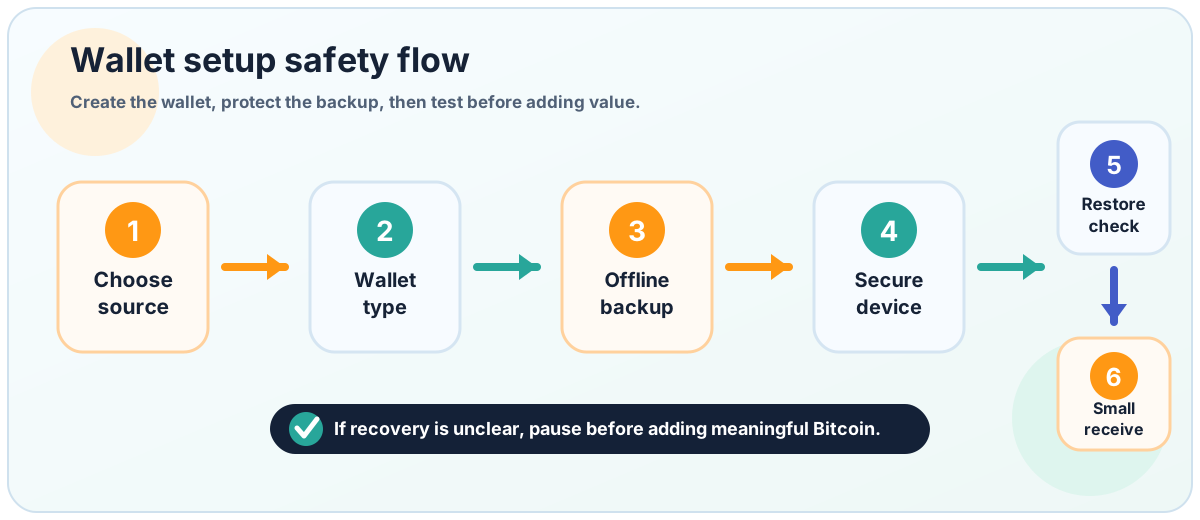
A wallet setup is not finished until the backup path is checked.
Step | What to check | Why it matters |
|---|---|---|
Source | Official website or official app store listing | Reduces fake-wallet risk |
Wallet type | Custodial or self-custody | Changes who controls recovery |
Seed phrase | Written offline and never shared | May be needed to restore funds |
Password or device lock | Device and app protection enabled | Reduces casual access risk |
Restore check | Backup works before real funds arrive | Prevents future lockout |
Receive address | Copied carefully and matched to the intended transfer | Avoids sending to the wrong place |
If one row still feels fuzzy, stop there. That is the part to learn before more Bitcoin enters the wallet.
Creating the wallet is the easy part. Proving that you can recover it is the part many beginners skip, which is why a real wallet restore drill belongs before meaningful value.
Common wallet setup mistakes
The same wallet mistakes appear again and again because they feel reasonable in the moment.
Downloading from an ad or message instead of the official source.
Choosing self-custody without understanding recovery responsibility.
Taking a seed phrase screenshot "just for now."
Letting cloud sync pull wallet backup information into online storage.
Treating a password as if it replaces the recovery phrase.
Skipping a restore check.
Receiving more Bitcoin than you are ready to lose while learning.
Assuming every crypto wallet is a good Bitcoin wallet.
The quiet rule underneath all of this is simple: do not add value until the recovery path is real to you.
FAQ
Is this the same as creating a Bitcoin wallet?
Sometimes. The phrase "crypto wallet" is broad, and not every crypto wallet is the right choice for a Bitcoin beginner. If your goal is Bitcoin storage, choose a wallet setup that clearly supports Bitcoin and matches your custody needs.
Should a beginner use a custodial wallet or self-custody wallet?
There is no one answer for everyone. Custodial accounts can feel easier because a company handles parts of access and recovery. Self-custody gives you more control, but also makes backup and recovery your responsibility.
Should I screenshot my seed phrase?
No. A seed phrase should not be stored in screenshots, cloud drives, chats, emails, or random forms. If a wallet gives you a recovery phrase, treat it as sensitive recovery information.
Do I need to test a wallet before receiving Bitcoin?
Yes, at least test the parts that matter: whether you understand the backup, whether you can restore access, and whether the receive screen matches the Bitcoin transfer you plan to make.
Can I use one crypto wallet for every coin?
Do not assume that. Some wallets support many assets, but support, recovery design, and transaction paths vary. A Bitcoin beginner should check Bitcoin support first instead of choosing a wallet because it promises everything.
What is the safest first amount to receive?
There is no universal amount. The safer mindset is to avoid sending meaningful Bitcoin into a wallet you have not yet understood, backed up, and tested.
Official References
Risk Disclaimer
This article is for beginner education only. It is not financial, investment, legal, tax, custody, or security advice. Bitcoin transactions can be irreversible, Bitcoin is volatile, and wallet mistakes can cause permanent loss. Wallet software, platform rules, withdrawal support, security features, and recovery processes can change. Check official wallet and platform documentation before acting, and use qualified professional help when needed.
Editorial Attribution
Written by Alex Chen. Reviewed by Jordan Blake for factual accuracy, clarity, and beginner safety.