
When you send Bitcoin, the network choice must match what the receiving wallet or platform supports. It is not just a speed setting, and it is not just a fee setting. If the receiver expects one path and you send through another, the payment may be delayed, rejected, or very hard to recover.
This mistake often happens when a platform shows several network options and one looks cheaper or faster. A beginner may choose it without checking whether the receiving side supports that exact network or transfer type.
This article is about wrong Bitcoin network selection inside the broader sell and send Bitcoin flow. It is not a full fee guide, not a minimum-withdrawal guide, and not a first-transfer amount strategy. The goal is to help you match the sending path to the receiver before you click send. For address-ownership and destination checks, use the address-check guide.

Match the network before you send.
What This Mistake Looks Like
The mistake can start with a dropdown. The platform asks you to choose a network, and several labels appear. One option looks familiar. Another looks faster. Another seems cheaper. You choose one because it feels reasonable, not because the receiving wallet asked for it.
Another version is assuming that anything with "BTC" or "Bitcoin" in the label must go to the same place. That is not always how platforms and wallets work. A Bitcoin on-chain address, a Lightning invoice, and a BTC-like asset on another network can represent very different paths.
The dangerous part is that the send screen may still let you continue. A warning may appear, but if you treat it like ordinary fine print, you may miss the main point: the receiver must support the network you choose.
Why The Network Must Match The Receiver
The receiving side decides what it can accept. If a wallet gives you a Bitcoin on-chain address, it is asking for an on-chain Bitcoin transaction. If it gives you a Lightning invoice or Lightning address, it is asking for a Lightning payment. If a platform lists other networks, those are not automatically interchangeable with the receiver's instructions.
Bitcoin On-Chain And Lightning Are Different Paths
Bitcoin on-chain transactions and Lightning payments both relate to Bitcoin, but they are not the same sending path. A Lightning invoice is not the same thing as a normal on-chain receiving address. A wallet that supports one path may not support the other for that specific receiving screen.
Some users search this as "on chain." In this article, on-chain means the regular Bitcoin network path that records a transaction on the Bitcoin blockchain. It is different from a Lightning payment and different from a BTC-like asset moving on another network.
For a beginner, the rule is simple: match the sender's network choice to the receiver's exact instruction. Do not translate the instruction in your head.
Similar Labels Do Not Mean The Same Destination
Some platforms may show labels that look close enough to confuse beginners. A label may mention BTC, Bitcoin, Lightning, wrapped Bitcoin, or a network name you have seen elsewhere. Similar words do not guarantee the same destination or recovery path.
If the label is not exactly what the receiver told you to use, pause. Check the official documentation or ask the receiving platform's official support before sending.
What To Check Before Choosing A Network
Before choosing a network, compare the sending screen with the receiving screen. Do not choose a network only because it looks cheap, fast, or familiar. The right network is the one the receiver actually supports for this transfer.
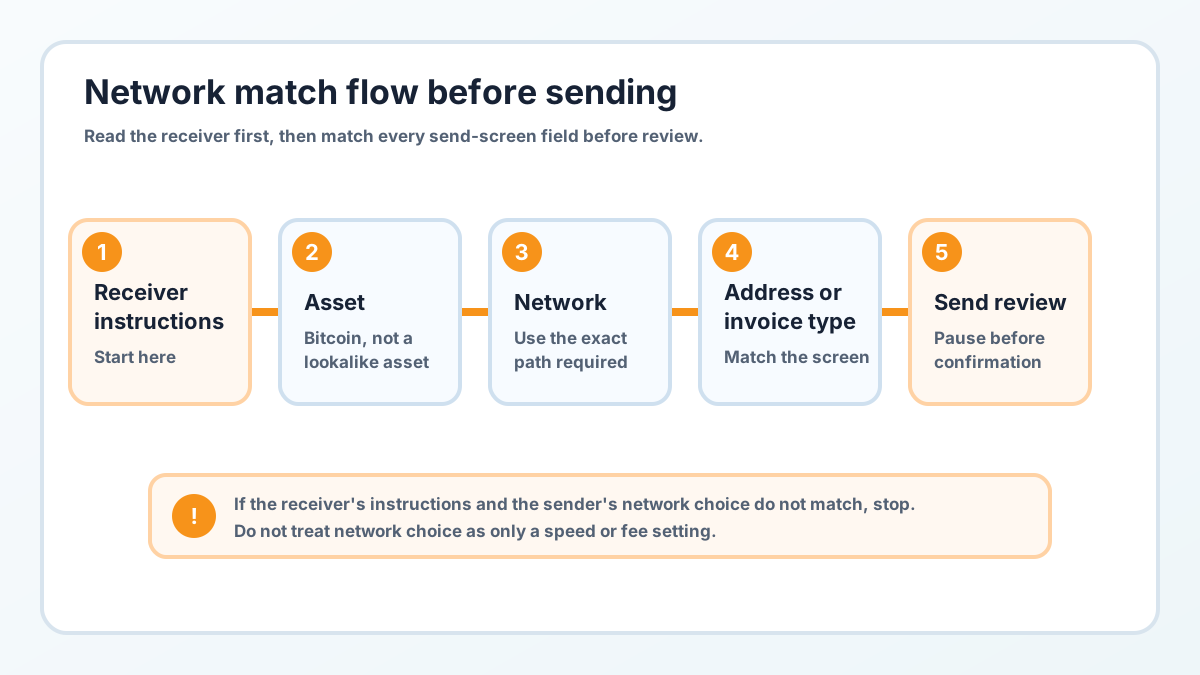
Network choice must match the receiver's instructions.
Check | What To Confirm | Where To Confirm |
|---|---|---|
Asset | You are sending Bitcoin, not a BTC-like asset on another chain | Sending platform and receiving wallet/platform |
Network | The selected network matches the receiving instructions | Withdrawal page, receive page, official help docs |
Address or invoice type | On-chain address, Lightning invoice/address, or another required format | Receiver screen, invoice, QR details |
Support | Both sender and receiver support that network | Official wallet/platform documentation |
Warning text | Any warning about unsupported networks, loss risk, or recovery limits | Platform confirmation screen |
Match Asset, Network, And Receiving Instructions
The safest habit is to read the receiver's instruction first. Then match the sender's fields to that instruction: asset, network, address or invoice type, and any extra requirement shown by the platform.
If the receiver says "Bitcoin network," do not assume a different network is close enough. If the receiver shows a Lightning invoice, do not paste it into an on-chain address field unless the app specifically supports that flow.
Do Not Choose A Network Only Because It Looks Cheaper Or Faster
Fees and minimums matter, but they are a separate check after network matching. A cheaper unsupported network can be much more expensive than a correct supported one if the funds do not arrive.
This article is not the place to compare fee schedules or minimum withdrawal amounts. The first question is simpler: does the receiver support this exact path?
If You Already Sent Through The Wrong Network
If you already sent through the wrong network, stop before sending again. Do not send a second transaction just to "fix" the first one. Save the transaction ID, receiving address or invoice, selected network, asset, amount, time, and screenshots of the official platform records.
Then check the official support guidance for the sending platform and the receiving platform. Recovery depends on the network, the asset, the receiving platform, and whether the destination can technically access that path. Sometimes support may help. Sometimes it may not be possible.
Do not trust strangers who promise recovery in direct messages. Do not share your seed phrase, private key, account password, or 2FA codes with anyone claiming they can retrieve the funds.
Save Records Before You Ask Official Support
Useful records may include:
Transaction ID or withdrawal ID
Selected network
Asset name shown by the sending platform
Receiving address, invoice, or destination record
Date, time, amount, and fee shown by the platform
Screenshots of official transaction status pages
Keep the records about the transaction, not your wallet secrets.
FAQ
What Does Network Mean When Sending Bitcoin?
In a send or withdrawal flow, network usually refers to the path used for the transfer. The selected network must match what the receiving wallet or platform supports.
What Does On Chain Mean When Sending Bitcoin?
On chain usually means the regular Bitcoin network path that records a transaction on the Bitcoin blockchain. It is not the same as a Lightning invoice or another network label.
Is Bitcoin On-Chain The Same As Lightning?
No. Bitcoin on-chain transactions and Lightning payments are different paths. Use the path shown by the receiver's instructions.
Can I Choose The Cheapest Bitcoin Network?
Not unless the receiver supports it. A cheaper option that the receiver cannot accept may create a much bigger problem than a normal fee.
What Happens If I Send Bitcoin On The Wrong Network?
The result depends on the sending platform, receiving platform, asset, and network. It may be delayed, rejected, recoverable through official support, or not recoverable. Do not assume recovery is guaranteed.
Should I Send A Test Amount First?
A small test can reduce some risk on a new path, but it does not replace checking the correct asset, network, and receiving instructions. Amount strategy is a separate topic.
Where Should I Check The Correct Network?
Check the receiving wallet or platform screen, the sending platform's network warning, and official help documentation from both sides. If they do not match, stop.
Risk Disclaimer
This article is for beginner education only. It is not financial, investment, legal, tax, custody, or security advice. Bitcoin transactions can be irreversible, Bitcoin is volatile, and wallet mistakes can cause permanent loss. Wallet software, platform rules, withdrawal support, security features, and recovery processes can change. Check official wallet and platform documentation before acting, and use qualified professional help when needed.
Editorial Attribution
Written by Alex Chen. Reviewed by Jordan Blake for factual accuracy, clarity, and beginner safety.