
If your wallet shows you a seed phrase or recovery phrase, do not treat it like a normal password, note, or photo. Those words can be enough to recover and control the wallet, so a digital copy can become a serious security risk.
The tempting shortcut is to take a photo, save a screenshot, put the words in a notes app, or upload them to cloud storage "just in case." That feels convenient, but it can spread the phrase across backups, synced devices, thumbnails, search indexes, email history, and old accounts.
This article is about digital seed phrase storage risk. It is not about Bitcoin withdrawal addresses, and it is not a full restore drill. The goal is to help you stop turning recovery words into ordinary files.

Keep recovery words offline.
What this mistake looks like
This mistake can look harmless at first. A beginner writes down the seed phrase, then takes a phone photo so it is not lost. Or they type it into a notes app, save it as a cloud document, email it to themselves, or send it to a private chat.
The intention is usually not careless. It is fear of losing access. But a seed phrase is different from a grocery list or a login hint. If someone gets the phrase, they may not need your phone, your exchange account, or your email password to create wallet access elsewhere.
The mistake is turning something that should stay private and offline into something that can be copied, synced, searched, backed up, or stolen like any other digital file.
Why a digital copy changes the risk
A digital copy changes the risk because it can move without you noticing. A photo can sync to cloud albums. A note can appear on another device. A text file can be included in a computer backup. An email draft can sit in an account for years.
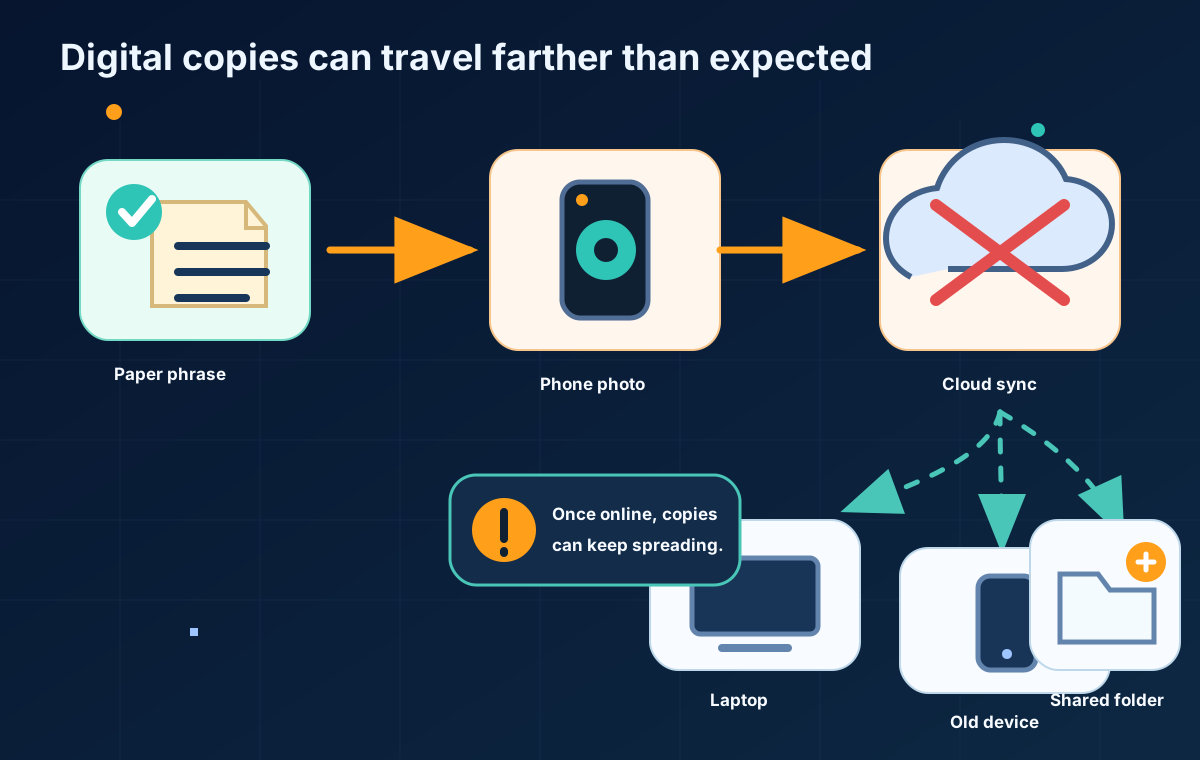
Digital copies can travel farther than expected.
A seed phrase is not just another password
A password can sometimes be reset by a service. A seed phrase is a wallet recovery tool. If it is exposed, the practical problem is not only that someone might log in as you. It is that someone may be able to restore the wallet somewhere else.
That is why support agents, social media accounts, browser pop-ups, giveaway sites, and "wallet recovery" pages should not receive your seed phrase. Anyone asking for those words should be treated as a danger sign.
Photos, notes, email, and cloud drives often sync farther than you think
The main issue is not only whether your current phone is locked. It is where the digital copy travels. Photos may create thumbnails. Cloud drives may sync across laptops. Notes may appear on old tablets. Emails and chats may be searchable long after you forget sending them.
Once the phrase becomes a digital object, you may no longer know every place it has been copied.
Safer storage choices start offline
The safer starting principle is simple: avoid creating a digital copy of the seed phrase. Use the wallet provider's official backup guidance, and keep the backup private, offline, and protected from both loss and discovery.
Storage choice | Main risk | Better principle |
|---|---|---|
Phone photo or screenshot | Can sync to cloud, thumbnails, backups, and other devices | Do not create an image of the seed phrase. |
Cloud drive document | Account compromise or shared folders can expose the phrase | Keep the phrase offline, not in a cloud file. |
Notes app | Notes may sync across devices and accounts | Avoid digital notes for recovery words. |
Email draft or message | Mailboxes and chats are long-lived and searchable | Do not send or store seed words in messages. |
Computer text file | Malware, backups, and old devices can expose it | Avoid plaintext files on internet-connected devices. |
Password manager | Better than a plain note, but still creates a digital copy | Beginners should follow wallet vendor guidance before using any digital storage. |
Paper or metal backup | Can be lost, damaged, copied, or found | Store offline, private, and protected from damage and discovery. |
No storage method is perfect. Paper can burn or be thrown away. Metal can be found by the wrong person. A safe place can be forgotten. The point is not to chase a magical storage method. The point is to avoid turning the phrase into a file that spreads through connected systems.
What to do if you already made a digital copy
If you already made a photo, screenshot, note, email, or cloud document, do not panic and do not start typing the phrase into random tools to "check" it. That can make the problem worse.
First, stop making new digital copies. Then check where the existing copy may have synced: cloud photos, notes, email, chats, shared folders, old phones, old laptops, and backup services. Remove obvious copies, but understand that deletion may not erase every cached, synced, or backed-up version.
If you believe the phrase may have been exposed, review your wallet provider's official guidance about moving funds to a new wallet with a new seed phrase. Do not rely on advice from strangers, direct messages, fake support accounts, or recovery websites.
Before you rely on the wallet again, create a new offline backup plan. A separate restore drill can help verify a backup later, but it should be done carefully and not rushed during an exposure scare.
Do not type the phrase into random tools to check it
Some scams pretend to "verify," "sync," "repair," or "recover" a wallet. They ask for the recovery phrase and then use it to steal funds. If a site, person, app, or AI tool asks for the phrase, stop.
FAQ
Where should I store my seed phrase?
Follow your wallet provider's official backup guidance. For beginners, the safest general principle is to keep the phrase offline, private, and protected from damage and discovery.
Is it safe to take a photo of my seed phrase?
No. A photo can sync to cloud albums, thumbnails, backups, and other devices. It can also be exposed if your phone, cloud account, or old device is compromised.
Can I store my seed phrase in cloud storage?
Cloud storage creates a digital copy connected to an online account. That can expose the phrase through account compromise, shared folders, old devices, or backups.
Is it safe to store a recovery phrase in a password manager?
A password manager may be safer than a plain text note, but it still creates a digital copy. Beginners should not assume it is appropriate unless they understand the tradeoffs and their wallet provider's guidance.
What happens if someone gets my seed phrase?
Someone with your seed phrase may be able to restore the wallet and control the funds. Treat any possible exposure seriously.
What should I do if I already saved my seed phrase online?
Stop creating new copies, remove obvious digital copies, check where they may have synced, and follow your wallet provider's official guidance about moving funds to a new wallet if exposure is possible.
Risk Disclaimer
This article is for beginner education only. It is not financial, investment, legal, tax, custody, or security advice. Bitcoin transactions can be irreversible, Bitcoin is volatile, and wallet mistakes can cause permanent loss. Wallet software, platform rules, withdrawal support, security features, and recovery processes can change. Check official wallet and platform documentation before acting, and use qualified professional help when needed.
Editorial Attribution
Written by Alex Chen. Reviewed by Jordan Blake for factual accuracy, clarity, and beginner safety.