
A Coinbase text scam usually does not begin with a villain speech. It begins with a normal-looking message, a link, a code, or a warning that makes your brain want to move quickly.
That is the dangerous part.
The scam is designed to turn a beginner's uncertainty into action: click this link, call this number, reply with this code, move funds now, secure your account before it is too late. The safer move is usually slower: stop, leave the text message, and verify through the official Coinbase app or website before returning to any Bitcoin buying process.

Do not let a text message control your next click.
Coinbase text scam in one sentence
A Coinbase text scam is a fake message that pretends to be from Coinbase so it can push you into clicking a link, calling fake support, sharing a verification code, sharing a withdrawal code, or moving funds before you have time to verify.
SatoABC is not Coinbase. It cannot access your account, review your inbox, recover funds, or decide whether one specific message is real. But it can help you use a safer rule:
If a message creates urgency and asks you to click, call, reply, share a code, or move money, do not start from the message. Start from the official app or website.
That rule matters because scam texts often look boring on purpose. A message may say:
"Your Coinbase withdrawal code is..."
"Your Coinbase account has been locked."
"Your Coinbase verification code is..."
"Reply YES to stop this withdrawal."
"Call support now to protect your account."
The wording changes. The pressure pattern stays similar.
Common fake-message patterns beginners see
A coinbase scam text usually tries to borrow Coinbase's trust while pulling you away from Coinbase's real account environment. It may look like a security alert, a withdrawal warning, a verification code, or a support message.
Message pattern | Why it is risky | Safer response |
|---|---|---|
"Your withdrawal code is..." | A scammer may be trying to make you reveal or use a code | Do not share codes with anyone |
"Your Coinbase withdrawal text requires action" | The message may pressure you before you can verify | Open the official app or website yourself |
Link to "secure" or "unlock" your account | The link may lead to a phishing page | Do not click unexpected text-message links |
Phone number for Coinbase support | The number may connect you to fake support | Use official help channels only |
Urgent account-lock warning | Urgency makes careful checking harder | Pause and verify independently |
Request to move crypto to a "safe wallet" | Moving funds may be irreversible | Do not send Bitcoin because a text told you to |
The exact sentence is less important than the behavior it asks from you. A message that wants you to hurry, leave the official app, or hand over a code deserves suspicion.
A text message should not become the doorway into your account.
Withdrawal codes and verification codes: what not to share
A verification code or withdrawal code is usually part of an account-security flow. It may help prove that the person taking an action has access to the account, device, or confirmation process.
A beginner may think, "It is just a code."
A scammer thinks, "That code is the door handle."
A Coinbase verification code text may appear around login, device checks, password reset, withdrawal, or other account-security moments. The code itself is not automatically suspicious. The danger begins when someone outside the official flow asks you to read it, forward it, type it into a link from a text, or repeat it over the phone.
A Coinbase withdrawal code scam often depends on confusion. The scammer may say the code is needed to cancel a withdrawal, protect the account, prove your identity, or stop fraud. That logic is backwards. If someone is asking for the code, the safer assumption is that the code protects something they are trying to reach.
A simple beginner rule:
Never share a Coinbase verification code, 2FA code, or withdrawal code with another person by text, phone, email, chat, social media, or support message.
That includes someone claiming to be support. Real safety does not require you to hand a stranger the key.
How to check a message without clicking it
When a message feels urgent, separate the message from the action.
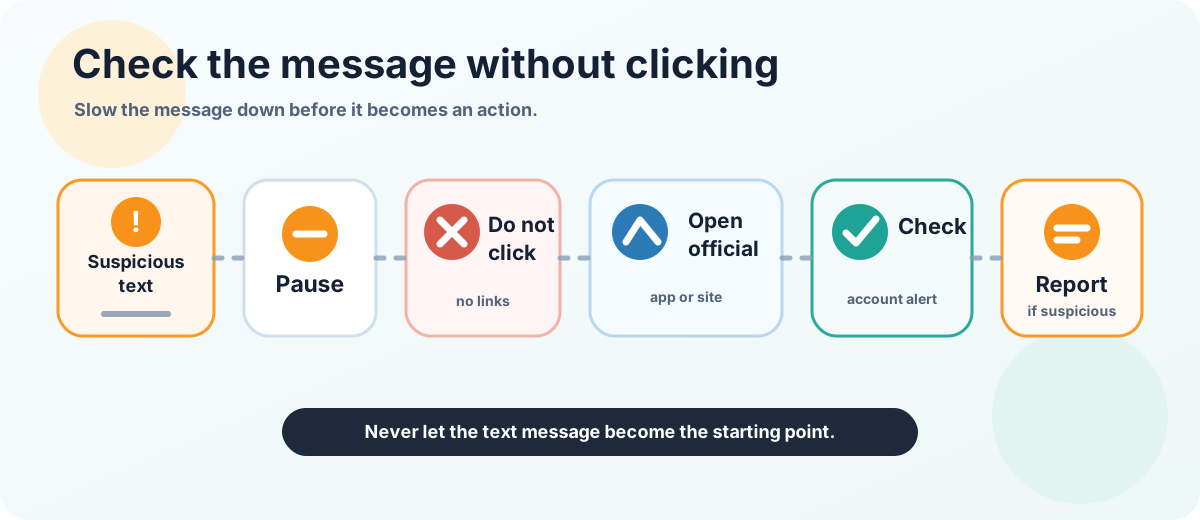
Pause, verify independently, and report suspicious messages.
Do not use the link in the message as your starting point. Do not call the number in the message. Do not reply with a code. Do not move funds because the message told you to.
Use a cleaner path:
Close the text message.
Open Coinbase through the official app, a trusted bookmark, or the official website you type yourself.
Check whether there is a matching alert inside the real account environment.
Review Coinbase's official help or security pages if the situation is unclear.
Save a screenshot of the suspicious message.
Report the message through Coinbase's official phishing-reporting path if it appears suspicious.
This is not dramatic. That is why it works. Scam messages want speed. Your defense is friction.
If the message was real, the official account environment should help you continue safely. If the message was fake, you have avoided using the scammer's doorway.
What to do if you already clicked or replied
If you already clicked a link, replied to a text, called a number, or shared a code, do not keep interacting with the message thread.
Stop.
Then move to official channels only.
Open Coinbase through a trusted route and review your account security settings, recent activity, devices, and withdrawal status. If you think the account may be at risk, use Coinbase's official help process. If you shared a password, reused that password elsewhere, or gave a code to someone, treat the situation as urgent.
Do not rely on the same text thread to fix the problem. Fake support can become a second scam layered on top of the first one.
Also avoid public troubleshooting that exposes private information. Do not post full screenshots, codes, phone numbers, email addresses, account details, seed phrases, private keys, or transaction-sensitive information in public forums.
Buying Bitcoin safely after a security scare
A Coinbase text scam does not automatically mean Coinbase is unsafe or not legit. Scammers impersonate well-known platforms because beginners recognize the names.
The practical lesson is about the buying environment. Before buying Bitcoin through any platform, make sure the account path is clean and the message path is not controlling your choices.
Ask yourself:
Am I on the real app or website?
Did I start from a trusted route, not a text-message link?
Do I understand why a code appeared?
Have I enabled strong account security?
Do I know where the official help center is?
Would I stop if a message asked me to share a code?
Buying Bitcoin is not only about choosing an amount and pressing buy. It is also about protecting the account around that purchase. If you are still sorting out platform rules, order screens, or card-payment steps, slow down and review the buy-before-rules checklist or the card purchase guide before using real money.
A simple rule can carry most of the weight:
If the message came to you unexpectedly, do not let that message control your next click.
FAQ
What is a Coinbase withdrawal code?
A Coinbase withdrawal code is a security-related code that may appear as part of a withdrawal or account verification flow. The exact process can change, so beginners should check Coinbase's official documentation and in-account prompts. The key safety point is simple: do not share a withdrawal code with another person.
Is a Coinbase withdrawal code text always a scam?
Not every code-related message can be judged from the text alone, but an unexpected Coinbase withdrawal code text should be treated carefully. Do not click links or reply with the code. Open Coinbase through the official app or website yourself.
What is a Coinbase withdrawal code scam?
A Coinbase withdrawal code scam is a fake message or fake support interaction that tries to make you reveal, enter, or act on a withdrawal code in a way that benefits the scammer. The safest response is to stop using the message and verify through official Coinbase channels.
Why would someone ask for my Coinbase verification code?
Because the code may help them complete an action as if they were you. If someone asks for your Coinbase verification code, 2FA code, or withdrawal code, assume the request is unsafe unless you are inside the official flow you started yourself.
Should I click a Coinbase text-message link?
Avoid clicking unexpected Coinbase-like text-message links. Open the official app or website yourself instead. This removes the scammer's link from the process.
Does a scam text mean Coinbase is not safe or not legit?
No. A fake text does not prove that Coinbase is fake. It means someone may be impersonating Coinbase. Broader questions like "is Coinbase safe" or "is Coinbase legit" belong in platform evaluation, while this article focuses on fake texts, codes, and beginner account safety.
What should I do if I already shared a code?
Stop interacting with the message or caller. Go through official Coinbase channels, review account security and recent activity, and follow Coinbase's official guidance for suspicious activity or phishing reports.
Official References
Risk Disclaimer
This article is for beginner education only. It is not financial, investment, legal, tax, custody, or security advice. Bitcoin transactions can be irreversible, Bitcoin is volatile, and wallet mistakes can cause permanent loss. Wallet software, platform rules, withdrawal support, security features, and recovery processes can change. Check official wallet and platform documentation before acting, and use qualified professional help when needed.
Editorial Attribution
Written by Alex Chen. Reviewed by Jordan Blake for factual accuracy, clarity, and beginner safety.