
Learning how to buy Bitcoin on Cash App starts with a slightly odd truth: the app can make Bitcoin feel like a normal phone payment, but Bitcoin is not a normal phone payment.
You can tap through a few screens, review a quote, and confirm a purchase. That part may feel familiar. The part that deserves more attention is what sits behind the button: identity verification, fees or spreads, account limits, price movement, transfer rules, wallet addresses, and records you may need later.
This guide walks through the beginner path for Cash App Bitcoin: what to check before starting, how the buy flow usually works, where fees and limits appear, how to send after buying, and how to convert Cash App Bitcoin back to cash if you decide to sell.
This is education, not investment advice. SatoABC does not tell readers to buy Bitcoin or use any specific platform.

Official Cash App Bitcoin page image showing the Bitcoin screen. Treat visible amounts as examples, not recommendations.
Can You Buy Bitcoin on Cash App?
Yes. Cash App offers Bitcoin features for eligible users, including buying, selling, sending, and receiving bitcoin. Availability can depend on your account status, identity verification, location, app version, and Cash App's current rules.
That last sentence is doing work.
It means a guide can explain the path, but your current app screen is the final source for your account. Cash App can change interface labels, fee presentation, limits, verification steps, withdrawal support, and regional availability. Before acting, check the current Cash App app screen and the official Cash App help pages.
For a beginner, "Can I buy Bitcoin on Cash App?" really breaks into five smaller questions:
Is the Bitcoin feature available for my account and region?
Has Cash App completed any identity verification it requires?
Do I understand the current quote, fee, spread, and total?
Do I know what I plan to do after buying?
If I later send bitcoin out, do I understand wallet address risk?
If one of those answers is unclear, pause there. The beginner mistake is not asking too many questions. The beginner mistake is treating the screen like a vending machine.
Cash App Bitcoin Requirements
Cash App is simple to use, but Bitcoin features are not available to every user by default. Before you try to buy BTC, make sure your account meets the basic requirements below.
Requirement | What Cash App Requires |
|---|---|
Age | For a standard Cash App account and a Cash App Virtual Currency Account, users must be U.S. residents and at least 18 years old, or the age of majority in their state. Cash App also has Sponsored Accounts for Teens, but teen Bitcoin access is sponsor-enabled and may have extra limits. |
Identity verification | Cash App may require legal name, email, text-enabled phone number, street address, ZIP code, date of birth, SSN, government ID, taxpayer ID, bank information, source of funds, and employment information. Cash App's IDV FAQ says it usually asks for legal name, date of birth, and the last four digits of SSN, and may also ask for full SSN, residential address, government photo ID, income verification, or source of funds. |
Region | Cash App Virtual Currency Services require the user to be a U.S. resident and use the service in the United States. Cash App may restrict Bitcoin services in certain states, territories, or jurisdictions, and it says users must not try to bypass location restrictions by hiding their IP address or submitting inaccurate location information. |
Funding source | For Bitcoin purchases, users may use funds available in Cash App Balance or fund the transaction from an external funding source, subject to applicable limits. Bitcoin or Cash App Balance bought with funds from a still-settling external transfer may be subject to withdrawal or transfer restrictions until settlement completes. |
Minimum purchase | Cash App says users can buy Bitcoin starting with as little as $1. The final BTC amount depends on the live conversion rate and any applicable fee or spread shown before confirmation. |
Fees shown before confirmation | Cash App says fees and any spread are shown before the user completes a Bitcoin transaction. Its public fee page lists market buy/sell fees by transaction size and says Cash App may include a spread in the quoted conversion rate. |
Withdrawal limits | Cash App says current limits can be displayed in the app and may vary by account, verification status, risk, compliance, and operational reasons. Cash App's public fee page says standard Bitcoin withdrawals have no fee, complete in 24 hours or less, and show a minimum withdrawal of 100,000 sats. |
Lightning Network | Cash App says Lightning payments can be instant and free on Cash App, and that Cash App charges no Lightning Network fees. However, Lightning Network is not available to New York residents, and USD-funded Lightning transfers may have per-transaction, daily, or weekly limits shown in the app. |
Cash App may change eligibility rules, limits, and fees over time. Always check the latest in-app confirmation screen and your account limits before buying, sending, or withdrawing Bitcoin.
The official app listing screenshot below is useful because it shows the structure beginners are trying to recognize: a Bitcoin balance area, a chart, and separate controls for buying, selling, and sending. Your live app screen may differ, but this gives you a real Cash App reference point before the step-by-step section.

Official Google Play screenshot of Cash App's Bitcoin screen. Use it as orientation, then verify your current app screen.
What You Need Before Starting
After you check the Cash App Bitcoin requirements above, prepare the basics before opening the buy screen:
The real Cash App installed from the official app store
Access to your own Cash App account and device
App security set up, such as PIN, Face ID, or fingerprint
A funding source or Cash App balance, if available for your account
A quiet moment to review the quote, fee, spread, and total before confirming
A plan for what you will do after buying: hold, sell, or send
Do not use another person's account, false identity information, edited documents, or a VPN to misrepresent your location. If Cash App asks for verification and you cannot complete it, stop and check the current official Cash App help information.
There is also a scam check before you even reach the buy screen.
If someone is pushing you to buy bitcoin and send it somewhere, stop. The FTC warns that crypto payment demands, claims that profit is certain, fake support messages, and urgent requests from strangers are common scam patterns. A real learning purchase can wait. A scam usually wants you moving before your brain returns to the room.
How to Buy Bitcoin on Cash App Step by Step
The exact app screens may change, but the basic Cash App Bitcoin buy flow is usually: open Cash App, find the Bitcoin area, choose Buy, enter an amount, review the quote and fees, then confirm with your security method if you decide to continue.
Here is the beginner map:
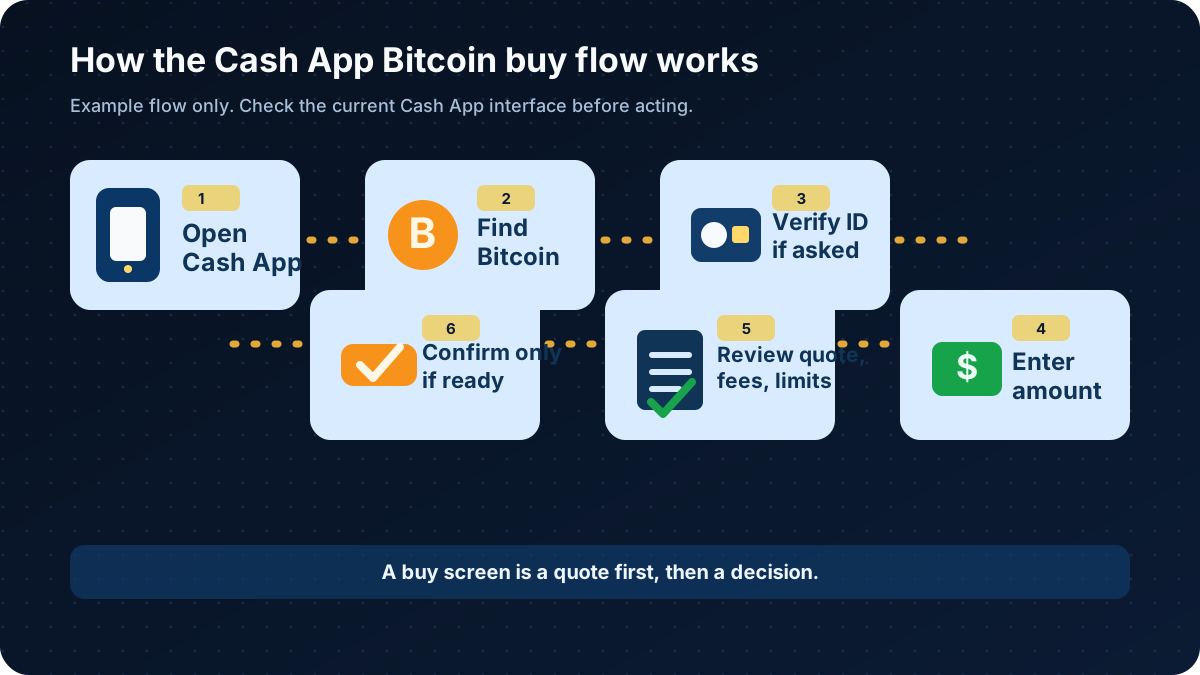
The buy path is easier to follow when you separate setup, amount, review, and confirmation.
Step 1: Open Cash App and Find the Bitcoin Area
Open Cash App and look for the Bitcoin section. Depending on the app version, it may appear as a Bitcoin tab, tile, or investing-related area.
Before touching anything financial, make sure you are in the real Cash App on your own phone. Do not open Cash App from a link sent by a stranger, social media message, fake support chat, or ad that looks suspicious. If you need the app, use the official app store listing for your device.
This step is not buying. It is orientation. You are making sure you are in the correct account and the correct part of the app.
Step 2: Complete Verification if Cash App Asks
Cash App may ask for identity verification before you can buy bitcoin. Follow the official in-app process only if you are comfortable with the requirements.
If verification is not available, fails, or asks for information you do not want to provide, stop and read the current Cash App help information. Do not look for a shortcut around identity checks. That path belongs to account problems, not beginner education.
Step 3: Choose Buy
Inside the Bitcoin area, choose Buy if the option is available.
This is a quote request, not a final decision. A useful mental model is to treat the buy screen like a draft email. You can read it, edit it, or close it. You have not sent anything until you confirm.
Step 4: Enter a Dollar Amount
Cash App Bitcoin purchases are usually entered as a dollar amount. You may see preset amounts or a custom amount field.
The amount is your choice. SatoABC cannot tell you how much to buy. Bitcoin can lose value, and even a small purchase can involve fees, spreads, price movement, and later tax or recordkeeping questions.
For a first learning transaction, the practical goal is not size. The practical goal is understanding the screen in front of you.
Step 5: Review the Quote, Fee, and Total
This is the screen that matters most.
Before confirming, check:
The asset says Bitcoin or BTC
The dollar amount is correct
The bitcoin amount shown makes sense to you
Any fee is visible before confirmation
Any spread or quoted price is understood
The funding source is correct
The purchase is one-time, unless you intentionally chose an automatic purchase
The final total is what you expect
Cash App's fee structure can change, and the app should show the current fee or spread before you confirm. Do not rely on an old screenshot, a friend's app, or a random article's fee number. Read your current quote.
If you feel rushed, confused, or annoyed, cancel. A canceled quote is much cheaper than a misunderstood purchase.
Step 6: Confirm Only if You Are Ready
If you choose to continue, Cash App may ask you to confirm with your PIN, Face ID, fingerprint, or another security method.
After confirmation, your Cash App Bitcoin balance should reflect the purchase according to the app's current process. Save the receipt, confirmation, or record that Cash App provides. You may need records later for personal tracking, account review, or taxes.
Fees, Limits, and Timing
Cash App may charge a fee and may include a spread when you buy or sell bitcoin. A spread means the price used in your quote may differ from a reference market price. The exact structure can change, so the useful habit is not memorizing a number. The useful habit is reading the current quote.
Before you confirm a purchase, check the current fee, spread, total, and amount of bitcoin you expect to receive.
Cash App's own Bitcoin page also shows that transfer choices can display a priority option, timing estimate, and fee. Do not copy the example number. The point is the structure: transfer option, estimated timing, and fee should be reviewed before you move bitcoin.

Official Cash App Bitcoin page image showing a transfer-fee example. The fee shown is not a current promise.
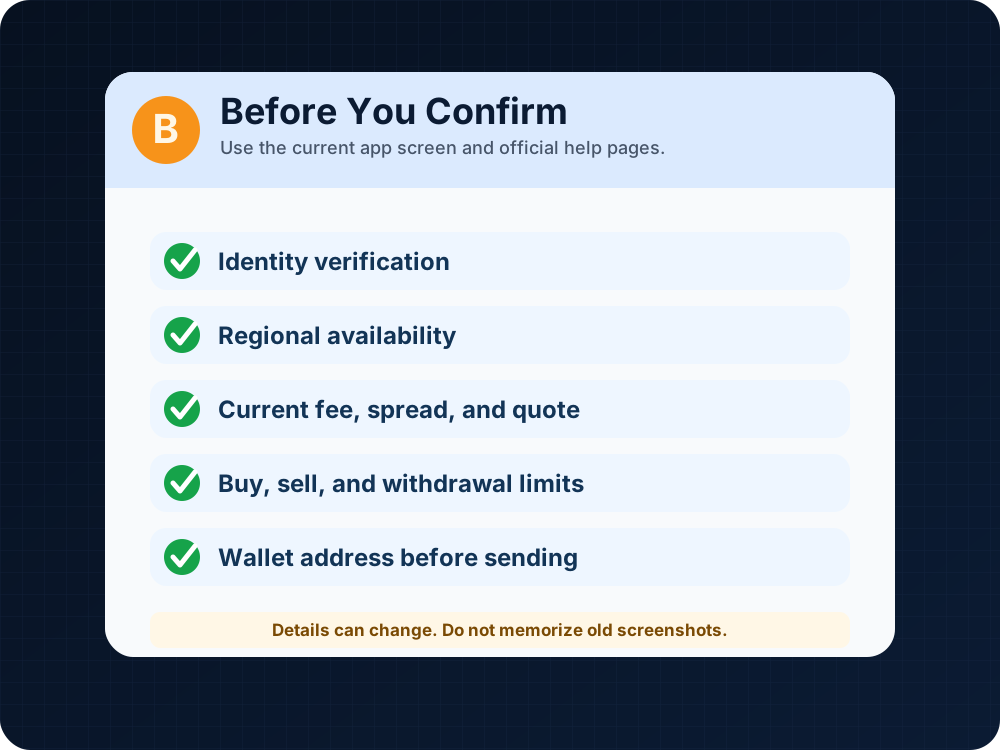
Pause at the review screen and check the current quote, fee, limits, and account requirements.
Limits can vary too. Cash App may apply account limits, verification-based limits, regional restrictions, or transfer rules. Your app may also show different options depending on whether you are buying, selling, sending, or withdrawing.
Timing is another area where beginners get surprised. An in-app purchase may display quickly, but external Bitcoin transfers can depend on platform review, withdrawal eligibility, network fees, and Bitcoin network confirmations. No article can promise a specific transfer time for your account.
The clean rule is this: check the app before acting, then check the official help page if something looks different from what you expected.
How to Send Bitcoin From Cash App After Buying
Buying bitcoin and sending bitcoin are different actions.
Buying changes your Cash App Bitcoin balance. Sending moves bitcoin to another person or an external wallet address if that feature is available for your account. Sending is more fragile because Bitcoin transfers may be irreversible.
A beginner send flow often looks like this:
Open the Bitcoin section.
Choose Send, Withdraw, or the current transfer option shown in the app.
Enter or scan the recipient's Bitcoin address or QR code.
Enter the amount.
Review the address, amount, fee, transfer method, and any network details.
Confirm only if every detail is correct.
Never type a Bitcoin address from memory. Copy it from the receiving wallet or scan a QR code from a screen you trust. Check the first and last characters before confirming. If the recipient wallet gives you network instructions, follow those instructions exactly.

Official Cash App Bitcoin article screenshot showing a send bitcoin screen. Amounts shown are examples from Cash App's own page, not a recommendation.
Do not send bitcoin because someone in a message thread says you must. That is where many scams get their oxygen.
How to Convert Cash App Bitcoin to Cash
People often search for how to convert Cash App Bitcoin when they want to turn bitcoin back into a dollar balance.
In plain English, converting Cash App Bitcoin to cash usually means selling bitcoin inside Cash App, if selling is available for your account. The general flow may look like this:
Open the Bitcoin section.
Choose Sell.
Enter the amount of bitcoin or dollar value you want to sell.
Review the quote, fee, spread, and expected cash amount.
Confirm only if you decide to sell.
Check where the cash balance appears after the sale.
Selling bitcoin may create tax records or reporting responsibilities. In the U.S., digital asset transactions can have tax consequences, and the rules can change. Keep records and check current IRS guidance or speak with a qualified tax professional if needed.
Do not sell, send, or cash out to avoid taxes, platform limits, identity checks, or local rules. This guide is about understanding the normal path, not getting around it.
After Buying: Hold, Send, Sell, or Cash Out
The buy screen is not the end of the story. It is the start of a second decision.
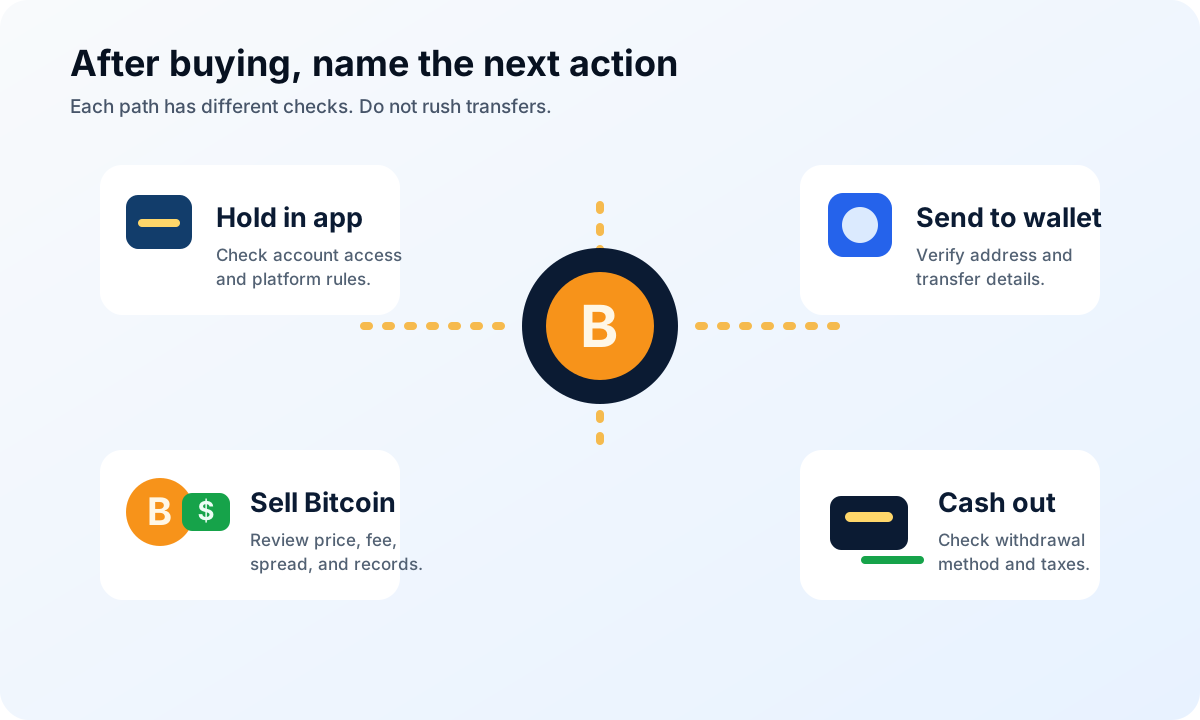
Buying Bitcoin is one step; the next action changes the risks and checks you need.
If you hold bitcoin inside Cash App, your main questions are account access, platform rules, security settings, and price volatility.
If you send bitcoin to a wallet, your main questions are address accuracy, transfer fees, network confirmation, wallet backup, and whether you understand recovery phrase safety. A recovery phrase or private key should never be shared. If it is lost or exposed, the loss can be irreversible.
If you sell bitcoin, your main questions are quote, fee, spread, price movement, records, and tax reporting.
If you cash out after selling, your main questions are withdrawal method, timing, platform limits, bank rules, and tax records.
The same bitcoin balance can lead to four different sets of beginner problems. Naming the next action correctly is half the work.
Common Cash App Bitcoin Mistakes
The first mistake is confusing Cash App dollars with Cash App Bitcoin. A dollar balance and a bitcoin balance are not the same thing. Bitcoin's dollar value can move after you buy it.
The second mistake is skipping the review screen. The review screen is where the fee, spread, quote, amount, and total should become visible. If you tap through it like a pop-up, you may not understand the transaction afterward.
The third mistake is assuming everyone sees the same limits. Cash App features and limits can vary by account, verification status, location, and current policy.
The fourth mistake is sending before learning addresses. A Bitcoin address is not a username. It is a destination. If the destination is wrong, the transfer may not be recoverable.
The fifth mistake is obeying pressure. A fake support agent, fake investor, fake romantic contact, or fake government warning may try to turn your Cash App screen into an emergency room. It is not one.
Beginner Checklist Before You Buy
Before buying Bitcoin on Cash App, walk through this checklist:
Am I using the real Cash App on my own device?
Is the Bitcoin feature available for my account and region?
Have I completed any verification Cash App requires?
Do I understand Bitcoin can lose value?
Have I reviewed the current quote, fee, spread, and total?
Is this a one-time buy, not an accidental recurring purchase?
Am I acting because I chose to, not because someone pressured me?
Do I know whether I plan to hold, send, sell, or cash out afterward?
If I plan to send bitcoin, do I understand Bitcoin addresses?
Have I saved records I may need later?
Have I checked current Cash App rules, limits, and availability?
If too many answers are fuzzy, wait. Bitcoin will still be there after you understand the screen.
FAQ
How do I purchase Bitcoin with Cash App?
Open Cash App, go to the Bitcoin section, choose Buy, enter a dollar amount, review the quote and any fees shown, then confirm with your app security method if you decide to continue. Cash App may require identity verification before buying.
Can I send Bitcoin from Cash App?
Cash App supports Bitcoin sending features for eligible users, but availability can depend on account status, location, verification, and current platform rules. Before sending, review the recipient address, amount, fee, transfer method, and any network details.
Does Cash App charge Bitcoin fees?
Cash App may charge a fee and may include a spread when buying or selling bitcoin. The exact amount can change and should be shown before confirmation. Review your current app quote instead of relying on older screenshots or examples.
How do I convert Cash App Bitcoin to cash?
To convert Cash App Bitcoin to cash, you generally sell bitcoin inside the Cash App Bitcoin section if the feature is available to your account. Review the quote, fee, spread, and expected cash balance before confirming. Selling may have tax consequences.
How much is $100 Bitcoin worth right now?
It depends on the current Bitcoin price and the quote shown by the platform at that moment. If you enter $100 in Cash App, review the app's current quote, fee, spread, and the bitcoin amount you would receive before confirming.
Can I buy $1 of Bitcoin on Cash App?
Cash App may show minimum purchase amounts or limits that depend on current policy and your account. Check the amount field and current app rules. Even a small purchase can involve fees, spreads, records, and price movement.
Is Cash App Bitcoin FDIC insured?
Cash App's Bitcoin disclosures state that virtual currency holdings are not protected by FDIC or SIPC insurance. Bitcoin is not the same as a bank deposit and involves risk, including possible loss of money.
Is Cash App a Bitcoin wallet?
Cash App includes Bitcoin features and may let eligible users send or receive bitcoin. That is different from a self-custody wallet where you control the private keys or recovery phrase. If you plan to withdraw to self-custody, learn wallet backup and address safety first.
Risk Disclaimer
This article is for beginner education only. It is not financial, investment, tax, legal, security, or platform advice. SatoABC does not recommend that readers buy Bitcoin or use any specific platform.
Bitcoin is volatile and can lose value. Cash App fees, spreads, limits, app features, verification rules, withdrawal support, regional availability, and timing can change. Review Cash App's current official information and your own app screen before confirming a transaction.
Bitcoin transactions, especially external sends, may be irreversible. Do not send bitcoin to anyone who pressures you, promises certain profit, claims to represent a government agency, or demands cryptocurrency payment to fix a problem.
Editorial Attribution
Written by Alex Chen. Reviewed by Jordan Blake for factual accuracy, clarity, and beginner safety.