
Paying with Bitcoin usually means opening a compatible wallet, scanning or pasting the merchant's payment request, checking the recipient, amount, payment method, and fee, and then approving the transaction once.
The phone-and-checkout part can feel like paying by card. The important difference arrives after you tap Send: a Bitcoin payment does not come with a card-style chargeback button. If the payment is broadcast using the wrong details, the network will not call it back for you.
So the useful beginner rule is simple: treat the final wallet screen as the last safe checkpoint, not as a routine button to get past.

Review the merchant, amount, payment method, and fee before approving a Bitcoin payment.
The Short Answer: Use the Merchant's Current Payment Request
First, confirm that the merchant actually accepts Bitcoin and which payment method it accepts for this order. A merchant may request:
an on-chain Bitcoin payment to a Bitcoin address;
a QR code or
bitcoin:payment link that can include an address and amount;a Lightning payment request for a Lightning-enabled wallet; or
a checkout page created by a payment processor.
These are not interchangeable labels for the same route. If the checkout asks for an on-chain Bitcoin payment, do not substitute a token on another network. If it asks for Lightning, your wallet must support that payment request. A QR code is only a way to carry data; it does not prove that the merchant is legitimate or that every field is correct.
Before paying, compare the request with the order page. The merchant name, order, amount, unit, and payment method should make sense together. If anything changed after you opened the wallet, stop and return to the merchant's official checkout.
What a Bitcoin Payment Request Can Contain
A plain Bitcoin address tells your wallet where an on-chain payment should go. A Bitcoin payment URI or QR code can also prefill details such as an amount, label, or message. Some modern payment requests can offer more than one supported way to pay, but wallet support varies.
That convenience removes typing. It does not remove judgment.
For example, a checkout may show a price in U.S. dollars and a payment amount in BTC or sats. The conversion can change while the order is open, and an invoice may expire. Your wallet may also display the amount in a different unit from the merchant page. Read both screens rather than assuming that the large number and the small number mean the same thing.
If you are unsure what an address represents, read our guide to what a Bitcoin wallet address is before sending.
Six Checks Before You Pay With Bitcoin
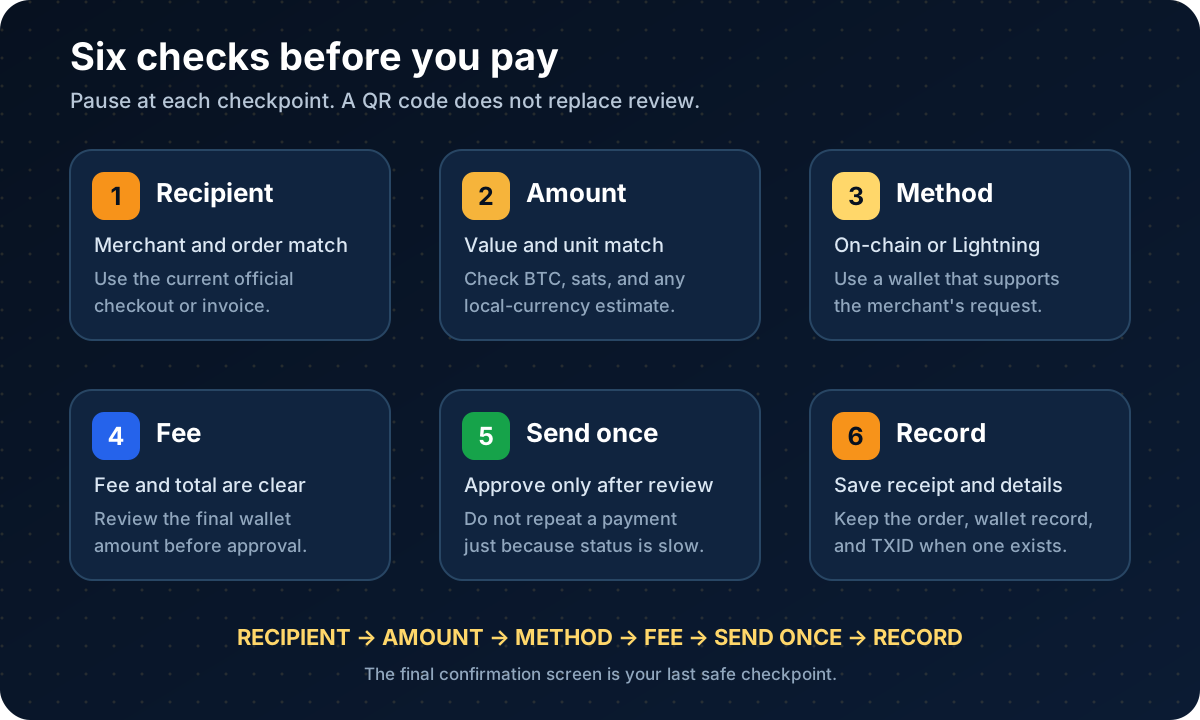
Pause at each checkpoint. A scanned request still needs a human review before funds move.
1. Recipient and Order
Start from the merchant's official website, app, invoice, or in-person checkout. Confirm that the business and order are the ones you intended to pay. Be suspicious of a payment address sent by an unexpected direct message, email reply, or "support" account.
2. Amount and Unit
Compare the merchant's requested amount with the wallet's final amount. Check whether each screen uses BTC, sats, or a local-currency estimate. Do not mentally move a decimal point because the interface looks familiar.
3. Payment Method
Confirm whether the request is for on-chain Bitcoin or Lightning. Use a wallet that supports the requested method. Do not send WBTC, another token, or an asset on a different network to a normal Bitcoin address.
4. Fee and Total
For an on-chain payment, the wallet may add a miner fee. That fee is separate from the merchant's amount and can change with network conditions and wallet settings. Lightning fees and routing behavior also depend on the wallet and payment path. Review the total before approving, and do not invent a lower fee by choosing an unsupported route.
5. Final Confirmation
Recheck the address or invoice, amount, and payment method on the wallet's last screen. If the wallet warns that the invoice is expired, unsupported, or already paid, stop instead of forcing another attempt.
6. Transaction Record
After sending, save the merchant order number, receipt, date, amount, and the wallet's payment record. An on-chain payment normally has a transaction ID, or TXID, that can help you look up the transaction. A Lightning payment does not normally create a separate public on-chain TXID for that individual payment, so keep the wallet receipt and invoice details.
How to Pay With Bitcoin Step by Step
The exact labels vary by wallet and merchant, but the safe sequence is usually the same.
Confirm the merchant accepts Bitcoin. Check the current checkout or payment policy. Do not rely on an old directory, sticker, screenshot, or search result.
Choose the merchant's offered Bitcoin method. Select on-chain Bitcoin or Lightning only if that option is shown for the order.
Open a compatible wallet. Use its Send, Scan, or Pay function. A wallet should never need you to reveal a private key or recovery phrase to make a normal payment.
Scan or paste the request. If you scan a QR code, allow the wallet to display the decoded details before you approve anything.
Compare the order and wallet screens. Check the recipient context, amount, unit, payment method, and any invoice expiration.
Review the fee and total. Make sure you have enough spendable bitcoin for the requested amount and any wallet fee.
Approve once. Use the wallet's normal confirmation method. Do not send again merely because the merchant page takes time to update.
Save the records. Keep the order number, merchant receipt, wallet record, and on-chain TXID when one exists.
For a fuller walkthrough of wallet controls, copying addresses, test transactions, and review screens, use our separate guide to how to send Bitcoin. This page stays focused on the part a general send tutorial cannot answer for you: whether the merchant's request, order, and policy all line up.
What Happens After You Send
An on-chain wallet may first show a transaction as pending or unconfirmed. That means it has been broadcast but has not yet been included in a block. Bitcoin blocks arrive on an irregular schedule; the familiar ten-minute figure is a long-term average, not a delivery promise.
Merchants choose their own acceptance rules. One may recognize a broadcast quickly, while another may wait for one or more confirmations before treating the order as paid. Large purchases, payment processors, and account systems can use different policies.
If the merchant still shows pending:
check that your wallet shows the payment as sent;
compare the amount and destination with the order;
use the on-chain TXID to inspect the transaction when appropriate;
wait for the merchant's stated confirmation process; and
contact the merchant through its official support channel if the records disagree.
Do not pay the same invoice again just because the webpage has not refreshed. A delayed status screen can turn one order into two irreversible payments.
Our Bitcoin TXID guide explains what a transaction ID can and cannot prove. For changing fees and confirmation conditions, see the guide to the Bitcoin mempool and transaction fees.
Can You Cancel or Refund a Bitcoin Payment?
The answer changes at one boundary: whether you have authorized and broadcast the payment.
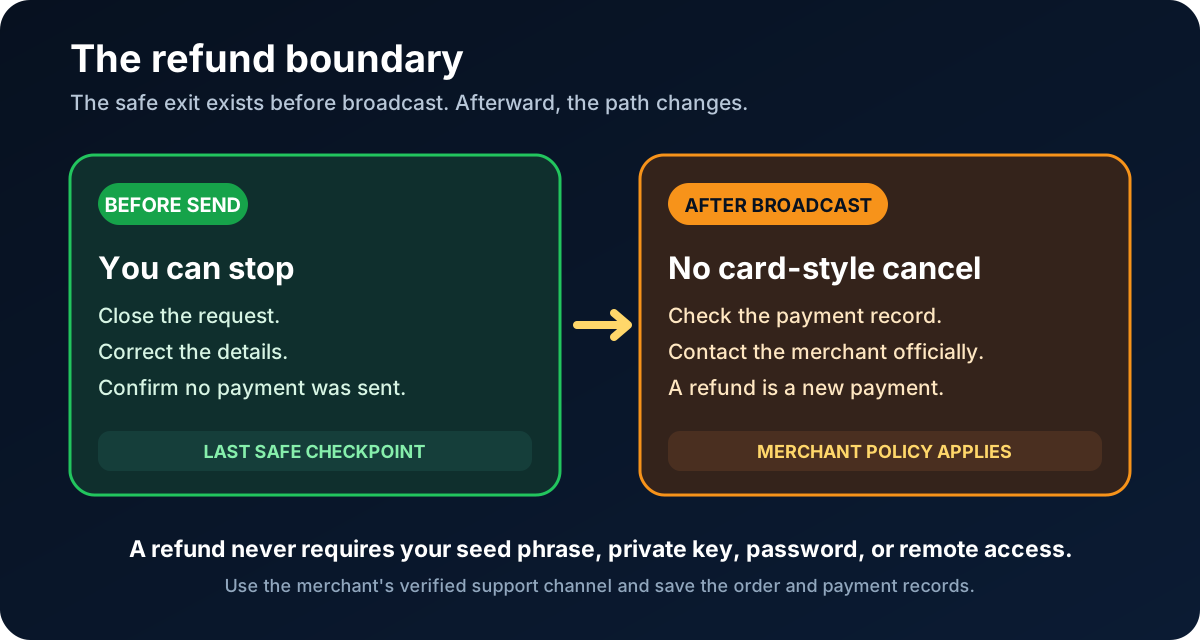
Before broadcast, you can stop. After broadcast, a refund normally depends on the merchant sending a separate return payment.
Before Authorization or Broadcast
If you have not approved the wallet prompt and no payment has been broadcast, you can usually close the request and correct the details. Confirm in your wallet that no payment record was created before trying again.
After Broadcast
You generally cannot cancel an on-chain Bitcoin payment like a card authorization. Wallet fee-bumping or transaction-replacement features are not reliable refund buttons and should not be presented as a guaranteed way to pull a merchant payment back.
A merchant can choose to refund you by sending a new payment under its refund policy. That is cooperation by the recipient, not a network reversal. The merchant may ask for a current refund address that you control. It should not need your seed phrase, private key, password, two-factor code, or remote access to your device.
Do not assume that a refund will equal the original local-currency value. The merchant's policy may define how it handles exchange-rate changes, network fees, partial refunds, expired invoices, returns, and processing time. Read that policy before paying when the purchase would be difficult to unwind.
Check the Merchant Policy Before Paying
The phrase "accepts Bitcoin" leaves several practical questions unanswered:
Does the merchant accept on-chain Bitcoin, Lightning, or both?
When does it consider the order paid?
What happens if an invoice expires while a payment is pending?
Does it refund in bitcoin, local currency, store credit, or another method?
Who pays any network or processing fee for a refund?
What records are required for support?
These rules can change. Use the policy attached to the current checkout, not a forum post or an older purchase.
For higher-value payments, consider whether the merchant is established, whether the refund terms are understandable, and whether a conventional payment method offers protections you need. Paying with Bitcoin is a payment choice, not a reason to lower your normal fraud checks.
Keep Records for Support and Taxes
Save enough information to connect the wallet payment with the real-world order:
merchant name and official contact channel;
order or invoice number;
date and time;
amount in BTC or sats;
local-currency value shown at the time;
on-chain TXID or wallet payment record;
receipt, refund terms, and support messages.
The TXID can help locate an on-chain transaction, but it does not by itself prove who controlled the sending wallet, which order the payment belonged to, or who has a legal obligation to refund it.
Tax treatment depends on where you live. In the United States, using bitcoin held as a capital asset to buy goods or services can be a disposal that creates a gain or loss. Other jurisdictions use different rules. Keep records and check current local tax guidance rather than assuming that a small purchase has no reporting consequence.
Common Bitcoin Payment Scams
The payment method does not make a suspicious request legitimate. Stop when someone unexpectedly asks you to send Bitcoin to:
fix a bank, tax, delivery, government, or account problem;
"protect" your savings in a special wallet;
unlock a refund or prize;
pay an urgent invoice that arrived through a new contact channel; or
satisfy a merchant or support agent who refuses normal identity checks.
Scammers like Bitcoin payments because the victim may act quickly and the transaction may be difficult to reverse. They may also send a QR code so the request feels mechanical and official. The square pattern is not a trust badge.
Verify a changed payment address through a separate official channel. Never share a seed phrase, private key, recovery phrase, wallet backup, password, or two-factor code with a merchant, payment processor, support agent, or refund service.
FAQ
Can Bitcoin payments be refunded?
Yes, a merchant can choose to send a separate refund, but the Bitcoin network does not automatically reverse the original payment. The refund depends on the merchant's policy and cooperation. Contact the merchant through its official channel and provide the order and public transaction details it requests—never wallet secrets.
Do I need a wallet to pay with Bitcoin?
Usually, yes. You need a Bitcoin wallet or supported account that can handle the merchant's payment request, such as an on-chain address or a Lightning invoice. Not every wallet supports every request type, so check compatibility before funding or paying.
What should I check before paying?
Check the merchant and order, amount and unit, on-chain or Lightning payment method, destination or invoice, wallet fee and total, and the final confirmation screen. Save the receipt and payment record after sending.
Can I cancel a Bitcoin payment?
You can exit before authorizing or broadcasting the payment. After an on-chain transaction is broadcast, you should not expect a card-style cancellation. Replacement or fee-bumping features are not guaranteed refund tools; if money must come back, the merchant normally needs to send a separate refund.
Risk Disclaimer
This article is for beginner education only. It is not financial, investment, legal, tax, payment-processing, custody, or cybersecurity advice. Bitcoin prices can change, and Bitcoin payments may be irreversible. A wrong recipient, amount, payment method, address, invoice, or duplicate payment can cause permanent loss. Merchant acceptance, wallet support, interfaces, fees, limits, confirmation requirements, refund policies, identity checks, and regional availability can change; verify current official information before paying.
Never share a private key, seed phrase, recovery phrase, wallet backup, password, two-factor code, or remote-access session. Keep self-custody recovery phrases backed up offline according to the wallet's official instructions; losing the only valid backup can cause permanent loss of access. Check merchant terms, platform policies, and current local tax rules before making or refunding a payment.
Editorial Attribution
Written by Alex Chen. Reviewed by Jordan Blake for factual accuracy, clarity, and beginner safety.