
No—not to a standard Bitcoin address unless the receiving service explicitly gives you a WBTC deposit route on the exact network you plan to use. Native BTC and wrapped Bitcoin may track a similar value, but they are different assets moving through different systems.
If the receiving screen asks for BTC on the Bitcoin network and gives you a Bitcoin address, such as one beginning with bc1, it is asking for native BTC. Do not select WBTC, Ethereum, or another token network because the word “Bitcoin” appears in the name.
That is the trap. The label looks familiar while the route underneath it has changed.

Native BTC and wrapped tokens use separate transfer paths. Check the asset, network, and receiving support before sending.
The Short Answer: Match the Asset and the Network
Before any crypto transfer, three things must agree:
Asset: Is the sender moving native BTC, WBTC, or another tokenized form of Bitcoin?
Network: Is the transfer using the Bitcoin network, Ethereum, or another supported chain?
Destination support: Does the receiving wallet or platform support that exact asset on that exact network?
Matching only one or two is not enough. “The address pasted successfully” is not the same as “the receiver can credit and later spend this asset.”
For example, imagine that you hold WBTC on Ethereum and the recipient gives you a normal Bitcoin on-chain address. The names look related. The transfer paths are not. A careful wallet may reject the address before anything is broadcast. If a platform offers several withdrawal networks, you still must follow the receiving side’s current instructions rather than choosing the closest-looking label.
Our broader guide to picking the wrong network explains the general network-matching problem. This page focuses on the particularly confusing version: BTC versus wrapped BTC.
BTC and Wrapped Bitcoin Are Not the Same Asset
BTC is the native asset recorded and transferred by the Bitcoin network. A Bitcoin wallet creates Bitcoin receiving addresses and tracks spendable Bitcoin outputs on that network.
Wrapped Bitcoin, usually shown as WBTC, is a tokenized representation of Bitcoin used on supported smart-contract networks. Current WBTC documentation describes BTC as the native Bitcoin asset and WBTC as a multichain token. On Ethereum, WBTC follows the ERC-20 token standard. Other supported WBTC networks can use different address systems and token implementations.
The word wrapped matters. It tells you that another system sits between the token and the BTC backing it. That adds things native BTC does not need: a supported token contract or mint, a specific chain, custody or redemption arrangements, and wallet or platform support for that version of the asset.
One unit of WBTC may be designed to represent one BTC, but that does not turn WBTC into a Bitcoin-network transaction. A boarding pass and a train ticket can display the same destination city. You still cannot use either one at the wrong gate.
The Three Checks That Must Agree
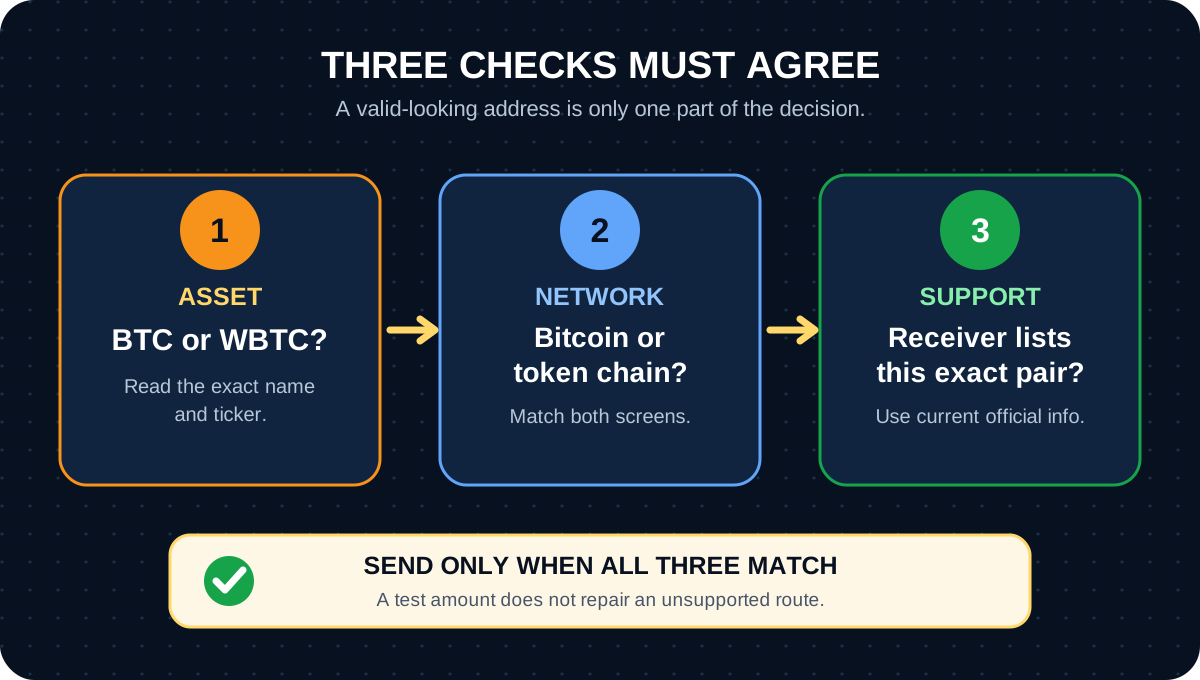
A transfer is ready only when the asset, network, and receiving support all match.
1. Check the Exact Asset
Read the asset name and ticker on the sending screen. Do not stop at the word Bitcoin.
BTCnormally means native bitcoin.WBTCnormally means Wrapped Bitcoin.Other names may refer to other tokenized or bridged versions with their own contracts and support rules.
Do not identify a token from its icon alone. Icons can look similar, and scam tokens can copy names and symbols. Use the wallet or platform’s current official asset page and, when relevant, its verified contract information.
2. Check the Exact Network
The network is not a delivery-speed preference. It determines which ledger records the transfer and which system must recognize the destination.
If your WBTC sits on Ethereum, an Ethereum transaction moves it. If it sits on another supported network, that network’s rules apply. Native BTC uses the Bitcoin network. A wallet that supports WBTC on one network does not automatically support WBTC on every other network.
The sender and receiver must name the same network. Similar address shapes are not proof of compatibility.
3. Check the Receiving Wallet or Platform
Open the receiver’s current Receive or Deposit screen. Select the exact asset first. Then read the supported network and copy the destination shown for that combination.
A multi-asset wallet can display BTC, WBTC, ETH, and other assets in one app. That shared interface does not merge the underlying networks. Think of the app as a building with several mailrooms. The fact that they share a lobby does not mean every package belongs in every slot.
If the receive screen does not list WBTC on your sending network, stop. Do not use a BTC address and hope the wallet recognizes the family resemblance.
How to Read an Exchange Deposit or Withdrawal Screen
Custodial platforms often ask you to choose both an asset and a network. Read those fields as a pair.
Suppose a deposit screen says:
Asset:
BTCNetwork:
Bitcoin
That is a native Bitcoin deposit route. It is not permission to send WBTC from Ethereum or another token network.
If a platform supports WBTC, it should show WBTC as the asset and list the networks it currently accepts. Support can change by platform, account, location, and time. An old screenshot, a forum answer, or the fact that another exchange supports a route does not establish that your destination supports it today.
Before confirming, compare both screens side by side:
the sending asset matches the receiving asset;
the selected sending network matches the receiving network;
the destination came from the receiver’s current screen;
any memo, tag, minimum, warning, or account requirement is satisfied;
the prepared amount and fees are acceptable.
If the screens disagree, do not translate one into the other. Stop and use the official help documentation for both services.
A Bitcoin Address Is Not a Universal Crypto Address
A normal Bitcoin address is a destination for a Bitcoin transaction. Common Bitcoin address families may begin with 1, 3, or bc1. They describe conditions for spending native bitcoin on the Bitcoin network.
Token networks use their own account or address systems. Ethereum-compatible networks commonly use addresses beginning with 0x, while other chains can use different formats. Even when two networks use the same-looking address format, they remain separate networks with separate transaction histories.
So the useful question is not:
Does this address look valid?
It is:
Did the receiving wallet generate this destination for this exact asset on this exact network?
See our Bitcoin wallet address guide for the difference between a receiving address, a wallet, and the private keys that control funds.
What to Check Before Sending WBTC or BTC
Use this sequence before the final confirmation screen:
Start at the receiver. Open the current receive or deposit page instead of reusing an old address from a screenshot or message.
Select the exact asset. Confirm whether the receiver wants BTC or WBTC.
Match the network word for word. Do not choose a network only because its fee looks lower or its name looks familiar.
Copy the destination from that screen. Avoid typing an address by hand. Compare the beginning and end after pasting.
Read warnings and current support docs. Check minimums, fees, account requirements, and whether the route is available in your region.
Confirm the sender can use that route. A platform may support receiving on a network without supporting withdrawals on the same network, or vice versa.
Consider a small test only after everything matches. A test transfer can reduce the size of a mistake, but it cannot make an unsupported route valid. Our guide explains why the first move should not be your largest.
Review the prepared transaction. Check the asset, network, destination, amount, and fee one final time.
For the native-BTC flow, use the separate beginner guide to sending Bitcoin.
BTC Network vs Token Network: The Warning Fork
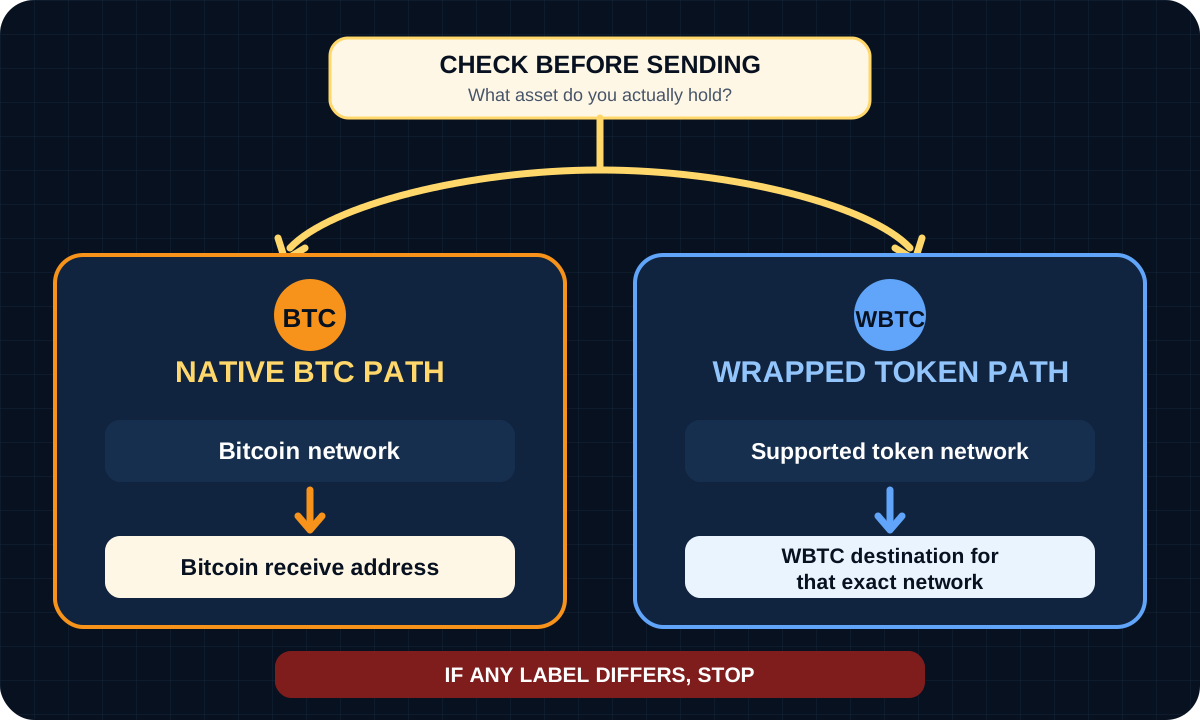
Native BTC follows the Bitcoin network. WBTC follows its supported token network until a legitimate conversion or redemption changes the asset.
The visual is intentionally simple because the decision should be simple.
Receiver asks for BTC on the Bitcoin network: send native BTC to the Bitcoin address it provides.
Receiver explicitly supports WBTC on your token network: send WBTC to the destination it provides for that exact network.
Receiver and sender show different assets or networks: stop. Convert or withdraw through a supported route only after checking current official terms, fees, limits, tax consequences, and availability.
Do not improvise a bridge, token swap, or private-key import because a stranger says it will “make the networks line up.” Those are separate operations with separate smart-contract, custody, fee, and security risks.
What to Do If You Already Used the Wrong Network
First, do not send another transaction to fix the first one. A second transfer creates a second problem unless you understand what happened to the first.
Save the evidence that does not reveal wallet secrets:
transaction hash or withdrawal ID;
asset and amount;
network selected;
destination address;
date and time;
sending and receiving platform names;
screenshots of the official transaction record and warning messages.
Then identify the current state.
If the Sender Rejected the Address Before Broadcast
If no transaction was created and no funds left, review the error and return to the receiver’s current deposit instructions. Do not try to force the transfer past the address check.
If a Transaction Completed on a Token Network
Use the block explorer for the network actually used and check the transaction hash, token, destination, and status. Then contact the receiving wallet or platform through its verified support channel. Only the destination provider can explain whether it supports or can recover that asset on that network.
Recovery is not guaranteed. Some platforms state that wrong-network transfers cannot be recovered. Others may review certain cases, sometimes with eligibility rules, long delays, or fees. Those policies can change.
If the Destination Is Your Self-Custody Wallet
Do not enter your seed phrase or private key into a website, “recovery bot,” direct message, or unfamiliar wallet. Check whether the wallet’s official documentation supports the network and token involved. If it does not, use the wallet maker’s verified support resources or a qualified specialist who never needs your recovery phrase.
Possessing a recovery phrase does not make every recovery safe or simple. Importing it into the wrong software can expose every asset controlled by that backup.
If the Destination Is a Custodial Platform
Contact the platform’s official support. The platform controls the deposit system and the relevant keys, so an outsider cannot legitimately recover the transfer for you. Provide the public transaction evidence it requests, but never provide a seed phrase, private key, password, two-factor code, or remote access to your device.
Wrong-network transfers attract recovery scammers because the victim is already worried and the blockchain evidence is public. Urgency is not proof of expertise.
FAQ
Is WBTC the same as BTC?
No. BTC is the native asset of the Bitcoin network. WBTC is a tokenized representation used on supported smart-contract networks. WBTC may be designed to represent BTC at a 1:1 ratio, but it does not move as a native Bitcoin transaction.
Can a Bitcoin address receive tokens?
A standard Bitcoin address is for native bitcoin on the Bitcoin network, not for ERC-20 or other network tokens. A multi-asset wallet may support both BTC and tokens, but it should provide a separate receive flow for the exact asset and network. Use the destination shown in that flow.
What happens if I use the wrong network?
The wallet may reject the address before sending, or the transaction may complete on a network the receiver does not support and remain uncredited. The outcome depends on the asset, network, destination, and who controls the destination keys. Stop, save the transaction evidence, and use official support. Do not assume recovery is possible.
Can support recover a wrong-network transfer?
Sometimes a wallet or platform can review an eligible case, but there is no general recovery guarantee. Some providers do not recover wrong-network transfers; others support only certain assets, networks, or amounts and may charge a fee. Check the current policy of the receiving service and ignore private-message recovery offers.
Risk Disclaimer
This article is for beginner education only. It is not financial, investment, legal, tax, custody, or cybersecurity advice. Bitcoin, WBTC, and other crypto assets can be volatile. Transfers may be irreversible, and choosing the wrong asset, network, contract, or destination can cause permanent loss.
Never share a private key, seed phrase, recovery phrase, wallet backup, password, two-factor code, or remote-access session. Keep self-custody recovery phrases backed up offline according to the wallet’s official instructions; losing the only valid backup can cause permanent loss of access. Wallet and platform support, interfaces, fees, minimums, limits, identity checks, recovery policies, and regional availability can change. Verify current official instructions before acting, and check local tax rules and platform policies before converting, sending, selling, or cashing out an asset.
Editorial Attribution
Written by Alex Chen. Reviewed by Jordan Blake for factual accuracy, clarity, and beginner safety.