
Seed phrase storage is the boring-looking part of self-custody that quietly carries the whole building.
The beginner version of the problem is simple: your wallet shows you a list of words, and your normal internet brain wants to save it the way it saves everything else. Take a photo. Put it in a notes app. Email it to yourself. Drop it into a password manager. Future-you can deal with the details.
That is the trap.
A seed phrase is not a normal note. In many self-custody wallets, it can restore access to the wallet. If someone else gets it, they may be able to restore the wallet too. If you lose it and also lose wallet access, there may be no reset button, support desk, or bank-style recovery process.
So the practical rule is:
Keep the seed phrase offline, private, readable, and recoverable by you.
This article is not about recommending a brand or selling a storage product. It is a beginner checklist for reducing common storage mistakes before they become expensive lessons.

Seed phrase storage is about keeping the recovery words offline, readable, private, and recoverable.
What Seed Phrase Storage Means
Seed phrase storage means how and where you keep the wallet recovery words after the wallet creates them.
If you still need the basic definition, start with what a seed phrase is. The short version is that a seed phrase, also called a recovery phrase or mnemonic phrase in many wallet contexts, can help restore a wallet. That makes it different from an ordinary app password.
Good seed phrase storage has four jobs:
Stay private. No casual photos, messages, cloud notes, support chats, or shared screens.
Stay offline. The backup should not be copied into internet-connected storage by default.
Stay readable. The words and order must still be clear when recovery is needed.
Stay findable by the right person. A backup nobody can locate during a real emergency is not much of a backup.
This is why seed phrase security feels a little strange. You are protecting a small object from two opposite disasters at the same time: theft and disappearance.
One disaster happens because someone finds it.
The other happens because nobody does.
Paper vs Metal Backup Basics
Most beginners start with paper because it is available, simple, and easy to inspect. Paper can work as a basic seed phrase storage method if it is written clearly, checked carefully, and kept away from casual access, moisture, heat, and disposal.
Paper also has obvious weaknesses. It can burn, tear, fade, get wet, or be thrown away by someone who thinks it is an old list. A paper backup left in a desk drawer is not the same thing as a thought-through backup plan.
Metal backup products exist because fire and water are real physical risks. A metal plate or capsule may be used as part of a cold wallet backup plan, especially when someone wants a more durable offline copy. But metal is not magic. It can still be misplaced, discovered, photographed, or stored in a poor location.
The better question is not "paper or metal?" The better question is:
Will this backup survive the most realistic problems in my life while staying hidden from the wrong people?
If you are learning how this fits into broader wallet choices, see SatoABC's guide to Bitcoin wallets and storage and the explainer on what a cold wallet is.
Why Photos, Cloud Notes, and Chats Are Risky
The riskiest seed phrase storage mistakes often look harmless because they are normal phone behavior.
Taking a photo feels responsible. Saving a note feels organized. Messaging yourself feels convenient. The problem is that modern devices are built to copy, sync, back up, search, index, and share information. That is wonderful for vacation photos. It is not wonderful for wallet recovery words.
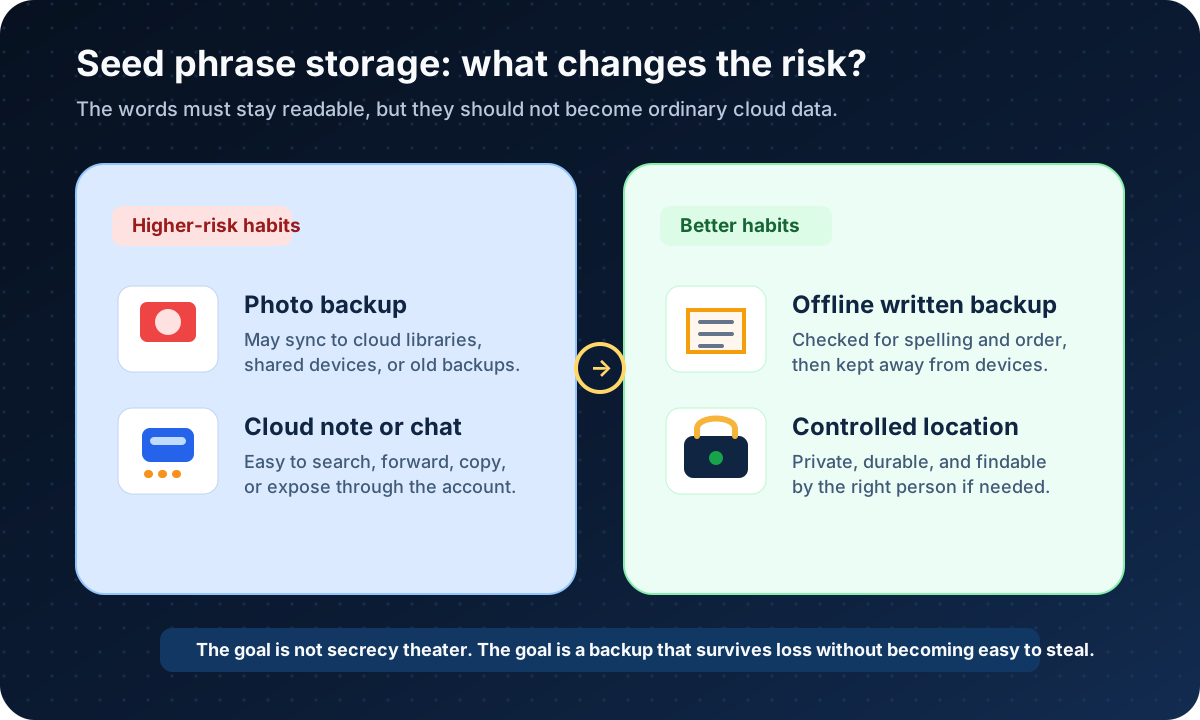
Online copies create extra places where a recovery phrase can leak. Offline backups reduce that specific risk.
Think of an online copy as a door that keeps politely making more doors.
A screenshot may sync to a cloud library. A notes app may sync to a laptop. An email draft may sit in an account for years. A chat message may be backed up, forwarded, searched, or exposed if the account is compromised.
For many beginners, the lower-risk default is not to make a digital copy at all. Write the phrase down offline, verify it, and store it in a location chosen for privacy and durability.
This does not mean every advanced setup is identical. Some experienced users build complex security systems. But for a beginner, the first lesson of crypto seed phrase storage is usually this: do not turn a recovery phrase into ordinary cloud data.
One Copy, Two Copies, and Location Risk
A single copy is easy to reason about. It is also a single point of failure.
Two copies can reduce loss risk. They also create two objects that must be protected. More copies may help with disaster planning, or they may simply create more chances for discovery. There is no universal number that fits every home, family, location, and amount at risk.
Use this simple model:
Too few copies: you may lose access if the one backup is destroyed or misplaced.
Too many casual copies: you create more opportunities for theft, mistakes, or accidental exposure.
Thoughtful duplicate copies: each copy has a specific purpose, a specific location, and a specific access plan.
The word "thoughtful" is doing work here.
A second backup stored in the same drawer as the first backup does not protect much against fire, flood, theft, or accidental disposal. A second backup stored somewhere nobody responsible can ever access may also fail when needed.
The goal is not drama. The goal is to avoid designing a treasure hunt for your future stressed-out self.
Household, Fire, Water, and the Too-Clever Problem
Seed phrase storage is partly a cybersecurity problem. It is also a household logistics problem, which is less glamorous and often more dangerous.
Ask practical questions:
Could this paper get wet, burned, faded, or thrown away?
Could a visitor, repair worker, roommate, child, or relative easily see or photograph it?
Could someone cleaning a room mistake it for trash?
Could I still find it if my phone is gone, my laptop is dead, and I am already stressed?
Have I made the hiding place so clever that I may forget it?
That last one is a very human failure mode. People like clever hiding places because they feel secure. Then time passes. The clever place becomes a vague memory with furniture around it.
A good storage plan is boring enough to work.
It should be private, but not mythical. Durable, but not impossible to access. Simple, but not careless.
Also be careful with family and estate planning. Do not casually share your seed phrase. At the same time, do not use "security" as an excuse to hide assets from lawful obligations, courts, tax authorities, or people who have a legitimate legal role in your planning. If inheritance or legal access matters, get appropriate professional guidance without exposing the phrase unnecessarily.
The Restore Drill: Storage Is Not Proven Until Recovery Works
A backup is a promise. A restore drill is how you check whether the promise is real.
The idea is not to test with an amount that would hurt to lose. The beginner-friendly version is to practice wallet recovery with an empty or low-value wallet, following the wallet's current official instructions. The point is to learn what recovery looks like before you are trying to recover under pressure.
SatoABC has a separate guide to a Bitcoin wallet restore drill. That page is the better place for the step-by-step drill. Here, the storage lesson is smaller:
Do not assume a backup works just because it exists.
Check the word order. Check spelling. Check whether the wallet's recovery process matches the backup you made. Check official wallet documentation before relying on any recovery method, because wallet wording, supported standards, and interfaces can vary.
The worst time to learn that word 7 is unreadable is the day you need word 7.
Before Funding the Wallet: Beginner Checklist
Before adding meaningful funds to a self-custody wallet, slow the process down. A wallet setup screen can make the task feel like a short form. It is not a short form. It is a small ceremony in which future access is being decided.
The checklist below repeats the same ideas in a more operational way. That is intentional. Seed phrase storage fails through tiny ordinary actions, not through one giant movie-scene mistake.
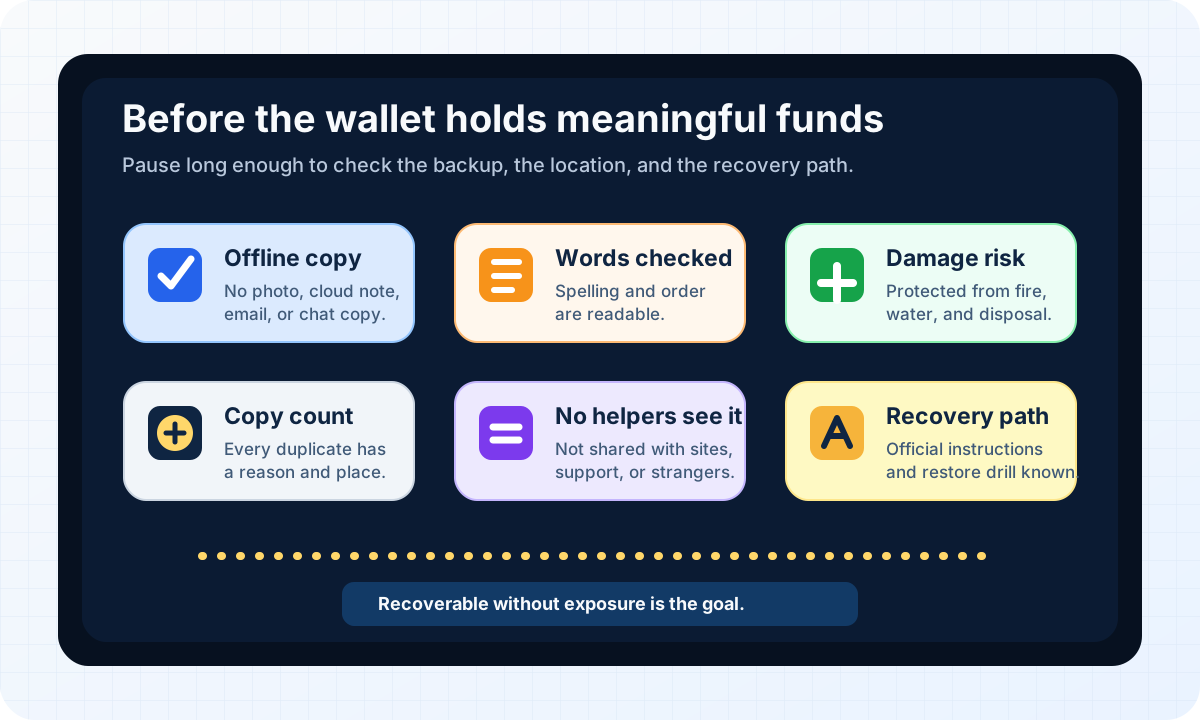
Review the backup before the wallet holds an amount you would seriously miss.
Use this beginner checklist:
It is not stored as a photo, cloud note, email draft, chat message, or synced document.
I wrote the phrase offline.
The right words in the wrong order may not restore the wallet.
I checked every word and the order.
Fire, water, fading, cleaning, moving, and accidental disposal are real risks.
I protected it from ordinary household damage.
If I have more than one copy, each copy has a clear reason and a controlled location.
I thought about duplicate storage.
No support agent, website, friend, social account, or stranger needs the phrase.
I did not expose it to helpers.
Wallet interfaces and recovery steps can change, so I will verify the current official help page before acting.
I know where official instructions are.
If someone uses the seed phrase to move bitcoin away, on-chain transactions may not be reversible.
I understand the irreversible part.
A small practice recovery can reveal mistakes before the backup is needed for something serious.
I have considered a restore drill.
If you are still setting up the wallet itself, the related guide on creating a crypto wallet safely can help you place this checklist in the larger setup process.
FAQ
Should I take a photo of my seed phrase?
No. For beginners, taking a photo is one of the clearest mistakes to avoid. Photos can sync to cloud storage, backups, shared albums, laptops, or other connected devices. A seed phrase should not be treated like a receipt, password hint, or ordinary note.
Is metal seed phrase storage required?
No universal rule says every beginner must use metal storage. Metal backups may help with fire or water durability, but they do not solve every risk. A metal backup can still be found, copied, misplaced, or stored badly. The core requirement is an offline, private, readable, recoverable backup that fits your actual risk.
How many copies should I keep?
There is no single number that fits everyone. One copy can be lost or destroyed. Too many casual copies can increase exposure. If you keep duplicate copies, each one should have a clear purpose, a controlled location, and a plan for who can access it under legitimate circumstances.
Should I tell anyone where it is?
Do not casually tell people where your seed phrase is, and never reveal the words to someone who does not need them. For household, inheritance, or legal planning, consider appropriate professional guidance. The goal is to plan access responsibly without exposing the phrase unnecessarily or trying to hide assets from lawful obligations.
Should I store a seed phrase in a password manager?
For many beginners, the simpler default is offline storage rather than putting the phrase in software that may sync, back up, or be reachable through an online account. Some advanced users may design more complex systems, but a beginner should understand the device, account, backup, and recovery risks before storing seed words digitally.
What if I already saved my seed phrase in the cloud?
Stop making additional copies and review the situation carefully. If the phrase may have been exposed, check the wallet's official guidance. In many cases, users consider creating a new wallet with a new seed phrase and moving funds to the new wallet, but that process involves address, fee, timing, and transaction-finality risk. Verify current wallet instructions before acting.
Risk Disclaimer
This article is for education only. It is not financial, investment, tax, legal, estate-planning, or cybersecurity advice. Bitcoin and other crypto assets involve risk, including loss of funds, irreversible transactions, theft, user error, changing wallet software, changing platform rules, and changing fees. Always verify wallet setup, backup, recovery, fees, limits, and availability using the wallet or platform's current official documentation before acting. Never share your seed phrase, private keys, wallet passwords, or login codes.
Editorial Attribution
Written by Alex Chen. Reviewed by Jordan Blake for factual accuracy, clarity, and beginner safety.