
A blockchain explorer is a public lookup tool for blockchain data. For Bitcoin beginners, the simplest use is checking whether a transaction appears on chain and what status it shows.
It is a little like a public receipt board. You can look up a transaction ID, see confirmations, view addresses, and check whether the transaction is still pending or already confirmed.
But a blockchain explorer is not a wallet. It is not a customer support desk. It is not a cancel button hiding behind a search box.
That last part matters when someone is nervous. A pending Bitcoin send can make a beginner stare at a screen like the screen owes them an apology. The explorer can help you read what is publicly visible, but it cannot reach into the Bitcoin network and undo a mistake.

A blockchain explorer can show public transaction status, but it cannot control or reverse a transaction.
Blockchain explorer in one sentence
A blockchain explorer is a website or tool that lets you search public blockchain information, such as Bitcoin transactions, addresses, blocks, fees, and confirmations.
If you ask "what is a blockchain explorer?" in the middle of a Bitcoin send, the practical answer is even shorter:
It is a way to check what the network can publicly show about a transaction.
That public part is the key. Explorer pages are built from blockchain data, not from your private wallet account. A block explorer may show a transaction ID, sending and receiving addresses, fee information, block details, and confirmation count. It should not need your private key, seed phrase, exchange password, or two-factor code.
If any page asks for those things while claiming to be an explorer, stop.
The explorer is the window. It is not the key.
What a transaction ID can show
A transaction ID, often shortened to txid, is a public identifier for a Bitcoin transaction.
Think of it as the lookup number for a transaction record. A wallet, exchange, or payment service may show a txid after a send or withdrawal. You can paste that txid into a public explorer to check Bitcoin transaction details.
A txid can help answer questions like:
Has the transaction appeared publicly?
Is it still unconfirmed?
How many confirmations does it show?
Which addresses appear in the transaction?
What fee information is visible?
Which block included the transaction, if it is confirmed?
A txid is not a password. It is not a recovery code. It does not let someone spend your Bitcoin by itself.
Still, it can reveal context. If you share a txid with another person, you may also be sharing related addresses, amounts, timing, and transaction history clues. Public does not mean harmless in every situation.
This is different from the actual Bitcoin send flow: sending is where the transfer is prepared, while the explorer is where you may read public status afterward. The broader Sell & Send path keeps those pieces in order.
Confirmations, fees, addresses, and status
Most beginners open an explorer and see a wall of fields. Some are useful immediately. Some are noise until you know what job they do.
Here is the beginner version:
Explorer field | What it means | Beginner caution |
|---|---|---|
Transaction ID / txid | Public identifier for a transaction | Not a password or recovery code |
Confirmations | Blocks added after the transaction | More confirmations usually means more finality, but requirements vary |
Address | Public sending or receiving address shown on-chain | Do not confuse it with a private key |
Fee | Amount paid to miners/network for including the transaction | It does not guarantee recovery if details were wrong |
Status | Pending, unconfirmed, or confirmed state | Check wallet or platform docs before acting |
Block | The block that included the transaction, if confirmed | Useful for status, not a support ticket |
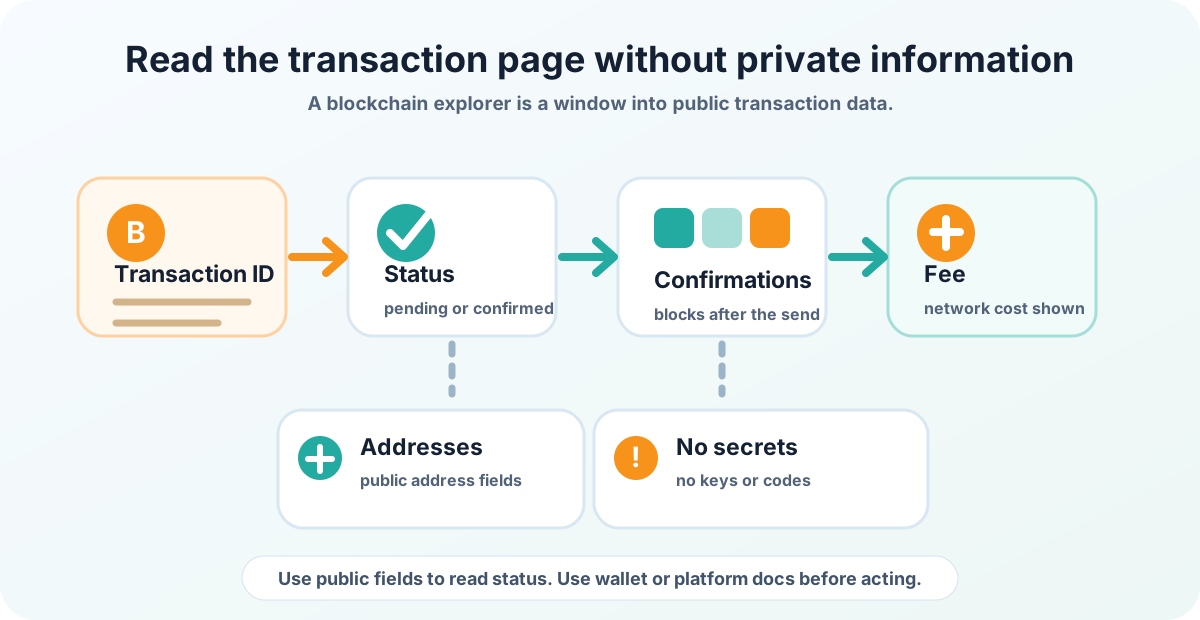
A transaction page can help you read status without entering private information.
The table is deliberately simple. A blockchain explorer can become a very deep place, but a beginner usually needs only enough to avoid panicking or making a second mistake.
What unconfirmed or pending can mean
Unconfirmed or pending usually means the transaction has not yet reached the level of confirmation expected by the wallet, platform, or service you are checking.
That does not automatically mean the Bitcoin is lost.
It also does not automatically mean you should start clicking random "speed up," "recover," or "support" links. Some wallets and platforms have legitimate guidance for pending transactions. Fake support pages also love nervous users.
The calm sequence is:
Check that the txid is real and visible.
Look at the status and confirmation count.
Compare it with your wallet or platform's official guidance.
Avoid entering private keys, seed phrases, or account credentials into any explorer or support form.
For deeper timing context, compare the explorer count with the official guidance from the wallet or platform you are using.
Why confirmations matter
Confirmations are one way Bitcoin transactions become more settled from the point of view of wallets, platforms, and services.
More confirmations generally mean more finality, but there is no universal beginner rule like "one number is always enough." A small personal send, a platform withdrawal, and a larger-value transfer may all be treated differently.
That is why the right question is not "How many confirmations does the internet say?"
The better question is: "How many confirmations does this wallet, platform, or receiving service require for this kind of transaction?"
An explorer can show the count. It cannot decide the receiving platform's rules.
What a block explorer cannot fix
A block explorer can show information. It cannot control the transaction.
It cannot:
Cancel a Bitcoin transaction.
Reverse a confirmed mistaken send.
Recover funds sent to the wrong destination.
Change the network used for a withdrawal.
Prove that a platform will credit your account.
Ask for your private key or seed phrase for "verification."
This is the hard boundary. Bitcoin.org's beginner safety guidance warns that Bitcoin transactions can be irreversible. An explorer may help you understand what happened, but it is not a rescue machine.
A wrong destination or wrong network is not something an explorer can repair. Fee or minimum amount confusion is also a separate pre-send rule problem, even if the explorer later shows the transaction.
The explorer is useful because it is honest about public data. It is dangerous only when a beginner expects it to be something else.
Privacy cautions before sharing a link
It is often safe enough to share a txid with a platform support team when the platform officially requests it. But "public" still deserves care.
A transaction link can expose:
The amount involved.
The time of the transaction.
Public addresses in the transaction.
Other visible activity connected to those addresses.
Context about what you were doing and when.
Bitcoin.org's privacy guidance explains that Bitcoin transactions are traceable in public ways, and address reuse or careless sharing can reduce privacy.
So before you post a transaction link in a public chat, forum, social media thread, or random support conversation, pause.
If you need help, prefer official support channels. Share only what the official channel asks for. Never share private keys, seed phrases, passwords, two-factor codes, or screenshots that reveal account details.
This is where address basics matter: public address information and private key control are not the same thing.
How this helps when sending or cashing out Bitcoin
A blockchain explorer is most useful after a send, withdrawal, or cash-out when you need to separate "I am waiting" from "something is wrong."
It can help you check:
Whether the transaction is visible on chain.
Whether the txid matches the one shown by your wallet or platform.
Whether the confirmation count is increasing.
Whether the receiving address shown publicly matches what you expected.
Whether you need to wait, check official docs, or contact the platform.
That is the after-send job. It should not replace the checks that happen before money leaves your control: address review, network selection, fee/minimum review, and small test moves.
If you are about to send through a new path, use the explorer as one follow-up tool, not the whole safety plan. Good first-move sizing keeps the initial transfer small enough that a mistake teaches you without becoming the whole story. Broader Bitcoin supply rules are a different question from transaction tracking.
FAQ
Is a blockchain explorer a wallet?
No. A blockchain explorer is a public lookup tool. A wallet helps manage keys and transactions. An explorer should not ask for your seed phrase, private key, password, or two-factor code.
Can a blockchain explorer cancel a Bitcoin transaction?
No. A blockchain explorer can show transaction information, but it cannot cancel, reverse, or recover a transaction. If a transaction is already sent, follow your wallet or platform's official guidance.
Is it safe to share a transaction ID?
A txid is not a password, but it can reveal public transaction context such as amount, timing, and related addresses. Share it only when there is a clear reason, preferably through official support channels.
What does unconfirmed mean?
Unconfirmed means the transaction has not yet reached the confirmation state expected by the relevant wallet, platform, or service. It does not automatically mean the funds are lost.
How many confirmations do I need?
It depends on the receiving wallet, platform, transaction type, and amount. Use the explorer to see the confirmation count, then check the official guidance for the wallet or platform you are using.
Can I search by wallet address?
Many explorers let you search public address information, but address pages can reveal transaction history. Do not confuse a public address with a private key, and be careful before sharing address pages publicly.
Official References
Risk Disclaimer
This article is for beginner education only. It is not financial, investment, legal, tax, custody, or security advice. Bitcoin transactions can be irreversible, Bitcoin is volatile, and wallet mistakes can cause permanent loss. Wallet software, platform rules, withdrawal support, security features, and recovery processes can change. Check official wallet and platform documentation before acting, and use qualified professional help when needed.
Editorial Attribution
Written by Alex Chen. Reviewed by Jordan Blake for factual accuracy, clarity, and beginner safety.