
A hardware wallet is a small physical device designed to keep private keys isolated from your everyday phone or computer. It helps sign Bitcoin transactions without exposing the private key to the normal online device you use to prepare the transaction.
That is the useful definition.
The beginner mistake is slightly different. A hardware wallet looks like a tiny vault, so it is easy to imagine that the Bitcoin goes inside the device. It does not. Bitcoin remains recorded on the Bitcoin network. The hardware wallet helps protect the keys and signing process that let you control Bitcoin tied to your addresses.
So the simplest model is:
Bitcoin is on the network. The hardware wallet helps protect the key that can authorize spending.
A hardware wallet can reduce some online risks, especially malware and phishing risks around private keys. It does not remove every risk. You still need to protect the seed phrase, check addresses, avoid fake apps and fake support, buy from official sources, and follow current setup instructions from the device maker.

A hardware wallet is a signing device. It is not a little box where Bitcoin is stored.
Hardware Wallet in One Sentence
A hardware wallet is a physical wallet device that keeps sensitive key material isolated and signs transactions in a more controlled environment than an ordinary internet-connected phone or laptop.
If you are still building the larger wallet map, start with Bitcoin wallets and storage. Wallets are not all the same. Some are apps, some are exchange accounts, some are cold storage setups, and some are hardware devices used for self-custody.
The word "wallet" is a little misleading here. In normal life, a wallet holds money. In Bitcoin, a wallet helps manage keys, addresses, and transactions. A hardware wallet is one way to keep the most sensitive part of that system away from the everyday online machine where browser tabs, downloads, messages, extensions, and bad decisions all live together.
That noisy machine might be fine for many tasks.
It is not an ideal home for a private key.
What Stays Offline?
In a typical hardware wallet setup, the private key is created or stored inside the device and is not meant to leave it during normal use. Your phone or computer may still be involved, but it usually acts as the screen, keyboard, internet connection, and transaction-preparation tool.
The hardware wallet does the more sensitive job: approving and signing.
This is why hardware wallets are often discussed as part of cold wallet storage. A cold wallet is the broader idea of keeping private keys offline or isolated from routine internet exposure. A hardware wallet is one common way to do that, but it is not the only cold storage method.
There is an important caveat:
"Offline" does not mean the whole experience is disconnected from the internet forever. You may still use a connected app to view balances, prepare transactions, update software, or broadcast a signed transaction. The point is narrower and more important: the private key should not need to sit exposed on the connected computer or phone.
That narrower point is where the safety value lives.
Device vs Seed Phrase
The hardware device is not the deepest backup. The seed phrase usually is.
Many beginners treat the device as the main thing and the seed phrase as paperwork. The opposite is often closer to the truth. If the device is lost, damaged, or replaced, the seed phrase may be the way to restore access in a compatible wallet setup. If someone else gets the seed phrase, they may be able to restore the wallet without needing your device.
That is why hardware wallet ownership has two separate objects:
This helps sign transactions and approve actions.
The device.
This can restore the wallet's keys in many wallet systems.
The seed phrase or recovery phrase.
If you are not clear on the backup side, read what a seed phrase is before setting up a device. Then read seed phrase storage before putting meaningful funds under that setup.
The seed phrase should not be photographed, uploaded, typed into random websites, sent to support, or stored casually in cloud notes. A hardware wallet cannot protect you from handing the recovery phrase to the wrong place. It is a strong door with a spare master key sitting somewhere else.
If the spare master key is copied, the door is no longer the main story.
How Transaction Signing Works
The most useful hardware wallet idea is transaction signing.
When you send Bitcoin, the wallet does not push coins out of a box. It creates a transaction instruction. That instruction needs a valid digital signature from the private key controlling the funds.
In a common hardware wallet flow, the connected wallet app prepares an unsigned transaction. The hardware wallet receives the details, shows important information for review, and signs inside the device if you approve. Then the signed transaction goes back to the connected app, which can broadcast it to the Bitcoin network.
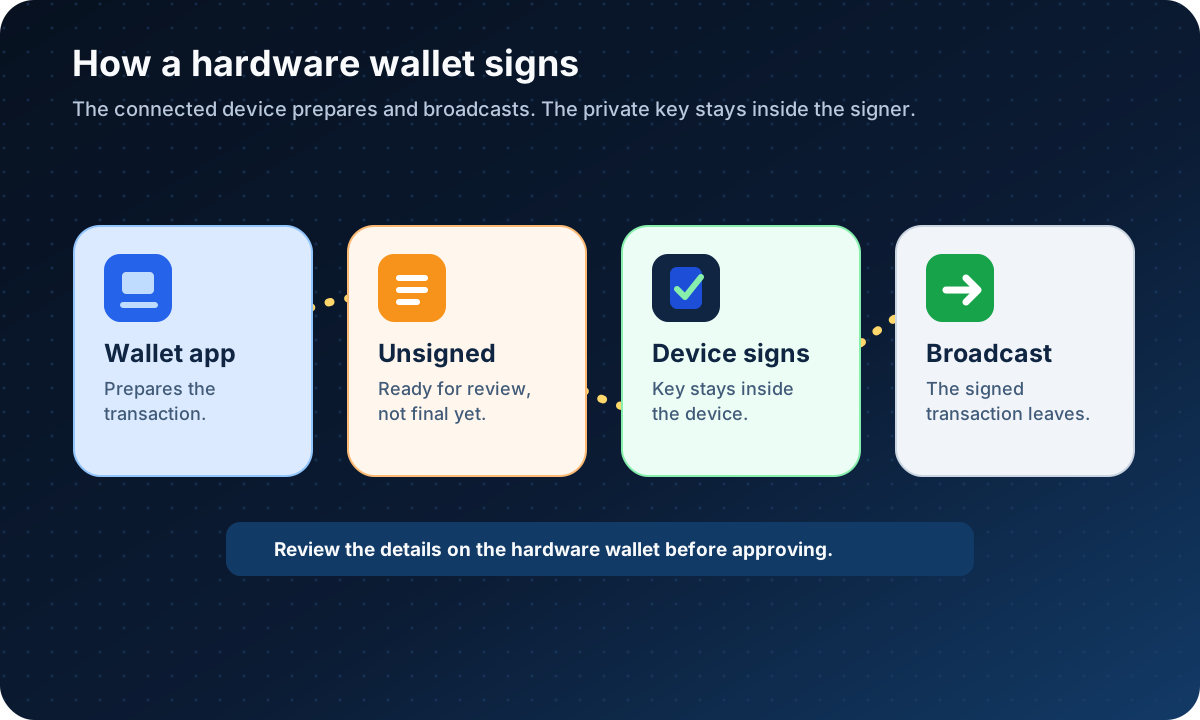
The online device prepares and broadcasts. The hardware wallet signs without exposing the private key.
The key point is not that the laptop disappears. The laptop still has a job. The point is that the laptop should not need the private key to do that job.
This also explains why device-screen review matters. If malware or a fake app changes the address or amount before signing, the hardware wallet screen may be your chance to catch it. Always review the address, asset, network, and amount on the device itself when the wallet supports that review.
Do not train yourself to click through warnings like they are cookie banners. A hardware wallet is only useful if the human holding it is still paying attention.
Hardware Wallet vs Hot Wallet
A hot wallet runs on, or stays close to, an internet-connected device. It can be convenient for learning, small balances, and regular transactions. The tradeoff is exposure: the same connection that makes the wallet easy to use also makes the device environment part of the risk.
A hardware wallet usually slows things down. That is partly the point.
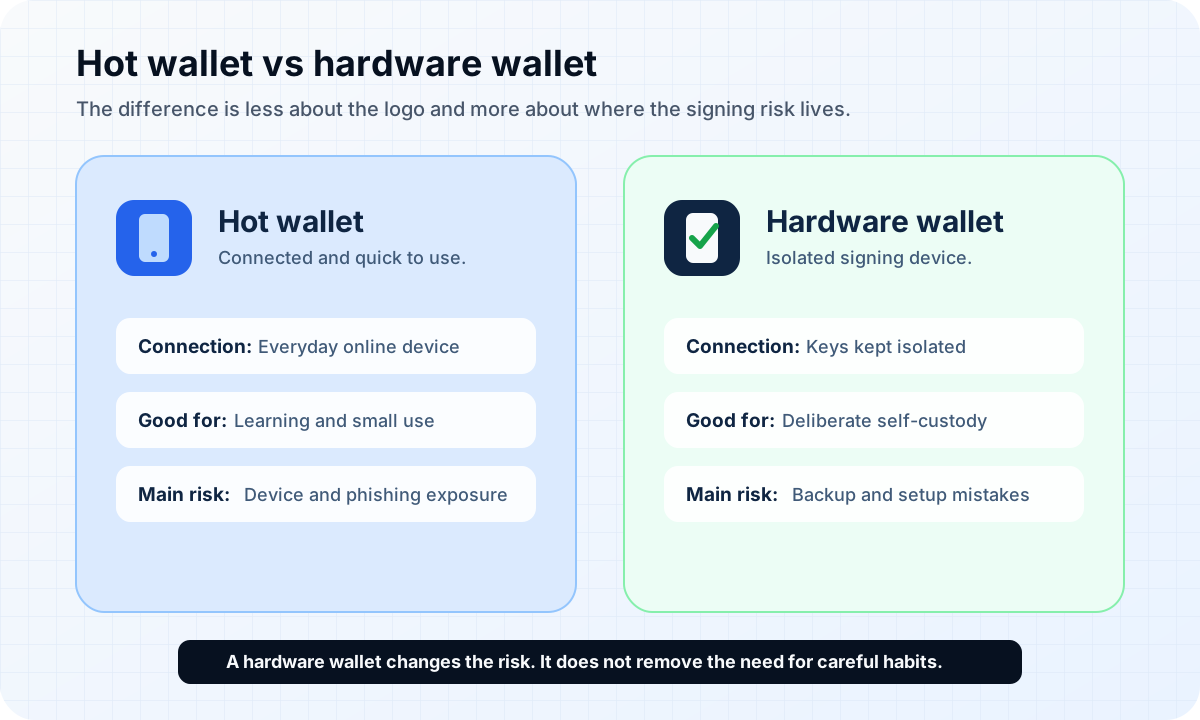
Hot wallets prioritize quick access. Hardware wallets prioritize isolated signing and stronger backup discipline.
Here is the plain comparison:
A hot wallet is usually easier to open and use from your daily device.
A hardware wallet is usually better suited to less frequent, more deliberate self-custody.
A hot wallet asks you to manage connected-device risk.
A hardware wallet asks you to manage setup, seed phrase backup, device authenticity, address review, firmware guidance, and recovery planning.
Neither choice makes all risk disappear.
The real beginner question is not "Which one sounds more advanced?" The real question is "Which set of risks am I prepared to manage?"
What a Hardware Wallet Does Not Fix
A hardware wallet can reduce a specific category of risk: private keys being exposed on an ordinary online device.
It does not fix everything around the wallet.
It does not protect you if you approve the wrong transaction after failing to check the device screen. It does not protect you if you send Bitcoin to the wrong address. It does not protect you if you enter your seed phrase into a fake recovery website. It does not protect you from losing the seed phrase, damaging the backup, or buying a tampered device from an unsafe source.
It also does not make Bitcoin transactions reversible. If you authorize a valid transaction and it confirms on-chain, reversal may not be possible.
This is the part that feels unfair to beginners. You buy a serious-looking device, and the device improves one part of the system. Then the rest of the system still asks you to be a careful adult in a room full of confusing buttons.
Annoying, but true.
Is a Hardware Wallet Right for Beginners?
A hardware wallet is not required for every beginner or every amount. For very small learning amounts, a reputable hot wallet or a custodial platform may be simpler, depending on what you are trying to learn and what risks you understand.
But a hardware wallet may be worth researching when:
you plan to hold Bitcoin outside an exchange for longer periods;
the amount would hurt to lose;
you are ready to protect a seed phrase offline;
you are willing to verify device authenticity and official setup instructions;
you can slow down and check transaction details before approving.
The phrase "beginner-friendly" can be slippery. A device can have a friendly interface and still demand serious backup discipline. A crypto hardware wallet is not a toy version of self-custody. It is self-custody with a dedicated signing device.
That can be useful.
It can also be misunderstood.
Beginner Setup Checklist
Before using a Bitcoin hardware wallet, treat setup as a careful process, not an unboxing ritual.
Use this checklist:
Device availability, prices, supported features, firmware guidance, and shipping options can change. Use official sources and avoid suspicious resale or pre-opened devices.
Check official sources before buying.
Follow the current official instructions. Be cautious if a device arrives with a prewritten seed phrase, a printed recovery card, or instructions asking you to use someone else's words.
Initialize the device yourself.
Do not photograph it, upload it, or type it into a normal website. The recovery phrase may be the real backup if the device fails.
Write the seed phrase offline.
Follow the maker's current guidance. Do not reuse simple codes or store the PIN beside the seed phrase.
Set and protect the device PIN or access method.
When supported, compare the address shown in the wallet app with the address shown on the hardware device.
Verify receive addresses on the device screen.
A small transaction can teach the receive, send, fee, and confirmation flow before larger transfers. Fees and confirmation timing can vary, so check current wallet and network conditions.
Send a small test first when learning.
A Bitcoin wallet restore drill can help confirm that your backup works before the device is lost or damaged.
Practice recovery before stress arrives.
Only follow official instructions. Do not click update links from random messages, ads, comments, or support impostors.
Keep firmware and companion software guidance current.
The checklist is not there to make the device feel scary. It is there because self-custody punishes casualness in boring places.
FAQ
Is Bitcoin stored inside a hardware wallet?
No. Bitcoin is recorded on the Bitcoin network. A hardware wallet helps manage and protect private keys that can authorize spending. The device is better understood as a signing tool, not a container full of coins.
Can a hardware wallet fail?
Yes. A device can be lost, damaged, become unsupported, or stop working. That is why the seed phrase or recovery method matters. Before relying on any device, check the maker's current official recovery guidance and consider practicing recovery with an empty or low-value setup.
Do I still need a seed phrase?
In many hardware wallet setups, yes. The seed phrase or recovery phrase may be the backup that restores wallet access if the device is lost or replaced. Never share it, photograph it, upload it, or type it into untrusted websites or apps.
Is a hardware wallet required for small amounts?
Not necessarily. For small learning amounts, some beginners may use a hot wallet or platform account while they learn basic wallet behavior. A hardware wallet becomes more relevant when the amount, storage period, and self-custody responsibility make isolated signing and stronger backup discipline worth the extra setup.
Is a hardware wallet the same as a cold wallet?
No. A hardware wallet is a device that can be used as part of cold storage. A cold wallet is the broader idea of keeping private keys offline or isolated from everyday internet exposure.
Can a fake app trick a hardware wallet user?
It can create serious risk. A fake app or compromised computer may try to show misleading transaction details, addresses, or update prompts. A hardware wallet can help by showing details on the device screen, but only if the user checks them carefully and follows official software guidance.
Risk Disclaimer
This article is for education only. It is not financial, investment, tax, legal, estate-planning, or cybersecurity advice. Bitcoin and other crypto assets involve risk, including loss of funds, irreversible transactions, theft, user error, wallet failure, fake apps, phishing, changing device support, changing firmware guidance, changing fees, and platform restrictions. Always verify wallet setup, backup, recovery, firmware, fees, limits, and availability using the wallet or platform's current official documentation before acting. Never share your seed phrase, private keys, wallet passwords, device PINs, or login codes.
Editorial Attribution
Written by Alex Chen. Reviewed by Jordan Blake for factual accuracy, clarity, and beginner safety.