
To self-custody Bitcoin, you use a wallet in which you—not an exchange or other custodian—control the keys or recovery authority. The practical process is: understand the responsibility, choose and verify a wallet, protect its backup offline, confirm a receiving address, and make a small test transfer before considering a larger move.
You do not need to do all of that today.
Self-custody is not a speed test or a loyalty test. It replaces reliance on a custodian with reliance on your own setup, backup, device security, and transaction checks. If one part is still fuzzy, the useful move is to pause at that part.

Self-custody is a sequence of checks, not one dramatic withdrawal.
This guide uses a five-gate model: learn → wallet → backup → receive → test. Each gate removes one unknown before you add the next.
What Bitcoin Self-Custody Means
Bitcoin self-custody means controlling the private keys—or the signing and recovery authority—that allow Bitcoin to be spent from your wallet. A genuine self-custody wallet does not require a custodian to approve an ordinary on-chain transaction.
The wallet does not hold little coins inside your phone. It manages keys that let the Bitcoin network recognize valid spending instructions. That is why losing the device is not always the disaster, while losing both the device and the valid backup can be.
Self-custody changes the failure model:
A custodian can have security failures, withdrawal restrictions, insolvency, outages, or account-recovery rules.
A self-custody user can have backup failures, phishing, malware, wrong-address mistakes, damaged devices, or permanently lost recovery information.
Neither side of that comparison is a magic safety bubble. For the full distinction, read Custodial vs Non-Custodial Wallets.
The U.S. Securities and Exchange Commission's investor education office describes the same core tradeoff: self-custody gives the user control of the keys and sole responsibility for protecting them. Its crypto asset custody bulletin also recommends considering technical comfort, wallet type, security, and costs before choosing a custody method.
The Five Gates Before a Withdrawal
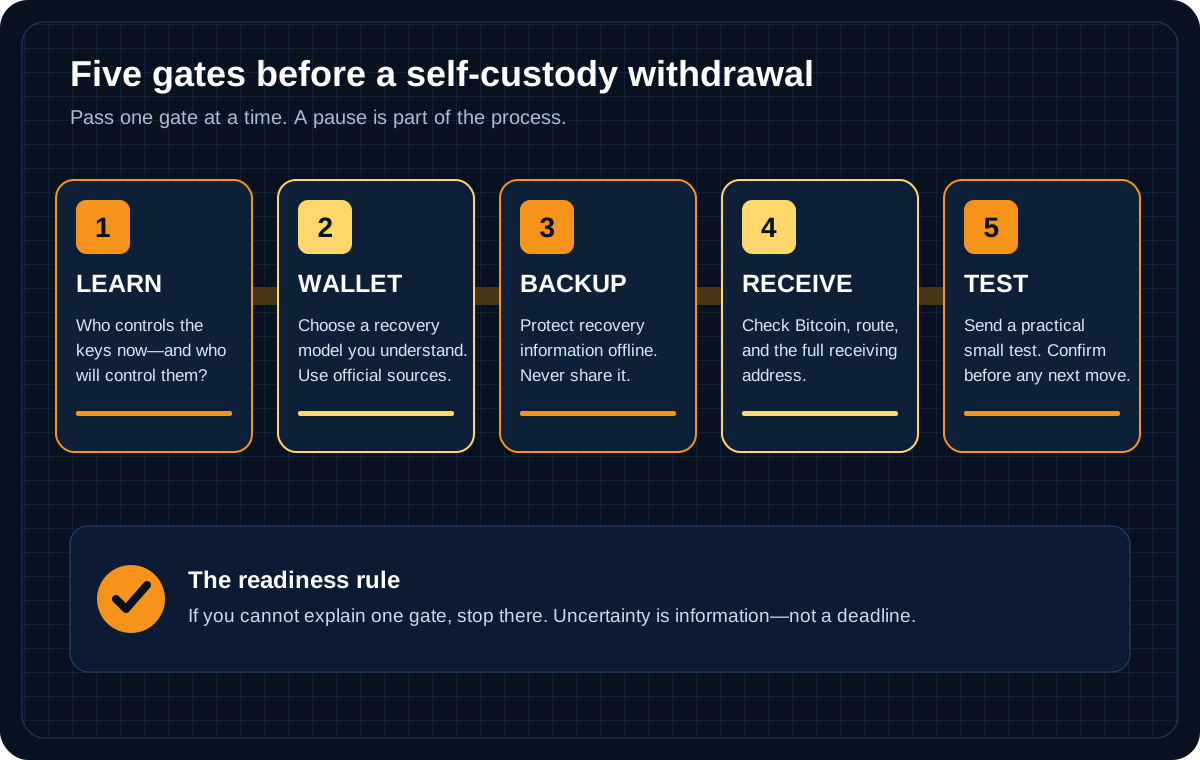
Do not pass a gate until you can explain what could fail there.
The five gates turn a vague command—“move your Bitcoin”—into five smaller questions:
Learn: Do I understand who controls the current balance and who will control the destination wallet?
Wallet: Did I choose a wallet type I can operate and obtain it through a verified official source?
Backup: Can I recover the wallet without exposing the recovery information?
Receive: Did I verify a fresh Bitcoin receiving address in the wallet itself?
Test: Can I complete and confirm a small first transfer under the platform's current rules?
This model is deliberately slow. A beginner mistake often happens when five unfamiliar actions are compressed into one button press.
Are You Ready for Self-Custody?
Readiness is not about technical prestige. It is about whether you can answer ordinary questions while calm—before a lost phone, failed login, or urgent message turns the task into a small panic festival.
You are closer to ready if you can say:
I know whether my current Bitcoin is in a custodial account or a wallet I control.
I understand that a Bitcoin transaction may be irreversible.
I can identify the exact official wallet website, app listing, or device documentation.
I know what backup method the wallet uses and where its official recovery instructions are.
I can store a seed phrase, private key, or wallet backup privately and offline when the wallet requires it.
I know the difference between a public receiving address and secret recovery information.
I can check the selected asset, network, address, amount, fee, and platform rules before confirming.
I am not moving funds because a stranger, “support agent,” influencer, or countdown timer is rushing me.
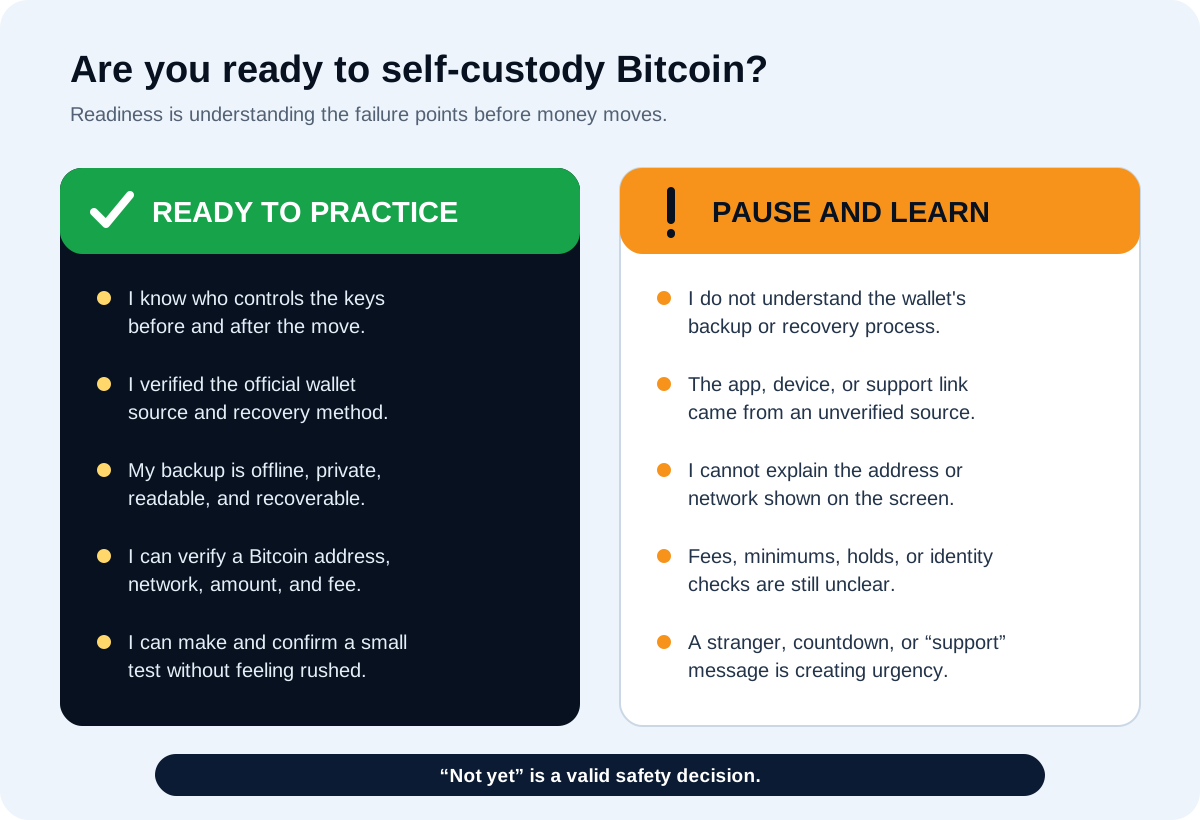
“Not yet” is a valid result when a backup, address, or platform rule is unclear.
When not to rush
Pause if any of these are true:
You have not practiced receiving Bitcoin.
You do not know how the wallet is recovered.
The wallet or device came from an unverified link, marketplace listing, direct message, or preconfigured package.
Someone else created the wallet or saw the recovery information.
The platform's withdrawal network, fee, minimum, hold, identity check, or regional rule is unclear.
You are being told to move funds to “protect” them, fix an account, claim a prize, or help an investigation.
You feel pressure to move the entire balance in one attempt.
The FTC warns that cryptocurrency transfers are a common tool in scams and that people offering recovery help may be scammers too. Use the service's official support route, not contact information supplied by an unexpected message.
Step 1: Choose a Self-Custody Wallet Type
A self-custody wallet can run on a phone, computer, dedicated hardware device, or a more complex setup using multiple keys. “Self-custody” answers who controls the keys. “Hot” and “cold” describe how exposed the signing environment is to online systems. They are different questions.
Mobile or desktop software wallet
A software wallet can make learning to receive and send easier because the interface is familiar. The tradeoff is that the phone or computer is connected to a larger world of apps, browsers, messages, clipboard tools, and malware.
Before selecting one, check:
Does the wallet support Bitcoin on-chain transactions?
Who can authorize a spend?
What exact backup or recovery method does it use?
Is the source code or security model explained clearly?
Where are the current official download and verification instructions?
What happens if the device is lost?
Hardware wallet
A hardware wallet keeps signing keys in a dedicated device and is commonly used for self-custody. It can reduce some online exposure, but it adds device purchasing, firmware, companion-app, physical backup, and recovery responsibilities.
If you choose this route, use the Hardware Wallet Setup Checklist. A hardware wallet is not protective if it arrives with a prewritten seed phrase, if a fake app captures the backup, or if the receiving address is never checked on the device.
Multisignature or assisted designs
Some wallets require more than one key or divide recovery among devices, people, or services. These arrangements can reduce certain single points of failure, but they can also add coordination and recovery complexity. They are not automatically beginner-friendly because they sound advanced.
For a first self-custody setup, prefer a recovery model you can explain without guessing. Product features and wallet designs change, so use current documentation for the exact wallet and version.
Step 2: Install or Initialize From an Official Source
Confirm the official website independently. Do not rely on the first sponsored result, a link inside a direct message, or a QR code from an unknown person. For hardware devices, confirm the maker's current purchasing and setup guidance. For software wallets, verify the official app-store publisher, domain, release page, or signatures when the project provides them.
Then initialize the wallet yourself in a private setting:
Close screen sharing, remote-access tools, cameras, and unnecessary apps.
Follow the wallet's current official setup instructions for the exact device or version.
Let the wallet create new recovery information if you intend to create a new wallet.
Stop if the package, app, website, or helper provides a prewritten seed phrase.
Never type a seed phrase into an ordinary website, chat, support form, email, or AI tool.
The purpose of this step is not to feel technologically heroic. It is to establish that the secret began under your control.
Step 3: Back Up the Seed Phrase or Recovery Method Offline
Many self-custody wallets create a seed phrase or recovery phrase. Others use wallet files, multiple keys, device shares, passphrases, or another documented recovery design. Follow the exact wallet's instructions; do not force one wallet's backup rules onto another.
If the wallet provides a seed phrase:
Record every word in the correct order using an offline physical method you understand.
Check spelling and order before funding the wallet.
Do not photograph, email, upload, print through an online service, or paste the words into a website.
Do not reveal the phrase to wallet support. Legitimate support can explain recovery but should not need the secret.
Protect the backup from theft, fire, water, fading, accidental disposal, and a hiding place so clever that nobody responsible can find it.
Read Seed Phrase Storage for Beginners before continuing if any of those choices are unresolved. Bitcoin.org's wallet security guidance also emphasizes backups, secure locations, current software, and careful use of online services.
Consider a recovery drill before meaningful funds
A backup that has never been tested is a promise written by your past self. That person probably meant well. Still, a careful recovery drill using an empty or low-value wallet can reveal misspelled words, wrong order, missing instructions, or a recovery process you do not understand.
Use the exact wallet's official recovery documentation and a controlled test environment. Never enter a real funded-wallet seed phrase into an unfamiliar app merely to “check” it. The dedicated Bitcoin Wallet Restore Drill explains the planning boundary in more detail.
Step 4: Create and Verify a Bitcoin Receiving Address
Open the receive screen in the destination wallet and generate or display a Bitcoin address. A receiving address is public information used to receive Bitcoin. It is not a private key or seed phrase.
Then verify it:
Confirm that the wallet is set to Bitcoin, not a similarly named asset.
Confirm that the sending platform supports an on-chain Bitcoin withdrawal to the address format shown.
Compare the address at the beginning, middle, and end after every copy-and-paste step.
When a hardware wallet supports address display, compare the address on the hardware device with the address in the companion app.
Recheck the final destination shown on the sending platform before approval.
A QR code reduces typing. It does not remove the need to verify what the code contains. Clipboard malware, fake apps, wrong screens, and plain human error can all replace or confuse an address.
For address formats and copy-paste checks, use Bitcoin Wallet Address Explained. The separate page Withdrawing Before You Understand Addresses is the correct stop point if the receive flow is still unclear.
Step 5: Make a Small Test Transfer
There is no universal “smallest safe amount.” Wallets and platforms can have changing withdrawal minimums, network fees, service fees, holds, and review requirements. A useful test is the smallest practical amount that:
meets the platform's current minimum and fee rules;
is small enough that losing it would not create meaningful harm;
travels through the same Bitcoin withdrawal path you intend to use later; and
can be recognized and verified in the destination wallet.
Before confirming the test, read the final screen one item at a time:
asset: Bitcoin or BTC;
route or network: the intended Bitcoin path;
destination address: full address matches the wallet;
amount: test amount, not the full balance;
fee and amount received: understood before approval;
hold, identity check, and regional rule: current platform requirements understood.
Bitcoin transactions may be irreversible. A platform may be able to stop an unbroadcast withdrawal in limited circumstances, but normal bank-style chargebacks do not apply after a valid on-chain transaction is sent and confirmed.
Use How to Send Bitcoin for a fuller sending workflow.
Step 6: Confirm the Test and Keep Non-Secret Records
Wait for the sending platform and destination wallet to show the transaction. You may also use a reputable block explorer with the public transaction ID (TXID) or public address. A pending transaction is not necessarily a failed transaction; confirmation time depends on network conditions, fees, wallet behavior, and platform processing.
Do not send a larger amount merely because the first screen says “submitted.” Confirm that the destination wallet recognizes the transaction and that you understand the status shown.
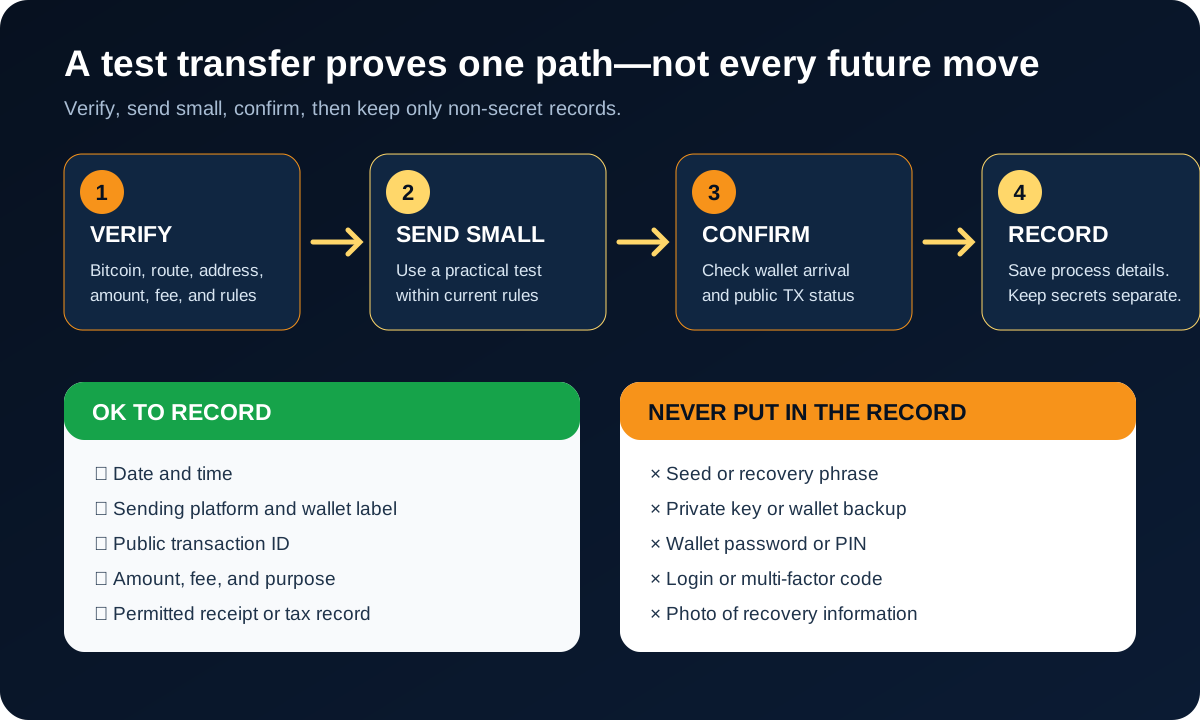
Keep process records, but never place secret recovery information in the same note.
Useful non-secret records may include:
date and time;
sending platform;
destination wallet name or your own neutral label;
public transaction ID;
amount and fee;
purpose of the test;
any platform receipt or tax record you are legally permitted to retain.
Do not include the seed phrase, private key, wallet password, PIN, backup file, login code, or a photo of recovery information. Keep transaction records according to relevant local tax rules and platform policies. The public Bitcoin ledger does not replace your legal recordkeeping obligations.
What Comes After a Successful Test?
A successful test proves something narrow: the address and transfer path worked for that transaction. It does not prove that every future address, fee, device, backup, or withdrawal will work forever.
Before considering a larger move, ask again:
Can I still recover the wallet if this device disappears?
Did I verify the new receiving address rather than assume it matches the old one?
Have any wallet, fee, minimum, hold, identity-check, network, or regional rules changed?
Is the amount consistent with my actual security and recovery plan?
Am I calm enough to recheck the final screen?
Self-custody is not completed when Bitcoin leaves an exchange. It is maintained every time you protect a backup, verify an address, update software carefully, resist a phishing message, and preserve the information needed for lawful records and recovery.
Common Beginner Mistakes
Moving the full balance first
This stacks the largest consequence on top of the least familiar attempt. Use a practical test when platform minimums and fees allow.
Treating the seed phrase like a password
A website password may be reset. A seed phrase may recreate control of the wallet elsewhere. Never share it or treat it as an ordinary digital note.
Downloading from an ad or direct message
Fake wallet sites and apps can look polished. Verify the official domain, publisher, documentation, and release path independently.
Checking only part of the address once
Verify the address after copy-paste and again on the final approval screen. When possible, compare the full address or multiple separated sections, not only the first few characters.
Assuming the test removed all future risk
The test validates one route at one moment. It does not validate the backup, every future address, or every later platform rule.
Asking strangers to inspect a backup
No helper needs your real seed phrase, private key, or backup to explain a general concept. Anyone who obtains valid recovery information may be able to move the Bitcoin.
FAQ
Do I need self-custody right away?
No. Self-custody adds direct control and direct responsibility. If you do not yet understand backups, receiving addresses, transaction finality, or wallet recovery, learning first is reasonable. A custodial account also has risks, so review its security, withdrawal rules, and current official documentation while you prepare.
Can I reverse a Bitcoin withdrawal?
Usually not after a valid on-chain transaction has been broadcast and confirmed. A platform may sometimes cancel an internal request before broadcast, depending on its rules and processing state, but Bitcoin does not provide a normal bank-style chargeback. Verify the address, network, amount, and fee before approval.
What is the smallest safe first move?
There is no universal safe amount. Use the smallest practical test that meets the sending platform's current minimum and fee rules and that you can afford to lose without meaningful harm. Check the amount the wallet will actually receive before confirming.
What should I prepare before withdrawing?
Prepare a verified self-custody wallet, its protected offline backup or documented recovery method, a checked Bitcoin receiving address, an understanding of the platform's current fees and rules, and a plan to confirm and record a small first transaction. If any one item is unclear, pause there.
Can wallet support recover my seed phrase?
Normally, a self-custody wallet provider cannot recreate a seed phrase it never controlled. Support may explain how to restore from an existing valid backup. Never send the phrase to support, a website, a chat, or anyone offering recovery help.
Risk Disclaimer
This article is for beginner education only. It is not financial, investment, legal, tax, custody, wallet-recovery, or cybersecurity advice. Bitcoin is volatile, and you can lose money. Bitcoin transactions may be irreversible, and wallet, address, backup, device, phishing, or recovery mistakes can cause permanent loss. Never share a private key, seed phrase, recovery phrase, password, PIN, login code, or wallet backup. Keep recovery information private and offline. Wallet software, recovery designs, fees, limits, holds, identity checks, withdrawal support, regional availability, and platform policies can change. Verify current official wallet and platform documentation and check relevant local tax and legal requirements before acting.
Editorial Attribution
Written by Alex Chen. Reviewed by Jordan Blake for factual accuracy, clarity, and beginner safety.